 AI仙宝
项目介绍
Agent 智能体 · 2026-11-09 更新 · 本站尚未实测
OpenAgent 定位于“下一代个人 AI 助手”,README 说明它由 LLM、RAG 和 Agent 循环驱动,以单可执行文件的形式发布,并声称无需安装。它把模型接入、知识库检索、自主 Agent 任务循环、可视化工作流与 MCP 工具集成放在同一个可自托管平台中。
按仓库介绍,用户可连接多家模型提供方,基于自有文档建立 RAG 知识库,并让 Agent 浏览网页、执行代码以及调用兼容 MCP 的工具。需要注意,除个人助手形态外,它还包含 BPMN 风格的可视化工作流编辑器,属于“助手 + 工作流平台”的复合产品,而非单一用途的脚本工具。
核心能力
点击能力名称查看输入、输出和原文依据。
- 多模型接入:README 列出 30 余个模型提供方,含 OpenAI、Azure OpenAI、Anthropic Claude、Google Gemini、DeepSeek、Mistral、Grok、Qwen、Doubao、Moonshot、ChatGLM、Baichuan、Ernie、iFlytek、HuggingFace、Cohere、Amazon Bedrock、OpenRouter、Ollama 等,并说明可按会话切换。实际可用范围以各提供方账号与官方文档为准。
- Agent 循环:涵盖浏览器操作(Browser-Use)、网页搜索与抓取、Shell 命令执行、Office 文档读写,以及接入 SSE / Stdio / StreamableHTTP 类型的 MCP 服务;README 强调工具调用过程透明可视。
- RAG 知识库:支持上传 PDF、Word、Excel 等文档并自动切分、向量化与索引,支持语义检索、多个独立知识库,以及 OpenAI、Azure、Gemini、Qwen、Cohere、Jina、HuggingFace、本地模型等多种嵌入来源。
- 工作流自动化:提供拖拽式可视化编排、条件与并行执行、定时触发任务,以及按提供方、模型、用户统计 token 消耗与费用。
- 平台能力:单文件程序、原生 Windows 支持、OIDC/OAuth2/LDAP/SAML 单点登录、多租户隔离、REST API 与 Swagger UI、审计日志、文件与媒体管理、管理后台统计与请求日志。
实际应用场景
适用场景
适合希望自行部署一套“多模型对话 + 私有文档问答 + 可调用工具的任务型助手”的个人或小团队;也适合需要可视化编排多步骤自动化流程、并把 MCP 工具挂载给模型调用的技术用户。如果只需要单一的问答机器人或纯提示词工作流,使用本项目的平台化能力可能超出需求。
安装与接入
README 声明提供 Linux、macOS、Windows(x86_64 / arm64)预编译包,安装脚本会下载最新 release 并在 14000 端口启动。
macOS / Linux / WSL:
curl -fsSL https://raw.githubusercontent.com/the-open-agent/openagent/master/scripts/install.sh | bash
Windows(PowerShell):
irm https://raw.githubusercontent.com/the-open-agent/openagent/master/scripts/install.ps1 | iex
安装后访问 http://localhost:14000。README 提到可选环境变量 OPENAGENT_VERSION、INSTALL_DIR、BIN_DIR,具体语义以官方文档为准。
从源码构建需要 Go 1.25.0+,前端需要 Node.js 20+ 与 Yarn 1.x;README 给出后端 go build、前端 cd web && yarn install && yarn start。另有 docker-compose up 方式。
使用条件与限制
- 是否需要部署
- 需自行准备运行环境,具体要求见正文
- 是否需要注册
- 账号和认证要求见正文;未明确说明的项目仍待核验
- 是否需要 API Key
- 待核验
- 费用与额度
- 费用边界见正文,项目许可不代表模型或托管服务免费
- 所需权限
- 待核验
- 许可证与服务条款
- 待核验
权限费用与限制
本项目会执行 Shell 命令、操作浏览器、读写 Office 文件并调用外部 MCP 工具,属于高权限自动化能力,部署时应限定运行环境与可访问资源,具体安全边界与沙箱机制 README 未说明,待核验。
费用方面,仓库代码以 Apache 2.0 发布,但模型调用费用由各模型提供方按其定价收取,嵌入服务与外部 API 也可能产生费用;是否存在商业模块或付费托管服务,资料未说明,待核验。官方在线演示分为只读浏览与可修改的 Playground(README 称数据每 5 分钟重置),仅作体验,不等同于生产部署。
国内使用情况
网友核验 用户经验分享
与站长实测独立,不代表官方认证或本站已实测。
最近核验:暂无有效核验。参与人数按当前项目有效身份去重;不同核验项分别统计,不合并成用户总结果。仅统计审核通过且未过期的记录。
分项统计、有效期与样本量
| 核验项目 | 有效人数 | 成功 / 部分 / 失败 / 无法判断 | 成功率 | 最近核验 / 有效期 |
|---|---|---|---|---|
| 官方网站访问 | 0 | 0 / 0 / 0 / 0 | 样本不足 | 暂无 / 7 天 |
| GitHub 仓库访问 | 0 | 0 / 0 / 0 / 0 | 样本不足 | 暂无 / 7 天 |
| 安装与运行 | 0 | 0 / 0 / 0 / 0 | 样本不足 | 暂无 / 30 天 |
| 官方服务国内连接 / MCP 连接 | 0 | 0 / 0 / 0 / 0 | 样本不足 | 暂无 / 30 天 |
| 国内网络情况 | 0 | 0 / 0 / 0 / 0 | 样本不足 | 暂无 / 7 天 |
| 国内模型兼容性 | 0 | 0 / 0 / 0 / 0 | 样本不足 | 暂无 / 30 天 |
| 自定义 API | 0 | 0 / 0 / 0 / 0 | 样本不足 | 暂无 / 30 天 |
| 海外服务依赖 | 0 | 0 / 0 / 0 / 0 | 样本不足 | 暂无 / 30 天 |
| 海外账号要求 | 0 | 0 / 0 / 0 / 0 | 样本不足 | 暂无 / 30 天 |
| 中文界面 | 0 | 0 / 0 / 0 / 0 | 样本不足 | 暂无 / 30 天 |
| 客户端兼容性 | 0 | 0 / 0 / 0 / 0 | 样本不足 | 暂无 / 30 天 |
| 账号及费用信息 | 0 | 0 / 0 / 0 / 0 | 样本不足 | 暂无 / 30 天 |
成功率 = 成功 ÷(成功 + 部分成功 + 失败);无法判断不计入分母。至少 5 份可判断结果才显示成功率。账号、费用、海外依赖与语言等事实项,成功表示核查结论与资料吻合,具体观察另行统计;不表示免费或没有海外依赖。不同网络、客户端和版本的结果不能直接等同。
最近有效核验
暂无审核通过且未过期的网友核验。欢迎提交真实使用记录。
查看全部有效核验 →国内实测状态:国内可用性待核验。协议兼容和官方资料说明不等于国内网络可用。
- 官方网站访问
- 尚未实测 待核验
- GitHub 仓库访问
- 尚未实测 待核验
- 官方服务国内连接
- 尚未实测 待核验
- 国内网络情况
- 尚未实测 待核验
- 国内模型兼容性
- 尚未实测 待核验
- 自定义 API
- 尚未实测 待核验
- 海外服务依赖
- 尚未实测 待核验
- 海外账号要求
- 尚未实测 待核验
- 中文界面
- 尚未实测 待核验
- 国内最后核验时间
- 尚未实测
许可与国内使用
仓库包含 Apache License 2.0 许可证文件,README 亦标注 Apache 2.0,适用于仓库代码本身;第三方模型、嵌入服务、云服务与演示站点各自遵循其自身条款,不应视为随项目一并授权或免费。
国内使用方面,README 列出的模型中包含 DeepSeek、Qwen、Doubao、Moonshot、ChatGLM、Baichuan、Ernie、iFlytek 等国内提供方,说明具备对接国内模型的能力;但本文未做实测,具体模型可用性、是否需要额外配置代理、安装脚本与文档站点的国内访问情况均待核验。文档站点为境外域名,域名本身不能说明服务部署地域。
项目资料与来源
字段依据与待核验事项
access:来源确认 · curl -fsSL https://raw.githubusercontent.com/the-open-agent/openagent/master/scripts/install.sh | bash
project_type:来源确认 · OpenAgent is an open-source personal AI assistant that brings together powerful LLMs, your own knowledge base, and autonomous agent loops
原始 README(折叠技术参考)
<div align="center"> <img src="https://cdn.openagentai.org/img/openagent-logo_1900x450.png" alt="OpenAgent" width="480"> <br/> <br/> **Next-generation personal AI assistant powered by LLM, RAG and agent loops — ships as a single binary, no installation needed** *Supporting computer-use, browser-use and coding agent* <br/> [](https://github.com/the-open-agent/openagent/actions/workflows/build.yml) [](https://github.com/the-open-agent/openagent/releases/latest) [](https://hub.docker.com/r/casbin/openagent) [](https://goreportcard.com/report/github.com/the-open-agent/openagent) [](https://github.com/the-open-agent/openagent/blob/master/LICENSE) [](https://discord.gg/5rPsrAzK7S) <br/> <a href="https://trendshift.io/repositories/26577" target="_blank"><img src="https://trendshift.io/api/badge/repositories/26577" alt="the-open-agent%2Fopenagent | Trendshift" style="width: 250px; height: 55px;" width="250" height="55"/></a> <br/> [**Live Demo**](https://demo.openagentai.org) · [**Playground**](https://try.openagentai.org) · [**Docs**](https://www.openagentai.org) · [**Discord**](https://discord.gg/5rPsrAzK7S) </div> --- English | [中文](./README_zh.md) --- ## What is OpenAgent? OpenAgent is an open-source personal AI assistant that brings together powerful LLMs, your own knowledge base, and autonomous agent loops — all in one self-hostable platform. Connect any model provider, build a RAG knowledge base from your documents, and let agents browse the web, run code, and call any MCP-compatible tool on your behalf. <div align="center"> <br/> | Usage Analytics | Activity Monitoring | |:------------------------------------------------------------------------------------------------------------:|:--------------------------------------------------------------------------------------------------------------------:| | 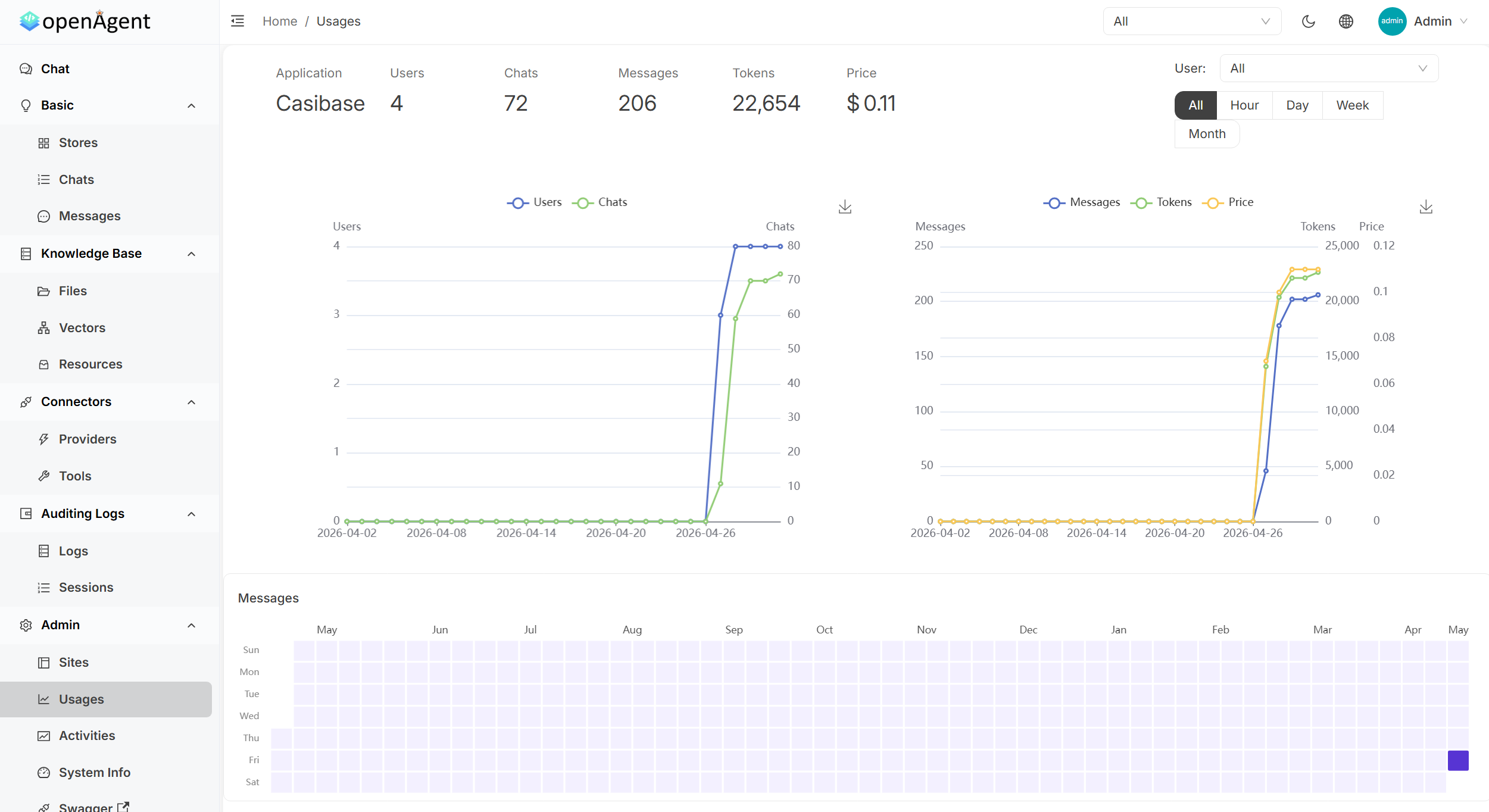 | 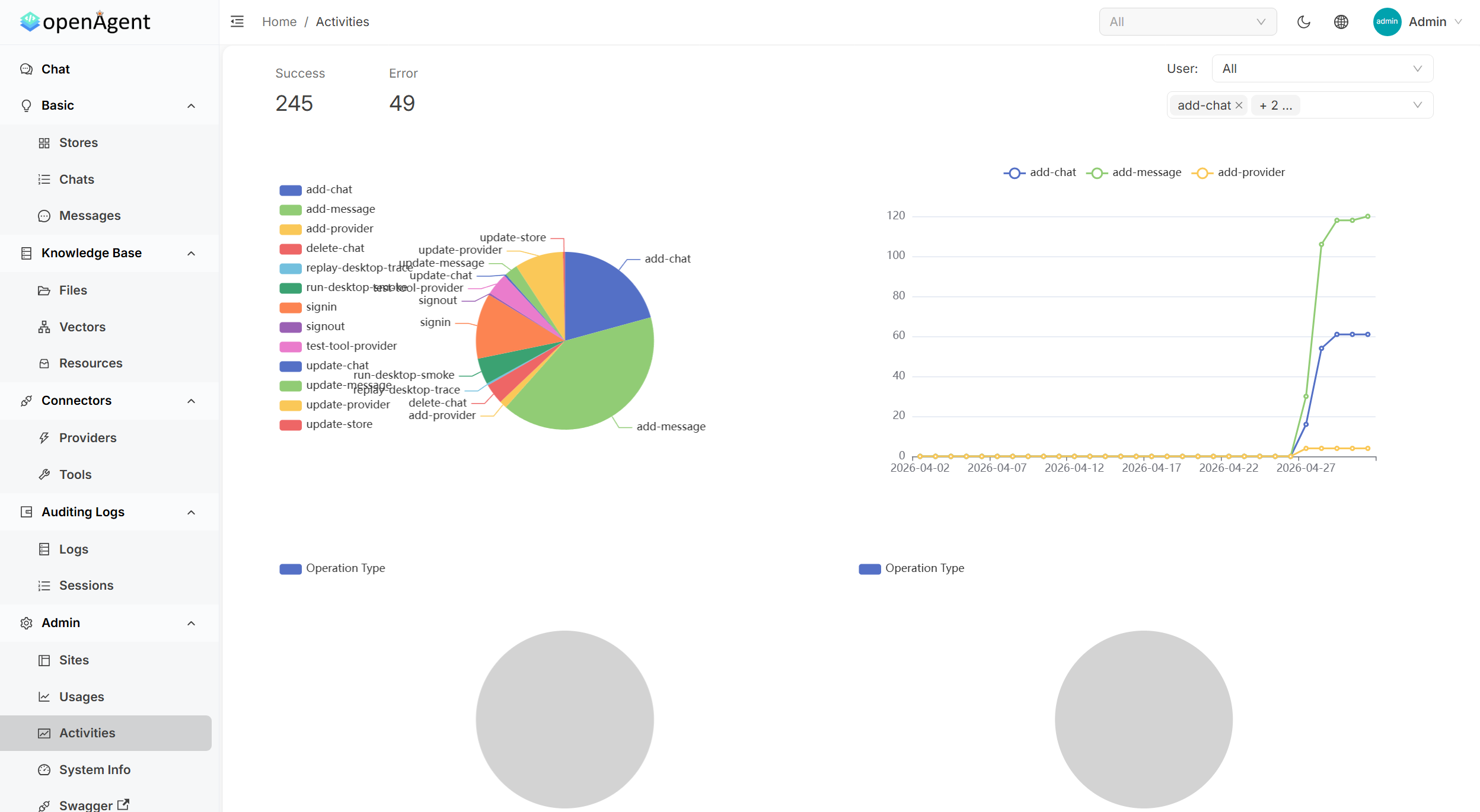 | | **Tool Management** | **Detailed Logs** | | 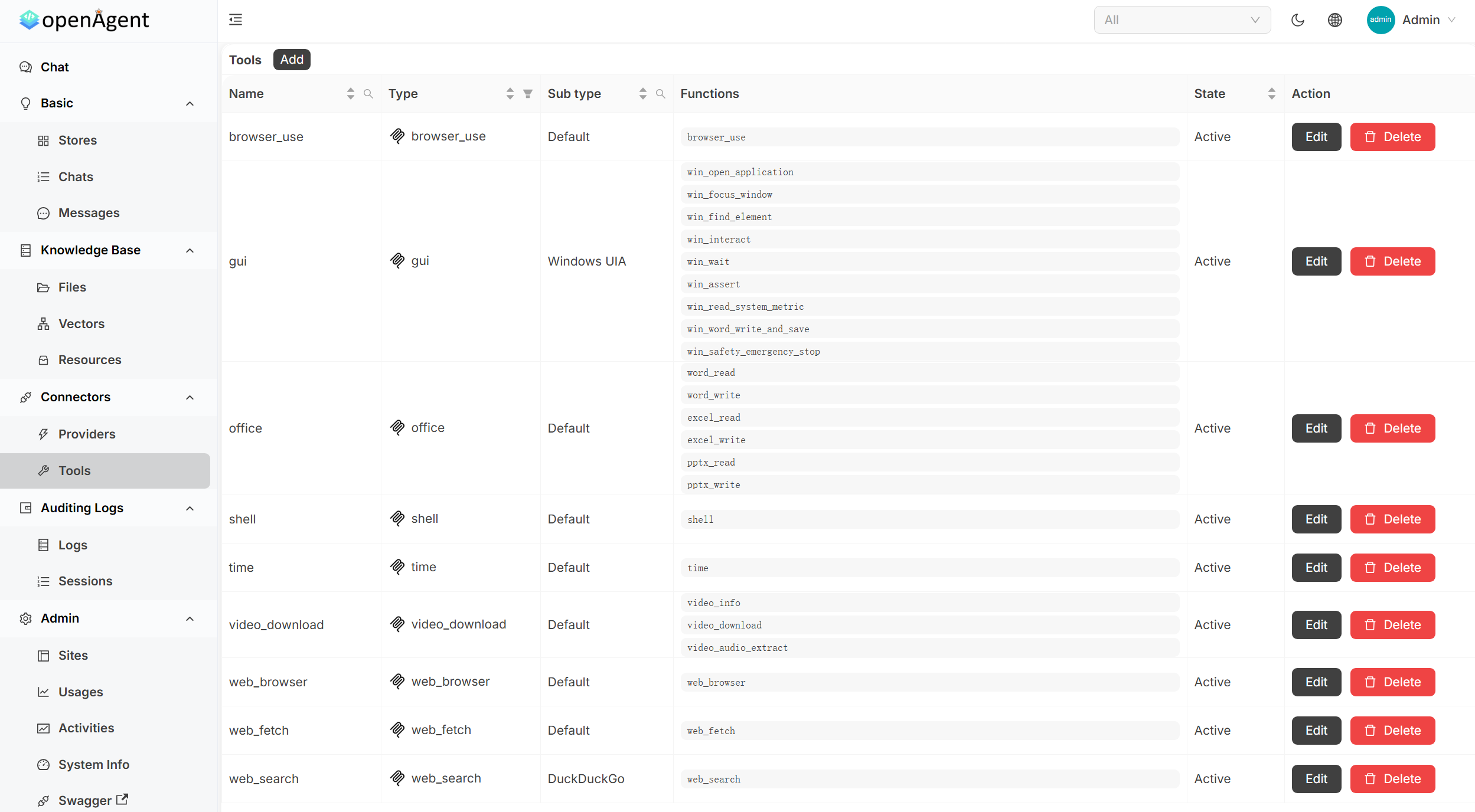 | 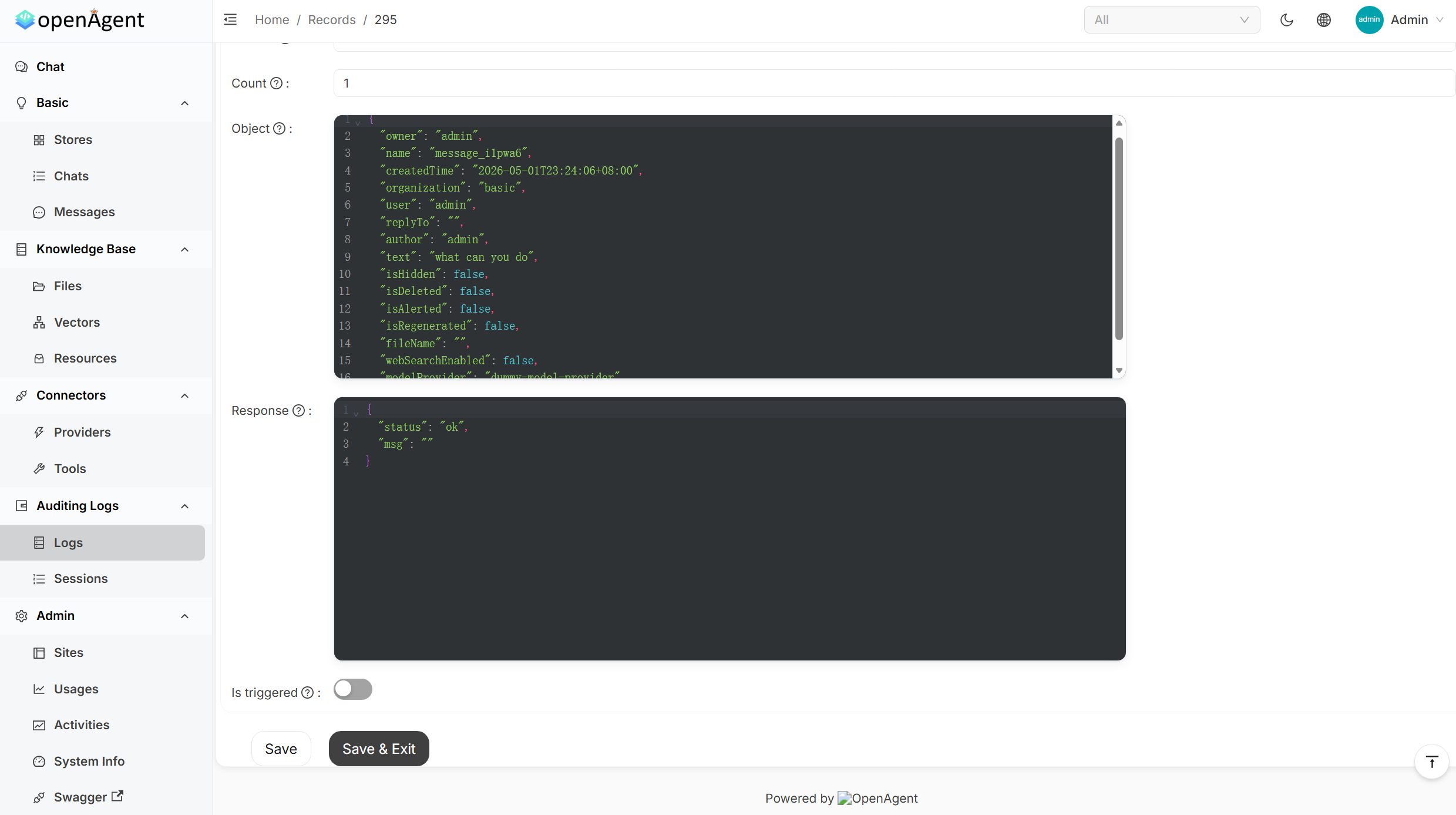 | <br/> </div> --- ## Sponsors > [Want to appear here?](mailto:admin@casibase.org) --- ## Quick Start Pre-built binaries for **Linux**, **macOS**, and **Windows** (`x86_64` / `arm64`). The installer downloads the latest release and starts OpenAgent on **port 14000**. **macOS / Linux / WSL** ```bash curl -fsSL https://raw.githubusercontent.com/the-open-agent/openagent/master/scripts/install.sh | bash ``` **Windows (PowerShell)** ```powershell irm https://raw.githubusercontent.com/the-open-agent/openagent/master/scripts/install.ps1 | iex ``` > **Windows runs natively** — no WSL, no Docker required. Open [http://localhost:14000](http://localhost:14000) and you're in. > Optional env vars: `OPENAGENT_VERSION`, `INSTALL_DIR`, `BIN_DIR` **Build from source** Prerequisites: - **Backend**: [Go](https://golang.org/dl/) 1.25.0+ - **Frontend**: [Node.js](https://nodejs.org/) 20+ and [Yarn](https://classic.yarnpkg.com/) 1.x ```bash # Backend go build # Frontend cd web && yarn install && yarn start ``` **Docker** ```bash docker-compose up ``` Open [http://localhost:14000](http://localhost:14000) once the containers are running. --- ## Features ### 🤖 30+ Model Providers Connect every major LLM provider and switch between them per conversation — no code changes required. <div align="center"> `OpenAI` · `Azure OpenAI` · `Anthropic Claude` · `Google Gemini` · `DeepSeek` · `Mistral` · `Grok` · `Qwen` · `Doubao` · `Moonshot` · `ChatGLM` · `Baichuan` · `Ernie` · `iFlytek` · `HuggingFace` · `Cohere` · `Amazon Bedrock` · `OpenRouter` · `Ollama` · `and more` </div> --- ### 🔄 Autonomous Agent Loops | Capability | Description | |:---------------------------|:---------------------------------------------------------------------------------------------------| | **Browser-Use** | Drive a real browser — navigate, click, fill forms, scrape, and screenshot pages | | **Web Search & Fetch** | Search the web and pull live page content into the agent's context | | **Shell Execution** | Run shell commands and scripts directly from the agent loop | | **Office Automation** | Read and write Word, Excel, and PowerPoint files | | **MCP Integration** | Plug in any MCP-compatible server (SSE / Stdio / StreamableHTTP) and expose its tools to the agent | | **Transparent Tool Calls** | See every tool invocation, its arguments, and its return value — step by step | --- ### 📚 RAG & Knowledge Base | Capability | Description | |:-------------------------|:----------------------------------------------------------------------------------------------| | **Document Ingestion** | Upload PDFs, Word docs, Excel sheets, and more — chunked, embedded, and indexed automatically | | **Semantic Search** | Retrieves the most relevant passages from your knowledge base before each LLM response | | **Pluggable Embeddings** | OpenAI, Azure, Gemini, Qwen, Cohere, Jina, HuggingFace, local models, and more | | **Isolated Stores** | Organise knowledge into separate stores; assign them per chat or per application | --- ### ⚡ Workflow Automation | Capability | Description | |:-------------------------------------|:--------------------------------------------------------------------| | **Visual Workflow Builder** | Compose multi-step pipelines with a BPMN-style drag-and-drop editor | | **Conditional & Parallel Execution** | Branch on gateway conditions; run independent tasks concurrently | | **Task Scheduling** | Trigger workflows or agent jobs on a recurring schedule | | **Usage Analytics** | Track token consumption and cost per provider, model, and user | --- ### 🏗️ Platform Features | Capability | Description | |:----------------------------|:------------------------------------------------------------------------------------------------------------------| | **Single Binary** | One executable file — no installer, no runtime dependencies. Download and run instantly on any supported platform | | **Native Windows Support** | Runs directly on Windows — no WSL, no Docker, no Linux subsystem required | | **Single Sign-On** | OIDC / OAuth2 / LDAP / SAML via the built-in auth layer | | **Multi-tenancy** | Isolated workspaces per user or organisation | | **REST API + Swagger UI** | Every feature is accessible programmatically | | **Audit Logs** | Full activity history for every action | | **File & Media Management** | Built-in storage for files, images, and video content | --- ### 📊 Admin Dashboard | Panel | What you get | |:------------------------|:--------------------------------------------------------------------------------------------| | **Usage Statistics** | Token & cost metrics per app, user, and model — with interactive charts and heatmaps | | **Activity Monitoring** | Real-time system operations with success/error rates, operation-type breakdowns, and trends | | **Tool Management** | Centralised CRUD for all agent tools: browser, shell, office, web search, and more | | **Request Logs** | Full request/response payloads with JSON formatting, filtering, and debugging | --- ## Online Demo | Environment | URL | Notes | |:-----------------|:-----------------------------|:--------------------------------------------------| | **Live Preview** | https://demo.openagentai.org | Read-only tour — no account needed | | **Playground** | https://try.openagentai.org | Make changes freely — data resets every 5 minutes | --- ## Documentation Full docs at **[https://www.openagentai.org](https://www.openagentai.org)** --- ## Community - **Discord** — [discord.gg/5rPsrAzK7S](https://discord.gg/5rPsrAzK7S) · chat with maintainers and other users - **Issues & PRs** — welcome! Please open an issue first to discuss larger changes --- ## License [Apache 2.0](https://github.com/the-open-agent/openagent/blob/master/LICENSE)
历史前置条件说明(补充参考)
运行预编译包只需下载并执行安装脚本(README 声明支持 Linux/macOS/Windows x86_64 与 arm64);源码构建需 Go 1.25.0+,前端需 Node.js 20+ 与 Yarn 1.x,或使用 Docker Compose。使用模型与嵌入能力需自备相应提供方的 API Key 或本地模型服务,具体配置步骤待核验。模型调用与嵌入服务可能产生费用,商业模块或托管服务是否收费待核验。README 提及演示与文档站点为境外域名,国内访问情况待核验。
项目来源与清单版权许可
https://github.com/the-open-agent/openagent
整理来源:https://github.com/slavakurilyak/awesome-ai-agents
清单版权与许可:
MIT License
Copyright (c) 2024 Slava Kurilyak
Permission is hereby granted, free of charge, to any person obtaining a copy of this software and associated documentation files (the "Software"), to deal in the Software without restriction, including without limitation the rights to use, copy, modify, merge, publish, distribute, sublicense, and/or sell copies of the Software, and to permit persons to whom the Software is furnished to do so, subject to the following conditions:
The above copyright notice and this permission notice shall be included in all copies or substantial portions of the Software.
THE SOFTWARE IS PROVIDED "AS IS", WITHOUT WARRANTY OF ANY KIND, EXPRESS OR IMPLIED, INCLUDING BUT NOT LIMITED TO THE WARRANTIES OF MERCHANTABILITY, FITNESS FOR A PARTICULAR PURPOSE AND NONINFRINGEMENT. IN NO EVENT SHALL THE AUTHORS OR COPYRIGHT HOLDERS BE LIABLE FOR ANY CLAIM, DAMAGES OR OTHER LIABILITY, WHETHER IN AN ACTION OF CONTRACT, TORT OR OTHERWISE, ARISING FROM, OUT OF OR IN CONNECTION WITH THE SOFTWARE OR THE USE OR OTHER DEALINGS IN THE SOFTWARE.