 AI仙宝
项目介绍
Agent 智能体 · 2026-11-09 更新 · 本站尚未实测
gptme 是运行在终端中的个人 AI 代理(README 原话为 “A personal AI agent that runs anywhere a terminal runs”),定位可跨笔记本、SSH 会话、tmux、无头服务器与 CI 流水线使用。它自称 provider-agnostic、local-first,并称“A great coding agent, but general-purpose enough to assist in all kinds of knowledge-work”,即既可辅助编码,也面向各类知识工作。
README 称其“Free and open-source”,并称该项目是该类代理 CLI 中较早的一个(最早提交可追溯至 2023 年),目前仍在活跃开发。
核心能力
点击能力名称查看输入、输出和原文依据。
- 本地代码执行:通过 shell 与 ipython(Python)工具在本地环境执行命令与代码。
- 文件读写与修改:提供 read、save/append、patch/morph 等工具做增量编辑。
- 网页搜索与浏览:借助 Playwright 的 browser 工具访问网页;另有 vision、screenshot 处理图像与桌面截图。
- 自我纠错:工具输出会回传给助手,使其能够回应并自我修正。
- 上下文机制:Lessons(按关键词、工具、模式匹配注入的上下文指引)、Skills(轻量工作流包,需按名称提及后自动加载)、Plugins(Python 包形式扩展工具、钩子与命令)与 Hooks(生命周期事件回调)。
- 跨工具记忆:README 称本地 Markdown 记忆库可在 gptme、Claude Code、Codex 等之间共享,并给出
gptme-util memoryCLI。 - 多模型接入:Anthropic、OpenAI、Google、Grok、DeepSeek 等;也可通过 OpenRouter/Requesty 访问更多模型,或用 Ollama、LM Studio、vLLM、llama.cpp 本地运行。
- MCP 双向支持:既可作为 MCP 客户端加载外部服务器,也可作为 MCP 服务器对外暴露 shell、Python REPL 与文件工具;另有 ACP 支持,供编辑器集成。
- 自主代理:配合 gptme-agent-template 与
gptme service init可搭建长期运行的无头代理。 - 界面:CLI、Textual TUI(gptme-tui)、Web UI 与 REST API 服务器。
实际应用场景
适用场景
README 列出的用途包括:开发与代码辅助、用自然语言获取 shell 命令、终端内数据分析、交互式学习、构建长期运行的自主代理、自动化研究流程等。示例命令涵盖生成可视化页面、渲染图像、按 git diff 补全 TODO、修复失败测试、批量处理媒体文件等。
安装与接入
README 给出的前置条件为 Python 3.11 或更新版本,以及至少一个 LLM 提供方的凭据。它给出的安装方式包括:
# With pipx (recommended, requires Python 3.11+)
pipx install gptme

# With uv
uv tool install gptme

# With optional extras
pipx install 'gptme[browser]'  # Playwright for web browsing
pipx install 'gptme[all]'      # Everything

# Latest from git with all extras
uv tool install 'git+https://github.com/gptme/gptme.git[all]'
安装后直接运行 gptme 进入交互;README 说明可用 @path 附加本地文件或目录作为上下文,-r 恢复最近对话,-t read-only 限制可用工具,-y 自动确认工具调用,-n 完全非交互(供脚本与 CI 使用)。配置可写入 ~/.config/gptme/config.toml。
如需作为 MCP 服务器运行,README 给出 gptme-mcp-server --tools shell,ipython,save,read(stdio 方式)。更完整的接入说明需参见官方文档。
使用条件与限制
- 是否需要部署
- 需自行准备运行环境,具体要求见正文
- 是否需要注册
- 账号和认证要求见正文;未明确说明的项目仍待核验
- 是否需要 API Key
- 待核验
- 费用与额度
- 费用边界见正文,项目许可不代表模型或托管服务免费
- 所需权限
- 待核验
- 许可证与服务条款
- 待核验
权限费用与限制
- 模型费用:软件本体自述免费开源,但所用模型服务是否收费取决于提供方。README 提到可在启动配置中选择 OpenRouter,并提供订阅方式(ChatGPT Plus/Pro、SuperGrok)或 API Key 方式;具体价格与额度需向相应提供方核验。
- 权限风险:gptme 会在本地执行 shell 命令与 Python 代码,并读写文件。
-y会自动确认工具调用,-n则“every tool call runs unreviewed”,README 明确建议此时限制其工作目录与凭据范围。 - 托管服务:README 提到 gptme.ai 为托管云服务,标记为早期访问(early access),费用与可用性待核验。
- 桌面端:README 的更新日志称已提供 Linux、macOS、Windows 桌面应用(AppImage 等),但本资料未提供安装验证与系统要求细节,实际支持情况待核验。
- 国内使用:资料未说明中国大陆网络环境下的可用性、境内镜像或备案情况,相关兼容性待核验。
国内使用情况
网友核验 用户经验分享
与站长实测独立,不代表官方认证或本站已实测。
最近核验:暂无有效核验。参与人数按当前项目有效身份去重;不同核验项分别统计,不合并成用户总结果。仅统计审核通过且未过期的记录。
分项统计、有效期与样本量
| 核验项目 | 有效人数 | 成功 / 部分 / 失败 / 无法判断 | 成功率 | 最近核验 / 有效期 |
|---|---|---|---|---|
| 官方网站访问 | 0 | 0 / 0 / 0 / 0 | 样本不足 | 暂无 / 7 天 |
| GitHub 仓库访问 | 0 | 0 / 0 / 0 / 0 | 样本不足 | 暂无 / 7 天 |
| 安装与运行 | 0 | 0 / 0 / 0 / 0 | 样本不足 | 暂无 / 30 天 |
| 官方服务国内连接 / MCP 连接 | 0 | 0 / 0 / 0 / 0 | 样本不足 | 暂无 / 30 天 |
| 国内网络情况 | 0 | 0 / 0 / 0 / 0 | 样本不足 | 暂无 / 7 天 |
| 国内模型兼容性 | 0 | 0 / 0 / 0 / 0 | 样本不足 | 暂无 / 30 天 |
| 自定义 API | 0 | 0 / 0 / 0 / 0 | 样本不足 | 暂无 / 30 天 |
| 海外服务依赖 | 0 | 0 / 0 / 0 / 0 | 样本不足 | 暂无 / 30 天 |
| 海外账号要求 | 0 | 0 / 0 / 0 / 0 | 样本不足 | 暂无 / 30 天 |
| 中文界面 | 0 | 0 / 0 / 0 / 0 | 样本不足 | 暂无 / 30 天 |
| 客户端兼容性 | 0 | 0 / 0 / 0 / 0 | 样本不足 | 暂无 / 30 天 |
| 账号及费用信息 | 0 | 0 / 0 / 0 / 0 | 样本不足 | 暂无 / 30 天 |
成功率 = 成功 ÷(成功 + 部分成功 + 失败);无法判断不计入分母。至少 5 份可判断结果才显示成功率。账号、费用、海外依赖与语言等事实项,成功表示核查结论与资料吻合,具体观察另行统计;不表示免费或没有海外依赖。不同网络、客户端和版本的结果不能直接等同。
最近有效核验
暂无审核通过且未过期的网友核验。欢迎提交真实使用记录。
查看全部有效核验 →国内实测状态:国内可用性待核验。协议兼容和官方资料说明不等于国内网络可用。
- 官方网站访问
- 尚未实测 待核验
- GitHub 仓库访问
- 尚未实测 待核验
- 官方服务国内连接
- 尚未实测 待核验
- 国内网络情况
- 尚未实测 待核验
- 国内模型兼容性
- 尚未实测 待核验
- 自定义 API
- 尚未实测 待核验
- 海外服务依赖
- 尚未实测 待核验
- 海外账号要求
- 尚未实测 待核验
- 中文界面
- 尚未实测 待核验
- 国内最后核验时间
- 尚未实测
许可与国内使用
仓库 LICENSE 文件为 MIT 许可证(版权 2023 Erik Bjäreholt),据此仓库代码可按 MIT 条款使用、修改与再分发,须保留版权与许可声明。需注意:MIT 仅覆盖本仓库代码,不覆盖所接入的第三方模型、托管服务(如 gptme.ai、chat.gptme.org)、社区插件及桌面二进制分发的其他条款,这些需分别核验。公开仓库与免费开源声明不等于模型调用或云服务免费。
关于在中国大陆的使用,资料未提供网络可达性、数据出境、合规备案或本地化部署支持的任何说明,均应视为待核验;若使用境外模型 API,还需自行评估数据与合规要求。
项目资料与来源
字段依据与待核验事项
access:来源确认 · # With pipx (recommended, requires Python 3.11+) pipx install gptme
project_type:来源确认 · personal AI agent that runs anywhere a terminal runs
原始 README(折叠技术参考)
<p align="center">
<img src="https://gptme.org/media/logo.png" width=150 />
</p>
<h1 align="center">gptme</h1>
<p align="center">
<i>/ʤiː piː tiː miː/</i>
<br>
<sub><a href="https://gptme.org/docs/misc/acronyms.html">what does it stand for?</a></sub>
</p>
<!-- Links -->
<p align="center">
<a href="https://gptme.org/docs/getting-started.html">Getting Started</a>
•
<a href="https://gptme.org/downloads/">Downloads</a>
•
<a href="https://gptme.org/">Website</a>
•
<a href="https://gptme.org/docs/">Documentation</a>
</p>
<!-- Badges -->
<p align="center">
<a href="https://github.com/gptme/gptme/actions/workflows/build.yml">
<img src="https://github.com/gptme/gptme/actions/workflows/build.yml/badge.svg" alt="Build Status" />
</a>
<a href="https://github.com/gptme/gptme/actions/workflows/docs.yml">
<img src="https://github.com/gptme/gptme/actions/workflows/docs.yml/badge.svg" alt="Docs Build Status" />
</a>
<a href="https://codecov.io/gh/gptme/gptme">
<img src="https://codecov.io/gh/gptme/gptme/graph/badge.svg?token=DYAYJ8EF41" alt="Codecov" />
</a>
<br>
<a href="https://pypi.org/project/gptme/">
<img src="https://img.shields.io/pypi/v/gptme" alt="PyPI version" />
</a>
<a href="https://pepy.tech/project/gptme">
<img src="https://img.shields.io/pepy/dt/gptme" alt="PyPI - Downloads all-time" />
</a>
<a href="https://pypistats.org/packages/gptme">
<img src="https://img.shields.io/pypi/dd/gptme?color=success" alt="PyPI - Downloads per day" />
</a>
<a href="https://doi.org/10.5281/zenodo.22816651">
<img src="https://zenodo.org/badge/DOI/10.5281/zenodo.22816651.svg" alt="DOI" />
</a>
<br>
<a href="https://discord.gg/NMaCmmkxWv">
<img src="https://img.shields.io/discord/1271539422017618012?logo=discord&style=social" alt="Discord" />
</a>
<a href="https://x.com/gptmeorg">
<img src="https://img.shields.io/twitter/follow/gptmeorg?style=social" alt="X.com" />
</a>
<br>
<a href="https://gptme.org/docs/projects.html">
<img src="https://gptme.org/badge.svg" alt="Built with gptme" />
</a>
</p>
<p align="center">
📜 A personal AI agent that runs <i>anywhere a terminal runs</i> — your laptop,
ssh sessions, tmux, headless servers, CI pipelines.<br/>
Provider-agnostic, local-first, and unconstrained: ships with shell, Python, web,
vision, and everything else an agent needs.<br/>
A great coding agent, but general-purpose enough to assist in all kinds of knowledge-work.
</p>
<p align="center">
Free and open-source. Works with Anthropic, OpenAI, Google, SpaceXAI, DeepSeek, OpenRouter, Requesty,
your existing ChatGPT/SuperGrok subscription, or fully local via Ollama and any
OpenAI-compatible server — your data, your models, your terminal.<br/>
A capable <a href="https://gptme.org/docs/alternatives.html">alternative</a> to Claude Code,
Codex, and Grok Bot, and a development-focused peer to self-hosted agents like OpenClaw
and Hermes Agent — one of the first agent CLIs (Spring 2023), still in very active
development.
</p>
## 📚 Table of Contents
- 📢 [News](#-news)
- 🎥 [Demos](#-demos)
- 🌟 [Features](#-features)
- [🛠 Tools](#-tools)
- [🔌 Extensibility: Plugins, Skills & Lessons](#-extensibility-plugins-skills--lessons)
- [🔗 Integrations: MCP & ACP](#-integrations-mcp--acp)
- [🤖 Autonomous Agents](#-autonomous-agents)
- [🛡 Guardrails](#-guardrails)
- [🛠 Use Cases](#-use-cases)
- [🛠 Developer Perks](#-developer-perks)
- [🚧 In Progress](#-in-progress)
- 🚀 [Getting Started](#-getting-started)
- 🛠 [Usage](#-usage)
- 🌍 [Ecosystem](#-ecosystem)
- 🏷️ [Repository Badge](#%EF%B8%8F-repository-badge)
- 💬 [Community](#-community)
- 📊 [Stats](#-stats)
- 📝 [Citation](#-citation)
- 🔗 [Links](#-links)
- ❓ [FAQ](#-faq)
## 📢 News
- **2026-09** - [v0.34.0](https://github.com/gptme/gptme/releases/tag/v0.34.0): Cross-harness memory (`gptme-util memory`, Claude Code & Codex integration), skills as slash commands, `gptme service init` for headless agents, context-scout pre-pass
- **2026-08** - [v0.33.0](https://github.com/gptme/gptme/releases/tag/v0.33.0): Hashline edit format, sandboxed Python/shell execution (Docker, Wasmtime), non-interactive exit taxonomy, `gptme explain`, server auth hardening
- **2026-07** - [v0.32.0](https://github.com/gptme/gptme/releases/tag/v0.32.0) & [v0.32.1](https://github.com/gptme/gptme/releases/tag/v0.32.1): Desktop app for Linux (AppImage), macOS, and Windows, with auto-updates since v0.32.1 — [download here](https://github.com/gptme/gptme/releases/latest); ACP support, MCP server, Textual TUI; [gptme.ai](https://gptme.ai) cloud service
- **2026-05** - [gptme-plugin-registry](https://github.com/gptme/gptme-plugin-registry) created: central registry for plugin discovery
- **2026-02** - Scheduled [dev pre-releases](https://github.com/gptme/gptme/releases) begin
- **2026-01** - [gptme-agent-template](https://github.com/gptme/gptme-agent-template) v0.4: [Bob](https://github.com/TimeToBuildBob) has run extensively as an autonomous agent, autonomous run loops, enhanced context generation
- **2025-12** - [v0.31.0](https://github.com/gptme/gptme/releases/tag/v0.31.0): Background jobs, form tool, cost tracking, content-addressable storage
- **2025-11** - [v0.30.0](https://github.com/gptme/gptme/releases/tag/v0.30.0): Plugin system, context compression, subagent planner mode
- **2025-10** - [v0.29.0](https://github.com/gptme/gptme/releases/tag/v0.29.0): Lessons system for contextual guidance, MCP discovery & dynamic loading, token awareness; [Bob](https://github.com/TimeToBuildBob) begins autonomous runs with GitHub monitoring
- **2025-08** - [v0.28.0](https://github.com/gptme/gptme/releases/tag/v0.28.0): MCP support, morph tool for fast edits, auto-commit, redesigned server API
- **2025-03** - [v0.27.0](https://github.com/gptme/gptme/releases/tag/v0.27.0): Pre-commit integration, macOS computer use, Claude 3.7 Sonnet, DeepSeek R1, local TTS with Kokoro
- **2025-01** - [gptme-contrib](https://github.com/gptme/gptme-contrib) created: community plugins including Twitter/X, Discord bot, email tools, consortium (multi-agent)
- **2024-12** - [gptme-agent-template](https://github.com/gptme/gptme-agent-template) v0.3: Template for persistent agents
- **2024-11** - Ecosystem expansion: [gptme-webui](https://github.com/gptme/gptme-webui), [gptme-rag](https://github.com/gptme/gptme-contrib/tree/master/packages/gptme-rag), [gptme.vim](https://github.com/gptme/gptme.vim), [Bob](https://github.com/TimeToBuildBob) created (first autonomous agent)
- **2024-10** - [First viral tweet](https://x.com/rohanpaul_ai/status/1841999030999470326) bringing widespread attention
- **2024-08** - [Show HN](https://news.ycombinator.com/item?id=41204256), Anthropic Claude support, tmux tool
- **2023-09** - [Initial public release](https://news.ycombinator.com/item?id=37394845) on HN, [Reddit](https://www.reddit.com/r/LocalLLaMA/comments/16atlia/), [Twitter](https://x.com/ErikBjare/status/1699097896451289115)
- **2023-03** - [Initial commit](https://github.com/gptme/gptme/commit/d00e9aae68cbd6b89bbc474ed7721d08798f96dc) - one of the first agent CLIs
<!-- source of truth: docs/timeline.rst and docs/changelog.rst -->
For more history, see the [Timeline](https://gptme.org/docs/timeline.html) and [Changelog](https://gptme.org/docs/changelog.html).
## 🎥 Demos
<table>
<tr>
<th>Terminal UI</th>
<th>Web UI</th>
</tr>
<tr>
<td width="50%">
[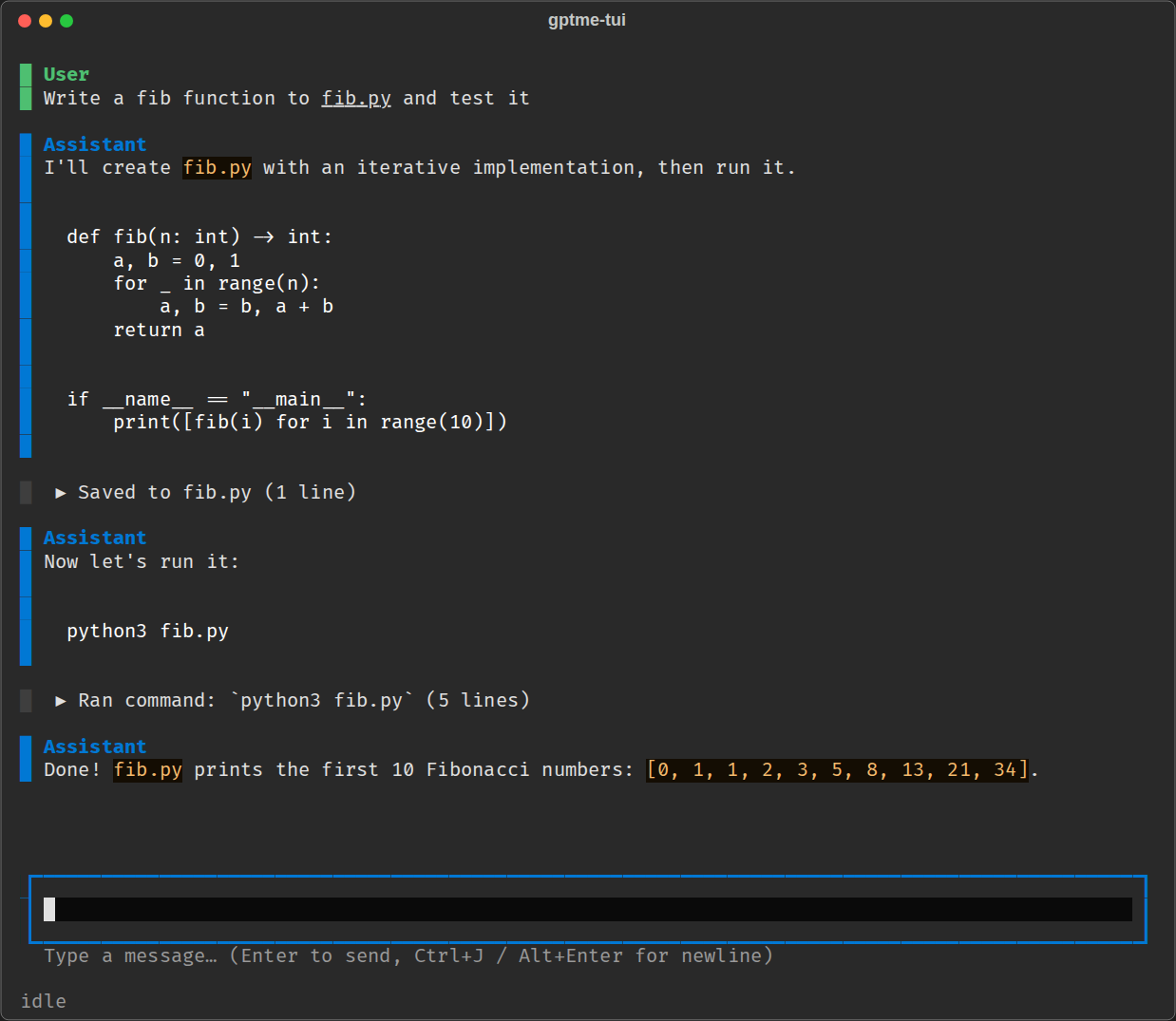][docs-tui]
<details>
<summary>Features</summary>
<ul>
<li> Textual-based <code>gptme-tui</code> (<code>pipx install 'gptme[tui]'</code>)
<li> Queue prompts while the agent is working
<li> Collapsible tool output
<li> Status bar with model, token usage, and agent state
<li> Or use the plain <code>gptme</code> CLI for scripted and non-interactive use
</ul>
</details>
</td>
<td width="50%">
[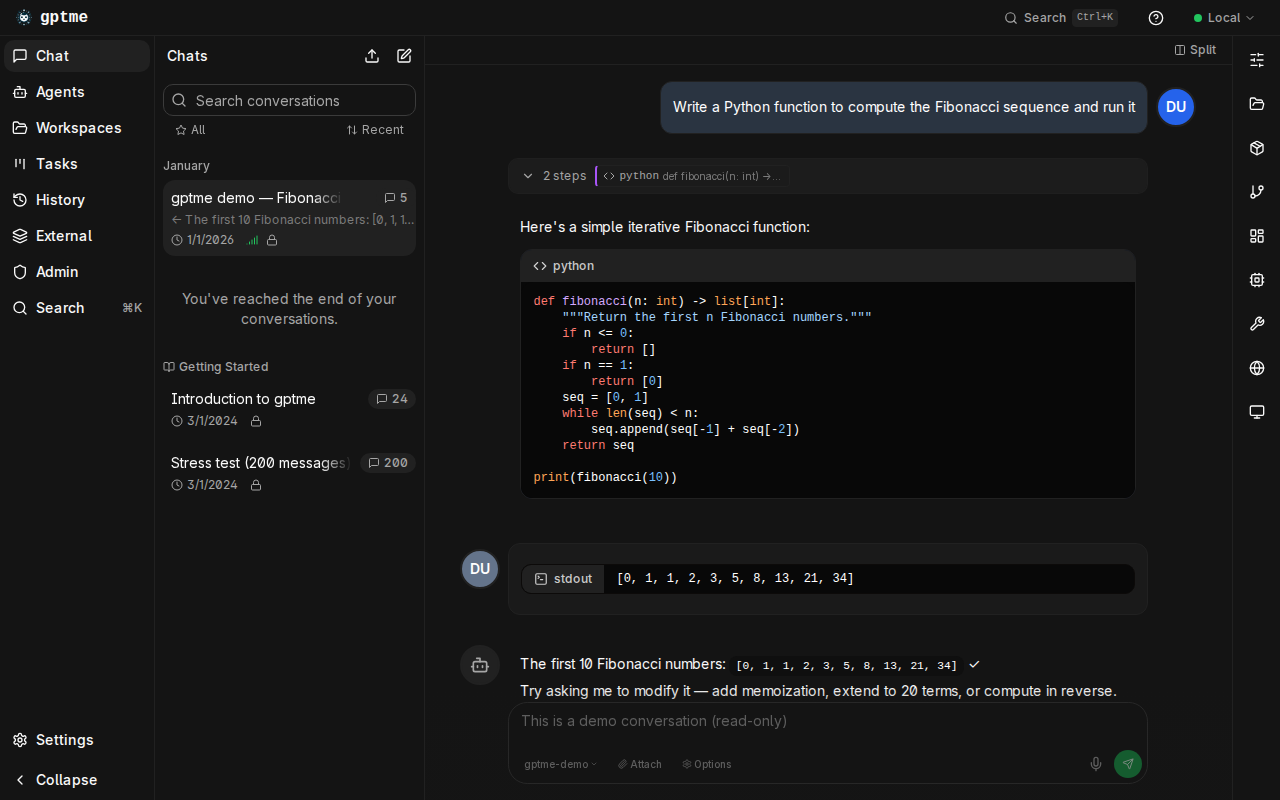](https://chat.gptme.org)
<details>
<summary>Features</summary>
<ul>
<li> Chat with gptme from your browser
<li> Access to all tools and features
<li> Modern, responsive interface
<li> Self-hostable
<li> Available at <a href="https://chat.gptme.org">chat.gptme.org</a>
</ul>
</details>
</td>
</tr>
<tr>
<th>Fibonacci</th>
<th>Mandelbrot with curses</th>
</tr>
<tr>
<td width="50%">
[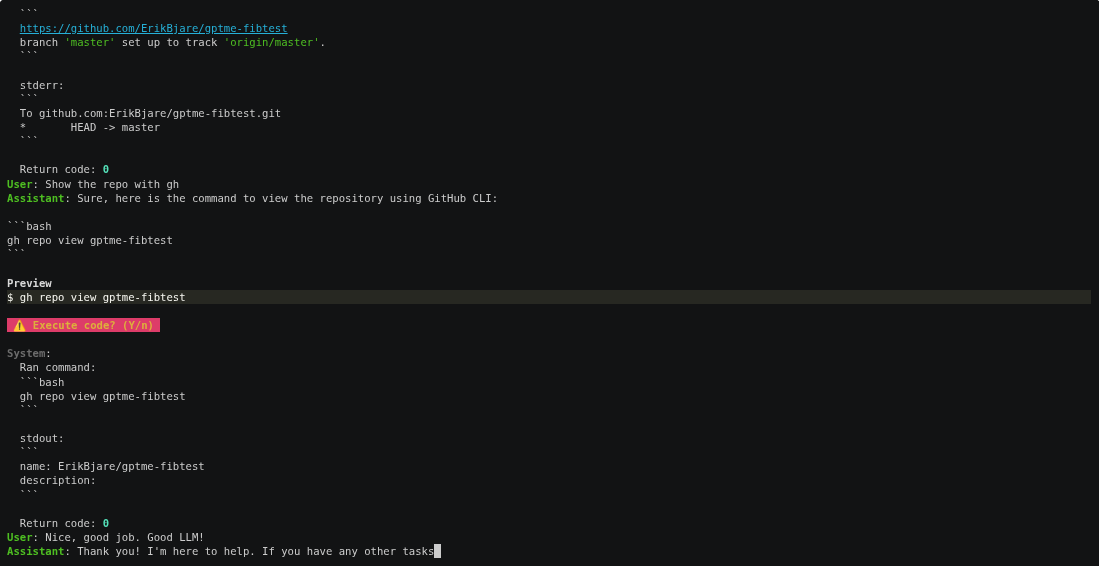](https://asciinema.org/a/606375)
<details>
<summary>Steps</summary>
<ol>
<li> Create a new dir 'gptme-test-fib' and git init
<li> Write a fib function to fib.py, commit
<li> Create a public repo and push to GitHub
</ol>
</details>
</td>
<td width="50%">
[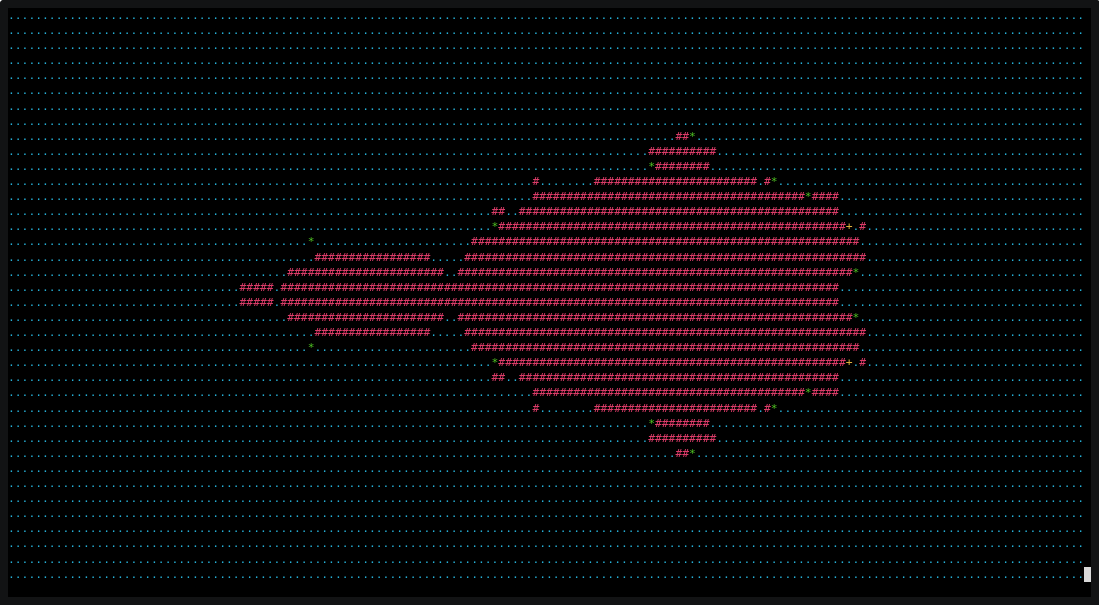](https://asciinema.org/a/621991)
<details>
<summary>Steps</summary>
<ol>
<li> Render mandelbrot with curses to mandelbrot_curses.py
<li> Program runs
<li> Add color
</ol>
</details>
</td>
</tr>
</table>
> [!NOTE]
> The terminal recordings above are from 2023 and show the classic CLI. More recordings are kept in the [Demo archive][docs-demos], and more up-to-date walkthroughs are in the [Examples][docs-examples].
## 🌟 Features
- 💻 **Code execution**
- Executes code in your local environment with the [shell][docs-tools-shell] and [python][docs-tools-python] tools.
- 🧩 **Read, write, and change files**
- Makes incremental changes with the [patch][docs-tools-patch] tool.
- 🌐 **Search and browse the web**
- Can use a browser via Playwright with the [browser][docs-tools-browser] tool.
- 👀 **Vision**
- Can see images referenced in prompts, screenshots of your desktop, and web pages.
- 🔄 **Self-correcting**
- Output is fed back to the assistant, allowing it to respond and self-correct.
- 📚 **[Lessons system][docs-lessons]**
- Contextual guidance and best practices automatically included when relevant.
- Keyword, tool, and pattern-based matching.
- Adapts to interactive vs autonomous modes.
- Extend with your own lessons and [skills][docs-skills].
- 🗃️ **[Cross-harness memory][docs-memory]**
- One local Markdown-based memory store shared by gptme, Claude Code, Codex, and any other harness.
- `gptme-util memory` CLI — save, recall, search, supersede, and audit entries from any terminal.
- Claude Code hook and Codex AGENTS.md integration included.
- 🤖 **Support for many LLM [providers][docs-providers]**
- Anthropic (Claude), OpenAI (GPT), Google (Gemini), SpaceXAI (Grok), DeepSeek, and more.
- Use OpenRouter or Requesty for access to 100+ models, or serve locally with Ollama, LM Studio, vLLM, or `llama.cpp`.
- Bring your own subscription: use your existing ChatGPT Plus/Pro or SuperGrok plan instead of API keys (see [providers][docs-providers]).
- [Pick the right model per task][docs-model-routing] — fast/cheap for triage, powerful for coding.
- 🌐 **Web UI and REST API**
- Modern [gptme-webui] bundled with `gptme-server` and hosted at [chat.gptme.org](https://chat.gptme.org).
- [Server][docs-server] with REST API.
- Standalone executable builds available with PyInstaller.
- 💻 **[Computer use][docs-tools-computer]**
- Give the assistant access to a full desktop, allowing it to interact with GUI applications.
- 🧠 **Code intelligence**
- Structural code understanding with [gptme-codegraph]: call graphs, symbol extraction, and impact analysis powered by Tree-sitter. 10 MCP tools for codebase navigation.
- 🔊 **Tool sounds** — pleasant notification sounds for different tool operations.
- Enable with `GPTME_TOOL_SOUNDS=true`.
### 🛠 Tools
gptme equips the AI with a rich set of built-in tools:
| Tool | Description |
|------|-------------|
| `shell` | Execute shell commands directly in your terminal |
| `ipython` | Run Python code with access to your installed libraries |
| `read` | Read files and directories |
| `save` / `append` | Create or update files |
| `patch` / `morph` | Make incremental edits to existing files |
| `browser` | Search and navigate the web via Playwright |
| `vision` | Process and analyze images |
| `screenshot` | Capture screenshots of your desktop |
| `rag` | Retrieve context from local files (needs the `gptme-rag` package) |
| `gh` | Interact with GitHub via the GitHub CLI |
| `tmux` | Run long-lived commands in persistent terminal sessions |
| `computer` | Full desktop access for GUI interactions |
| `subagent` | Spawn sub-agents for parallel or isolated tasks |
| `chats` | Reference and search past conversations |
| `memory` | Save and recall memory entries shared across harnesses |
| `lessons` | Look up contextual guidance and skills |
| `todo` | Keep a task list for the current conversation |
| `mcp` | Discover and load MCP servers at runtime |
Use `/tools` during a conversation to see all available tools and their status.
### 🔌 Extensibility: Plugins, Skills & Lessons
gptme has a layered extensibility system that lets you tailor it to your workflow:
**[Plugins][docs-plugins]** — extend gptme with custom tools, hooks, and commands via Python packages:
```toml
# gptme.toml
[plugins]
paths = ["~/.config/gptme/plugins", "./plugins"]
enabled = ["my_plugin"]
```
**[Skills][docs-skills]** — lightweight workflow bundles (Anthropic format) that auto-load when mentioned by name. Great for packaging reusable instructions and helper scripts without writing Python.
**[Lessons][docs-lessons]** — contextual guidance that auto-injects into conversations based on keywords, tools, and patterns. Write your own to capture team best-practices or domain knowledge.
**[Hooks][docs-hooks]** — run custom code at key lifecycle events (before/after tool calls, on conversation start, etc.) without a full plugin.
**[gptme-contrib][gptme-contrib]** — community-contributed plugins, packages, scripts, and lessons:
| Plugin / Package | Description |
|--------|-------------|
| [gptme-codegraph](https://github.com/gptme/gptme-contrib/tree/master/packages/gptme-codegraph) | Structural code retrieval with tree-sitter: 10 MCP tools for parse, call graph, blast/impact analysis |
| [gptme-consortium](https://github.com/gptme/gptme-contrib/tree/master/plugins/gptme-consortium) | Multi-model consensus decision-making |
| [gptme-imagen](https://github.com/gptme/gptme-contrib/tree/master/plugins/gptme-imagen) | Multi-provider image generation |
| [gptme-lsp](https://github.com/gptme/gptme-contrib/tree/master/plugins/gptme-lsp) | Language Server Protocol integration |
| [gptme-ace](https://github.com/gptme/gptme-contrib/tree/master/plugins/gptme-ace) | ACE-inspired context optimization |
| [gptme-gupp](https://github.com/gptme/gptme-contrib/tree/master/plugins/gptme-gupp) | Work state persistence across sessions |
### 🔗 Integrations: MCP & ACP
**[MCP (Model Context Protocol)][docs-mcp]** — gptme works in both directions:
- **MCP client:** discover and load external MCP servers as gptme tools.
- **MCP server:** expose gptme's persistent shell, Python REPL, and file tools to
Claude Desktop, Cursor, or any other MCP client.
```sh
pipx install gptme # MCP support included by default
# Run gptme as an MCP server over stdio
gptme-mcp-server --tools shell,ipython,save,read
```
The server keeps shell and Python state across tool calls. See the [MCP docs][docs-mcp]
for a ready-to-paste Claude Desktop configuration and MCP client setup.
**[ACP (Agent Client Protocol)][docs-acp]** — use gptme as a coding agent directly from your editor:
```sh
pipx install 'gptme[acp]'
```
This makes gptme available as a drop-in coding agent in [Zed](https://zed.dev/) and JetBrains IDEs. Your editor sends requests, gptme executes with its full toolset (shell, browser, files, etc.) and streams results back.
### 🤖 Autonomous Agents
gptme is designed to run not just interactively but as a **persistent autonomous agent** — an AI that runs continuously, remembers everything, and gets better over time. The [gptme-agent-template][agent-template] provides a complete scaffold:
- **Persistent workspace** — git-tracked "brain" with journal, tasks, knowledge base, and lessons
- **Run loops** — scheduled (systemd/launchd) or event-driven autonomous operation
- **Task management** — structured task queue with YAML metadata and GTD-style workflows
- **Meta-learning** — lessons system captures behavioral patterns and improves over time
- **Multi-agent coordination** — file leases, message bus, and work claiming for concurrent agents
- **External integrations** — GitHub, email, Discord, Twitter, RSS, and more
```sh
# Create and run your own agent
gptme-agent create ~/ada --name Ada
cd ~/ada
gptme-agent install # runs on a schedule
gptme-agent status # check on it
```
#### Headless Agents with systemd
For quick setup of a gptme agent as a persistent systemd service on any Linux machine, use `gptme service init`:
```sh
# Generate a complete headless agent setup
gptme service init --name Ada --model anthropic/claude-haiku-4-5 --work-dir ~/ada
# Install and start on a daily timer
systemctl --user daemon-reload
systemctl --user enable --now Ada.timer
# Update the schedule (--force overwrites all generated files, including gptme.toml and startup script)
gptme service init --name Ada --work-dir ~/ada --timer-schedule hourly --force
```
This command scaffolds:
- **systemd service unit** — runs your agent in a user session
- **Optional timer** — schedule autonomous runs (hourly, daily, weekly, or on-demand)
- **Startup script** — runs one non-interactive gptme session per trigger and writes a durable journal entry
- **Session prompt** — `prompt.md`, the instruction the agent executes on every run
- **Skeleton config** — `gptme.toml` and `AGENTS.md` ready to customize
The scaffolded workspace is self-contained and runs as generated — edit `prompt.md` to say what the agent should do each run; all you need is gptme installed. Perfect for automation, monitoring, CI/CD orchestration, or running background agents on headless servers.
See [Running agents autonomously](https://gptme.org/docs/agents/autonomous.html) for scheduling, monitoring, and guardrails.
[**Bob**](https://github.com/TimeToBuildBob) is the reference implementation — created in late 2024 and running autonomously since 2025, with [5,000+ merged pull requests](https://timetobuildbob.com/stats/) to his name. Bob opens PRs, reviews code, fixes CI, manages his own task queue, maintains a growing set of behavioral lessons, posts on [Twitter](https://twitter.com/TimeToBuildBob), responds on Discord, and writes [blog posts](https://timetobuildbob.github.io/).
Multiple specialized agents can run in parallel — e.g. Bob (engineering) and [Alice](https://github.com/TimeToLearnAlice) (personal assistant & orchestration) — coordinating through shared infrastructure.
See the [Autonomous Agents docs](https://gptme.org/docs/agents.html) for the full guide.
### 🛡 Guardrails
Persistent agents need guardrails around the full loop, not just tool permissions:
- **Input guardrails** — structured task selectors in the agent workspace keep work focused and reduce thrashing on notifications or ambiguous work. Bob uses a CASCADE-style selector for this layer.
- **Pre-action guardrails** — [lessons][docs-lessons] inject situational guidance before the agent acts.
- **Output guardrails** — [hooks][docs-hooks] and [pre-commit checks](https://gptme.org/docs/usage.html#pre-commit-integration) validate file changes before control returns to the user.
This stack is simple and composable: selectors improve work choice, lessons steer behavior, and checks verify the result. You can add evals on top later, but the baseline guardrail loop already exists.
### 🛠 Use Cases
- 🖥 **Development:** Write and run code faster with AI assistance.
- 🎯 **Shell Expert:** Get the right command using natural language (no more memorizing flags!).
- 📊 **Data Analysis:** Process and analyze data directly in your terminal.
- 🎓 **Interactive Learning:** Experiment with new technologies or codebases hands-on.
- 🤖 **Agents & Tools:** Build long-running autonomous agents for real work.
- 🔬 **Research:** Automate literature review, data collection, and analysis pipelines.
### 🛠 Developer Perks
- ⭐ One of the first agent CLIs created (Spring 2023) that is still in active development.
- 🧰 **Easy to extend**
- Most functionality can be implemented with [tools][docs-tools], [hooks][docs-hooks], and [commands][docs-commands].
- [Plugins][docs-plugins] allow for easy packaging of extensions.
- Trying to stay [tiny][docs-arewetiny] — minimal core, extend as needed.
- 🧪 Extensive test suite, run on every PR.
- 🧹 Clean codebase, checked and formatted with `ruff` and `mypy`.
- 🤖 [GitHub Bot][docs-bot] to request changes from comments! (see [#16](https://github.com/gptme/gptme/issues/16))
- Operates in this repo! (see [#18](https://github.com/gptme/gptme/issues/18) for example)
- Runs entirely in GitHub Actions.
- 📊 [Evaluation suite][docs-evals] for testing capabilities of different models.
- 📝 [gptme.vim][gptme.vim] for easy integration with vim.
### 🚧 In Progress
- ☁️ **[gptme.ai](https://gptme.ai/?utm_source=github&utm_medium=docs&utm_campaign=gptme_ai_readme_probe_202609)** — managed cloud service for running gptme agents (early access; still self-hostable by running `gptme-server` + `gptme-webui` yourself)
- 🏆 Advanced evals for testing frontier capabilities
## 🚀 Getting Started
### Prerequisites
- Python 3.11 or newer
- Credentials for at least one LLM provider:
- Fastest no-credit-card path: start `gptme`, choose **OpenRouter** in the
startup provider setup (browser OAuth), then run
`gptme "hello" -m openrouter/openrouter/free`. On an existing setup, use
`/account setup openrouter` inside a session. See
[Getting Started][docs-getting-started].
- Subscriptions work too: sign in with your ChatGPT Plus/Pro or SuperGrok plan
via `gptme-auth openai-subscription` or `gptme-auth grok-subscription`,
no API key needed (see [providers docs][docs-providers]).
- You can also set API keys manually for [Anthropic](https://console.anthropic.com/)
(`ANTHROPIC_API_KEY`), [OpenAI](https://platform.openai.com/)
(`OPENAI_API_KEY`), [OpenRouter](https://openrouter.ai/)
(`OPENROUTER_API_KEY`), and other providers.
- Local models need no key at all — run Ollama (or any OpenAI-compatible server)
and use `-m local/<model>`, see [providers docs][docs-providers].
### Installation
For full setup instructions, see the [Getting Started guide][docs-getting-started].
```sh
# With pipx (recommended, requires Python 3.11+)
pipx install gptme
# With uv
uv tool install gptme
# With optional extras
pipx install 'gptme[browser]' # Playwright for web browsing
pipx install 'gptme[all]' # Everything
# Latest from git with all extras
uv tool install 'git+https://github.com/gptme/gptme.git[all]'
```
### Quick Start
```sh
gptme
```
You'll be greeted with a prompt. Type your request and gptme will respond, using tools as needed.
### Example Commands
```sh
# Create a particle effect visualization
gptme 'write an impressive and colorful particle effect using three.js to particles.html'
# Generate visual art
gptme 'render mandelbrot set to mandelbrot.png'
# Get configuration suggestions
gptme 'suggest improvements to my vimrc'
# Process media files
gptme 'convert to h265 and adjust the volume' @video.mp4
# Code assistance from git diffs
git diff | gptme 'complete the TODOs in this diff'
# Fix failing tests
make test | gptme 'fix the failing tests'
# Auto-approve tool confirmations (user can still watch and interrupt)
gptme -y 'run the test suite and fix any failing tests'
# Fully non-interactive: no prompts and no confirmations, for scripts/CI
# (every tool call runs unreviewed — scope its workspace and credentials accordingly)
gptme -n 'run the test suite and fix any failing tests'
# Machine-readable automation output (JSONL on stdout)
gptme --non-interactive --output-format json 'summarize the current git diff'
```
For more, see the [Getting Started][docs-getting-started] guide and the [Examples][docs-examples] in the [documentation][docs].
### ⚙️ Configuration
Create `~/.config/gptme/config.toml`:
```toml
[user]
name = "User"
about = "I am a curious human programmer."
response_preference = "Don't explain basic concepts"
[prompt]
# Additional files to always include as context
# files = ["~/notes/llm-tips.md"]
[env]
# Set your default model
# MODEL = "anthropic/claude-sonnet-4-6"
# MODEL = "openai/gpt-5.6-sol"
```
For all options, see the [configuration docs][docs-config].
## 🛠 Usage
```sh
gptme # start an interactive chat
gptme 'fix the failing tests' # start with a prompt
gptme 'review this' @main.py @README.md # attach files as context
gptme -m anthropic/claude-sonnet-4-6 # pick a model for this session
gptme -t read-only 'summarize the repo' # restrict which tools are available
gptme -y 'run the tests and fix them' # auto-approve tool calls, stay in the loop
gptme -n 'summarize the git diff' # fully non-interactive, for scripts and CI
gptme -r # resume the most recent conversation
```
Use `@path` to attach a local file or directory. Ordinary path mentions stay as
text; for spaces, enclose the reference in backticks (`` `@my notes.txt` ``).
Set `GPTME_AUTO_INCLUDE_PATHS=1` to restore legacy implicit path inclusion.
See the [attachment guide](https://gptme.org/docs/usage.html#prompt-attachments)
for URL consent, clipboard images, and automation.
During a conversation, `/help` lists the slash-commands — `/undo`, `/backtrack`,
`/tools`, `/tokens`, `/compact`, `/model`, and more. `gptme --help` shows every
flag, and `gptme <subcommand>` reaches the other CLIs (`gptme tools list`,
`gptme chats search`, `gptme skills list`).
Full reference: [CLI docs](https://gptme.org/docs/cli.html) ·
[commands][docs-commands] · [usage guide](https://gptme.org/docs/usage.html) ·
[automation][docs-automation]
## 🌍 Ecosystem
gptme is more than a CLI — it's a platform with a growing ecosystem:
| Project | Description |
|---------|-------------|
| [Web UI](https://github.com/gptme/gptme/tree/master/webui) | Modern React web interface, available at [chat.gptme.org](https://chat.gptme.org) |
| [gptme-contrib] | Community plugins, packages, scripts, and lessons |
| [gptme-codegraph] | Structural code retrieval with tree-sitter (10 MCP tools for code graph analysis) |
| [gptme-agent-template][agent-template] | Template for building persistent autonomous agents |
| [gptme-provider-template][provider-template] | Template for building custom LLM provider plugins |
| [gptme-rag](https://github.com/gptme/gptme-contrib/tree/master/packages/gptme-rag) | RAG integration for semantic search over local files |
| [gptme.vim] | Vim plugin for in-editor gptme integration |
| [Desktop app](https://github.com/gptme/gptme/releases/latest) | Native app for Linux, macOS, Windows, and Android, built from this repo |
| [gptme.ai](https://gptme.ai) | Managed cloud service (early access) |
**Community agents powered by gptme:**
- [Bob](https://github.com/TimeToBuildBob) — autonomous AI agent, created late 2024 and running autonomously since 2025, contributes to open source and manages his own tasks
- [Alice](https://github.com/TimeToLearnAlice) — personal assistant & agent orchestrator, forked from the same architecture
## 🏷️ Repository Badge
This repo is maintained with [gptme](https://gptme.org).
To show your repo is AI-assisted with gptme, add the badge below.
```markdown
[](https://gptme.org)
```
## 💬 Community
- **[Discord][discord]** — ask questions, share what you've built, discuss features
- **[GitHub Discussions](https://github.com/gptme/gptme/discussions)** — longer-form conversation and ideas
- **[X/Twitter](https://x.com/gptmeorg)** — updates and announcements
Contributions welcome! See the [contributing guide](https://gptme.org/docs/contributing.html).
## 📊 Stats
### ⭐ Stargazers over time
[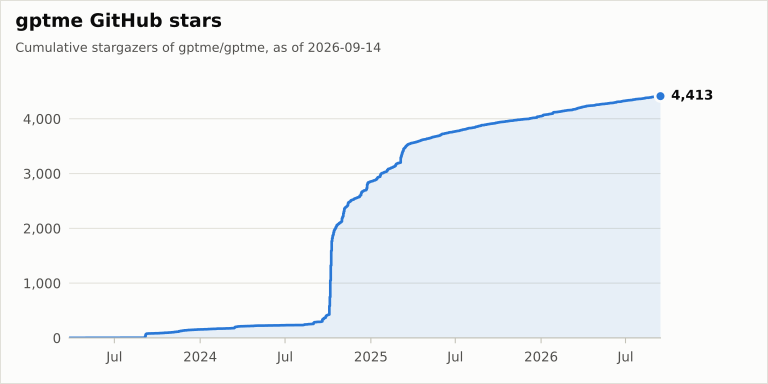](https://github.com/gptme/stats)
Community and usage numbers (stars, downloads, contributors) are collected daily in [gptme/stats](https://github.com/gptme/stats).
### 📈 Download Stats
- [PePy][pepy]
- [PyPiStats][pypistats]
[pepy]: https://pepy.tech/project/gptme
[pypistats]: https://pypistats.org/packages/gptme
## 📝 Citation
If you use gptme in your research, please cite it. The citation metadata lives in
[`CITATION.cff`](./CITATION.cff) (GitHub's "Cite this repository" button uses it).
The [Zenodo concept DOI](https://doi.org/10.5281/zenodo.22816651) identifies gptme
across all archived versions. For reproducibility, cite the version-specific DOI
from the Zenodo record for the release you used.
```bibtex
@software{gptme,
author = {Bjäreholt, Erik},
title = {gptme},
year = {2023},
doi = {10.5281/zenodo.22816651},
url = {https://github.com/gptme/gptme}
}
```
If you publish work that uses gptme, we'd love to hear about it on [Discord][discord].
## 🔗 Links
- [Website][website]
- [Documentation][docs]
- [GitHub][github]
- [Discord][discord]
<!-- links -->
[website]: https://gptme.org/
[discord]: https://discord.gg/NMaCmmkxWv
[github]: https://github.com/gptme/gptme
[gptme.vim]: https://github.com/gptme/gptme.vim
[gptme-webui]: https://github.com/gptme/gptme/tree/master/webui
[gptme-contrib]: https://github.com/gptme/gptme-contrib
[gptme-codegraph]: https://github.com/gptme/gptme-contrib/tree/master/packages/gptme-codegraph
[agent-template]: https://github.com/gptme/gptme-agent-template
[provider-template]: https://github.com/gptme/gptme-provider-template
[bob]: https://github.com/TimeToBuildBob
[docs]: https://gptme.org/docs/
[docs-getting-started]: https://gptme.org/docs/getting-started.html
[docs-examples]: https://gptme.org/docs/examples.html
[docs-demos]: https://gptme.org/docs/demos.html
[docs-tui]: https://gptme.org/docs/tui.html
[docs-providers]: https://gptme.org/docs/providers.html
[docs-model-routing]: https://gptme.org/docs/models.html
[docs-tools]: https://gptme.org/docs/tools.html
[docs-tools-python]: https://gptme.org/docs/tools/python.html
[docs-tools-shell]: https://gptme.org/docs/tools/shell.html
[docs-tools-patch]: https://gptme.org/docs/tools/patch.html
[docs-tools-browser]: https://gptme.org/docs/tools/browser.html
[docs-tools-computer]: https://gptme.org/docs/tools/computer.html
[docs-lessons]: https://gptme.org/docs/lessons.html
[docs-skills]: https://gptme.org/docs/skills.html
[docs-memory]: https://gptme.org/docs/memory.html
[docs-bot]: https://gptme.org/docs/bot.html
[docs-server]: https://gptme.org/docs/server.html
[docs-evals]: https://gptme.org/docs/evals.html
[docs-config]: https://gptme.org/docs/config.html
[docs-arewetiny]: https://gptme.org/docs/arewetiny.html
[docs-plugins]: https://gptme.org/docs/plugins.html
[docs-hooks]: https://gptme.org/docs/hooks.html
[docs-commands]: https://gptme.org/docs/commands.html
[docs-mcp]: https://gptme.org/docs/mcp.html
[docs-acp]: https://gptme.org/docs/acp.html
[docs-features]: https://gptme.org/docs/features.html
[docs-alternatives]: https://gptme.org/docs/alternatives.html
[docs-system-dependencies]: https://gptme.org/docs/system-dependencies.html
[docs-providers-custom]: https://gptme.org/docs/providers-custom.html
[docs-agents]: https://gptme.org/docs/agents.html
[docs-automation]: https://gptme.org/docs/automation.html
[anthropic-computer-use]: https://www.anthropic.com/news/3-5-models-and-computer-use
## ❓ FAQ
Short answers with pointers into the [documentation][docs] — the docs are the source of truth, this section just gets you to the right page.
### What is gptme?
gptme is a **personal AI agent that runs anywhere a terminal runs** — your laptop, SSH sessions, tmux, headless servers, CI pipelines. It's provider-agnostic, local-first, and unconstrained: ships with shell, Python, web, vision, and everything else an agent needs. Pronounced /ʤiː piː tiː miː/ like "GPT-ME".
See [Features][docs-features] for the full picture.
### How does gptme compare to other AI coding assistants?
gptme is open source and model-agnostic, runs in any terminal, and is built for
**persistent autonomous agents** whose memory lives in a git repo you own — not
just interactive pair programming.
It's compared two ways: against coding agents (Claude Code, Codex, Cursor, Cline,
Aider, OpenHands) and against persistent personal agents (OpenClaw, Hermes Agent,
Grok Bot, Devin). See [Alternatives][docs-alternatives] for the maintained tables.
### How do I install it?
```sh
curl -sSf https://gptme.ai/install.sh | sh # auto-detects uv or pipx
```
Or install directly with `pipx install gptme` / `uv tool install gptme` (Python 3.11+).
See [Installation](#installation) above, the [Getting Started guide][docs-getting-started],
and [System dependencies][docs-system-dependencies] for the extras individual tools need.
### Do I need an API key?
No — you can also use a subscription you already pay for, or run a local model:
- **Subscription**: `gptme-auth openai-subscription` (ChatGPT Plus/Pro) or
`gptme-auth grok-subscription` (SuperGrok), then e.g. `gptme -m openai-subscription/<model>`.
- **Browser sign-in**: pick OpenRouter in the startup setup (or `/account setup openrouter`).
- **API keys**: `ANTHROPIC_API_KEY`, `OPENAI_API_KEY`, `OPENROUTER_API_KEY`, `GEMINI_API_KEY`,
`XAI_API_KEY`, `DEEPSEEK_API_KEY`, `GROQ_API_KEY`, `MOONSHOT_API_KEY`, and more.
- **Local models**: no credentials at all, see below.
If setup is missing or broken, run `gptme-doctor --fix`. Full provider list, model
prefixes, and setup details: [Providers][docs-providers].
### Can I run it fully locally?
Yes, against any OpenAI-compatible server (Ollama, LM Studio, vLLM, llama.cpp):
```sh
ollama pull llama3.2:3b && ollama serve
OPENAI_BASE_URL="http://127.0.0.1:11434/v1" gptme 'hello' -m local/llama3.2:3b
```
Put `OPENAI_BASE_URL` under `[env]` in `~/.config/gptme/config.toml` to make it stick,
or define a named provider entry. Note that small local models are significantly less
capable at tool use. See [Local & custom providers][docs-providers-custom].
### What tools does it have?
Shell, Python, file read/save/patch, browser, vision, computer use, tmux, subagents,
MCP, and more — run `/tools` in a conversation to see what's active in your setup.
See [Tools][docs-tools] for the full list and per-tool docs.
### Does it support MCP?
Both directions: gptme consumes external MCP servers as tools, and `gptme-mcp-server`
exposes gptme's session-backed shell, Python, and file tools to Claude Desktop, Cursor,
and other MCP clients. See [MCP][docs-mcp]. For editor integration (Zed, JetBrains),
gptme also speaks [ACP][docs-acp].
### How do I teach it my conventions and make it remember?
- [Lessons][docs-lessons] — guidance auto-included when keywords, patterns, or tools match.
- [Skills][docs-skills] — portable knowledge bundles in the Agent Skills format, loaded by name.
- [Memory][docs-memory] — cross-harness memory entries shared with Claude Code and Codex.
- [Plugins][docs-plugins] and [hooks][docs-hooks] — custom tools, commands, and lifecycle code.
### How do I create an autonomous agent?
```sh
gptme-agent create ~/ada --name Ada # workspace from the agent template
gptme-agent install # run on a schedule (systemd/launchd)
```
The workspace *is* the agent: identity, journal, tasks, and lessons live in a git repo
you own. See [Agents][docs-agents] for the full workflow and guardrails, and
[Bob][bob] for an agent that has been running autonomously since 2025.
### How do I use gptme in scripts and CI?
Use `-n`/`--non-interactive`, which skips confirmations and exits when done:
```sh
git diff | gptme -n 'review this diff for bugs'
gptme -n --output-format json 'summarize the failing tests' # JSONL on stdout
```
See [Automation][docs-automation] for GitHub Actions, cron, and systemd recipes,
or the [GitHub bot][docs-bot] for a ready-made `@gptme` PR/issue bot.
### How do I configure it?
Configuration lives in `~/.config/gptme/config.toml` (global), `gptme.toml` (per project),
and per-conversation settings; environment variables and CLI flags override them.
Set your default model with `MODEL` under `[env]`, keep API keys in `config.local.toml`,
and use `-v` for verbose logging. See [Configuration][docs-config].
### Where can I find more resources?
- **Website**: [gptme.org](https://gptme.org)
- **Documentation**: [docs.gptme.org](https://gptme.org/docs/)
- **Examples**: [Examples](https://gptme.org/docs/examples.html)
- **Downloads**: [Downloads](https://gptme.org/downloads/)
- **Discord**: [Discord Community](https://discord.gg/NMaCmmkxWv)
- **Twitter**: [@gptmeorg](https://x.com/gptmeorg)
---
**Happy Agent Building!** 🤖
历史前置条件说明(补充参考)
Python 3.11 或更新版本;至少一个 LLM 提供方的 API Key 或订阅(Anthropic、OpenAI、Google、Grok、DeepSeek、OpenRouter 等),或使用 Ollama 等本地模型;本地 shell 与文件系统执行权限(-n 模式下工具调用不经确认);访问 PyPI 及境外模型 API 需网络可达,中国大陆可用性待核验;gptme.ai 托管服务费用待核验。
项目来源与清单版权许可
https://github.com/gptme/gptme
整理来源:https://github.com/slavakurilyak/awesome-ai-agents
清单版权与许可:
MIT License
Copyright (c) 2024 Slava Kurilyak
Permission is hereby granted, free of charge, to any person obtaining a copy of this software and associated documentation files (the "Software"), to deal in the Software without restriction, including without limitation the rights to use, copy, modify, merge, publish, distribute, sublicense, and/or sell copies of the Software, and to permit persons to whom the Software is furnished to do so, subject to the following conditions:
The above copyright notice and this permission notice shall be included in all copies or substantial portions of the Software.
THE SOFTWARE IS PROVIDED "AS IS", WITHOUT WARRANTY OF ANY KIND, EXPRESS OR IMPLIED, INCLUDING BUT NOT LIMITED TO THE WARRANTIES OF MERCHANTABILITY, FITNESS FOR A PARTICULAR PURPOSE AND NONINFRINGEMENT. IN NO EVENT SHALL THE AUTHORS OR COPYRIGHT HOLDERS BE LIABLE FOR ANY CLAIM, DAMAGES OR OTHER LIABILITY, WHETHER IN AN ACTION OF CONTRACT, TORT OR OTHERWISE, ARISING FROM, OUT OF OR IN CONNECTION WITH THE SOFTWARE OR THE USE OR OTHER DEALINGS IN THE SOFTWARE.