 AI仙宝
项目介绍
Agent 配套工具 · 2026-11-09 更新 · 本站尚未实测
LoopTroop 是一个本地运行的图形化编排器,目标是把一条编码工单(ticket)转成有计划、可审阅、由编码代理执行的拉取请求。它不依赖单一长对话,而是把工作拆成若干独立阶段:规划阶段把访谈内容整理成 PRD,再切分为最小的可执行单元(bead);执行阶段通过多轮自动修复循环处理每个 bead;最后做整体复核并交付 PR。
README 将项目定位为“本地 GUI orchestrator for long-running, high-correctness AI software delivery”,并强调其面向复杂、多文件的功能开发,追求“slow and perfect”而非即时响应速度。项目当前状态为早期 alpha(README 原文:early alpha software, but it is usable for real work),作者提示仍可能有缺陷。仓库未显示归档或停止维护。
需要区分:LoopTroop 本身是编排层,真正写代码的是外部编码代理 OpenCode,LoopTroop 不替代它,也不替你完成代码审查。
核心能力
点击能力名称查看输入、输出和原文依据。
- LLM 议会规划:多个独立模型实例分别起草方案,按加权评分表互相评分并投票,胜出方案再综合落选方案中的亮点进行细化,并做覆盖度校验。README 称该流程用于访谈问题、PRD/规格和 bead 蓝图生成。
- 访谈(Interview):写规格前,议会先整理出针对性问题以澄清歧义;用户在 Interview 工作区作答,问题分批下发并可根据先前回答调整。README 说明该阶段可能按设计耗时超过一小时。
- PRD 与 Beads:把工单和访谈答案转成含 Epic 与用户故事的产品需求文档,再切分为 bead。每个 bead 包含目的、可衡量的验收标准、依赖与前置上下文、目标文件、验证与测试步骤。README 明确只实现 Beads 方法论,而非完整的外部 Beads Project。
- 隔离执行与 Ralph 式恢复:在独立的 Git worktree 中执行,失败时保留精简错误轨迹、安全重置 worktree、丢弃被污染的会话并以干净上下文重试。README 提示这个过程可能持续数小时,设计上支持无人值守运行。
- 人类审批门:规划规格、执行蓝图和最终 PR 交付物都需要用户主动审核签核;README 注明审批门未来版本会变为可选。
- 可选人工 QA:勾选式清单,失败项可生成 QA 修复 bead,改进项可新建工单。
- 上下文工程:每个状态只向代理提供最小必要上下文,以减少长会话带来的上下文退化。
实际应用场景
适用场景
适合仓库规模、多文件、强正确性要求的功能开发,例如需要先对齐需求再分步落地、并希望最终产出可审阅 diff 与 PR 的工程任务;也适合希望对长时间无人值守的代理循环保留状态、日志与审批节点的团队。
不适合:几秒钟就能完成的小改动、紧急快速修复、简单任务。README 建议此类场景使用 IDE 对话工具或 Replit、Bolt、Lovable 等工具。README 也明确 LoopTroop 不是“魔法自动驾驶”,不能免除代码审查、diff 检查、密钥保护和安全环境运行的义务。
安装与接入
README 给出的快速开始为:
curl -fsSL https://www.looptroop.ovh/install | sh
looptroop open
open 会在后台启动 LoopTroop 并打开浏览器。其他安装渠道在 README 中分别给出(curl/PowerShell、npm、Homebrew、Scoop、Chocolatey、WinGet、bun、pnpm、Yarn Classic、Docker、独立可执行文件),各渠道的前置要求和随附依赖不同,请以原文安装页为准逐项核对,不要混用。例如 npm 渠道要求 Node 24.19.0 或更新版本;Homebrew 渠道安装 Node 与 gh,使用系统 Git。
安装后需要:在 OpenCode 中配置服务商、在 LoopTroop 的 Configuration 界面选择模型、挂接带 GitHub origin 的本地仓库,然后创建工单。README 说明 LoopTroop 不会替你安装 OpenCode,而是在没有可连接服务端时启动已安装的 CLI,并自动识别 v1 或 v2。
除 LoopTroop 外还需要:已认证的 git 与 gh(工单在开始编码前会检查这两项,因为最终以 PR 收尾);以及配置好服务商与可用模型的 OpenCode。
使用条件与限制
- 是否需要部署
- 需自行准备运行环境,具体要求见正文
- 是否需要注册
- 账号和认证要求见正文;未明确说明的项目仍待核验
- 是否需要 API Key
- 待核验
- 费用与额度
- 费用边界见正文,项目许可不代表模型或托管服务免费
- 所需权限
- 待核验
- 许可证与服务条款
- 待核验
权限费用与限制
- 代码为开源,模型与云服务不因此免费。README 称 LoopTroop 免费且完全开源,但多模型议会与长重试循环会消耗大量 API Token;README 提到 OpenCode 中服务商的订阅方案可能有助于降低成本。具体价格与额度需向各服务商及官方核验。
- 高权限执行风险:README 明确说明编排器以
dangerously-skip-permissions(YOLO)模式运行 OpenCode,授予代理完整本地执行权限且不弹确认。代理以本机用户权限运行,可能删除系统目录、破坏配置或工作区。Git worktree 只隔离代码改动,不沙箱化命令执行。README 强烈建议在一次性虚拟机、云开发机或沙箱环境运行,并且只挂接你信任的仓库。 - README 提示 LoopTroop 会保留仓库本地 Git 配置(包括
core.sshCommand),自定义 SSH 包装脚本可能在远程操作时以你的账户权限执行;worktree 隔离不能限制包装脚本在主机的行为。 - 限制:alpha 版本中 LLM 议会支持 2 至 10 个不同模型(含主实现模型);每个项目同时只能有一个处于执行阶段的活跃工单。
- 状态保存在本地 SQLite、JSONL 日志和
.ticket/**YAML 制品中。
国内使用情况
网友核验 用户经验分享
与站长实测独立,不代表官方认证或本站已实测。
最近核验:暂无有效核验。参与人数按当前项目有效身份去重;不同核验项分别统计,不合并成用户总结果。仅统计审核通过且未过期的记录。
分项统计、有效期与样本量
| 核验项目 | 有效人数 | 成功 / 部分 / 失败 / 无法判断 | 成功率 | 最近核验 / 有效期 |
|---|---|---|---|---|
| 官方网站访问 | 0 | 0 / 0 / 0 / 0 | 样本不足 | 暂无 / 7 天 |
| GitHub 仓库访问 | 0 | 0 / 0 / 0 / 0 | 样本不足 | 暂无 / 7 天 |
| 安装与运行 | 0 | 0 / 0 / 0 / 0 | 样本不足 | 暂无 / 30 天 |
| 官方服务国内连接 / MCP 连接 | 0 | 0 / 0 / 0 / 0 | 样本不足 | 暂无 / 30 天 |
| 国内网络情况 | 0 | 0 / 0 / 0 / 0 | 样本不足 | 暂无 / 7 天 |
| 国内模型兼容性 | 0 | 0 / 0 / 0 / 0 | 样本不足 | 暂无 / 30 天 |
| 自定义 API | 0 | 0 / 0 / 0 / 0 | 样本不足 | 暂无 / 30 天 |
| 海外服务依赖 | 0 | 0 / 0 / 0 / 0 | 样本不足 | 暂无 / 30 天 |
| 海外账号要求 | 0 | 0 / 0 / 0 / 0 | 样本不足 | 暂无 / 30 天 |
| 中文界面 | 0 | 0 / 0 / 0 / 0 | 样本不足 | 暂无 / 30 天 |
| 客户端兼容性 | 0 | 0 / 0 / 0 / 0 | 样本不足 | 暂无 / 30 天 |
| 账号及费用信息 | 0 | 0 / 0 / 0 / 0 | 样本不足 | 暂无 / 30 天 |
成功率 = 成功 ÷(成功 + 部分成功 + 失败);无法判断不计入分母。至少 5 份可判断结果才显示成功率。账号、费用、海外依赖与语言等事实项,成功表示核查结论与资料吻合,具体观察另行统计;不表示免费或没有海外依赖。不同网络、客户端和版本的结果不能直接等同。
最近有效核验
暂无审核通过且未过期的网友核验。欢迎提交真实使用记录。
查看全部有效核验 →国内实测状态:国内可用性待核验。协议兼容和官方资料说明不等于国内网络可用。
- 官方网站访问
- 尚未实测 待核验
- GitHub 仓库访问
- 尚未实测 待核验
- 官方服务国内连接
- 尚未实测 待核验
- 国内网络情况
- 尚未实测 待核验
- 国内模型兼容性
- 尚未实测 待核验
- 自定义 API
- 尚未实测 待核验
- 海外服务依赖
- 尚未实测 待核验
- 海外账号要求
- 尚未实测 待核验
- 中文界面
- 尚未实测 待核验
- 国内最后核验时间
- 尚未实测
许可与国内使用
仓库 LICENSE 为 MIT License(Copyright (c) 2026 LoopTroop AI),允许使用、复制、修改、合并、发布、再许可和销售,需保留版权与许可声明,软件按“原样”提供、不附担保。该许可仅覆盖仓库代码;README 提到的第三方模型、OpenCode、GitHub 及各类包管理器与镜像渠道的条款需另行核验。
国内网络环境下能否顺利访问文档站、安装脚本域名、GitHub Releases 与模型服务商,资料未说明,属待核验事项;无法据此判断是否有国内镜像或本地化适配。域名不代表服务部署地域。
资料中未说明模型的具体可用清单细节以外的国内模型支持情况;README 仅在对比表举例列出 Anthropic、OpenAI、NVIDIA NIM 等,实际可选模型取决于 OpenCode 中配置的服务商,需核验。
项目资料与来源
字段依据与待核验事项
access:来源确认 · curl -fsSL https://www.looptroop.ovh/install | sh
project_type:来源确认 · LoopTroop helps you turn a coding ticket into a planned, reviewable, agent-executed pull request.
原始 README(折叠技术参考)
# LoopTroop
[](https://github.com/looptroop-ai/LoopTroop/releases)
[](LICENSE)
[](https://www.looptroop.ovh/docs/installation#what-you-need-first-per-channel)
[](https://scorecard.dev/viewer/?uri=github.com/looptroop-ai/LoopTroop)
[](https://www.looptroop.ovh/docs/installation#download-statistics)
[](https://github.com/looptroop-ai/LoopTroop/actions/workflows/ci.yml)
[](https://app.codecov.io/gh/looptroop-ai/LoopTroop)
> **A smart local engine that automates big coding tasks from start to finish.**
> LLM councils plan it. Ralph loops perfect it. OpenCode worktrees ship it.
LoopTroop helps you turn a coding ticket into a planned, reviewable, agent-executed pull request.
Instead of trusting a single, endless AI chat session, where the conversation history gets bloated, the AI gets confused, and code quality falls off a cliff, LoopTroop breaks the job into clean, separate stages. **Planning** turns an interview into a PRD, which is then split into the smallest manageable milestones, called "beads." **Execution** runs each bead through multiple targeted auto-fix loops. A **final review** ties it all together.
| Architectural Layer | Core | Technical Lifecycle |
| :--- | :--- | :--- |
| **1. Planning** | *LLM Councils Plan It* | Human Input ➔ AI Interview ➔ PRD ➔ Atomic Beads |
| **2. Execution** | *Ralph Loops Perfect It* | Isolated Bead Work ➔ Multi-Loop Automated Testing & Fixing |
| **3. Shipping** | *OpenCode Worktrees Ship It* | Code Isolation ➔ Final Verification Pass ➔ Main Branch Handoff |
**Start here:** [Docs](https://www.looptroop.ovh/docs/) | [Getting Started](https://www.looptroop.ovh/docs/getting-started) | [Ticket Lifecycle Screenshots](https://www.looptroop.ovh/docs/ticket-lifecycle-screenshots) | [LLM Council](https://www.looptroop.ovh/docs/llm-council) | [Context Engineering](https://www.looptroop.ovh/docs/context-engineering) | [Execution](https://www.looptroop.ovh/docs/beads)
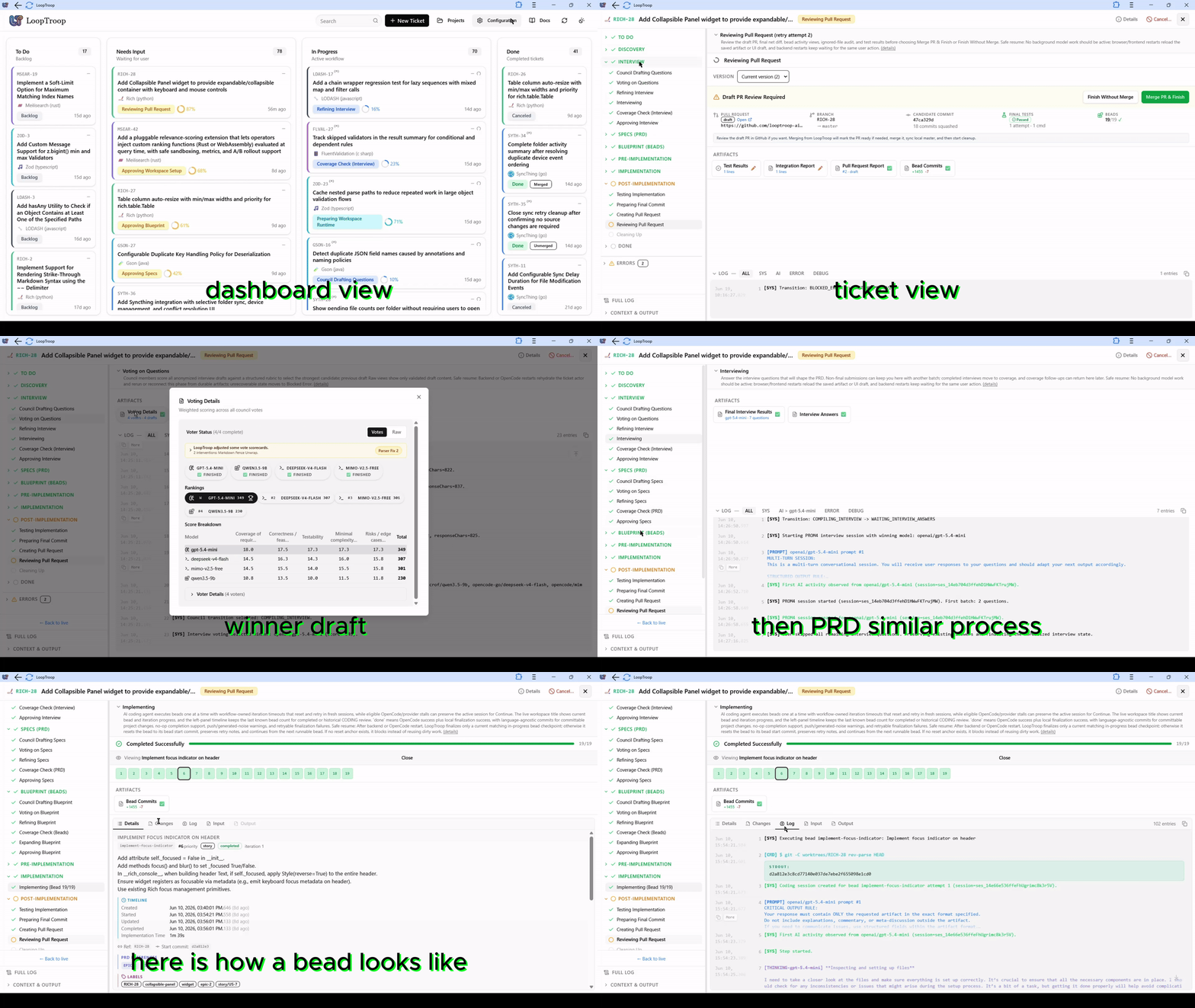
*An animated walkthrough of a ticket lifecycle and the configuration menu.*
### 📸 Screenshots
<details>
<summary><strong>Click to expand the screenshot gallery</strong></summary>
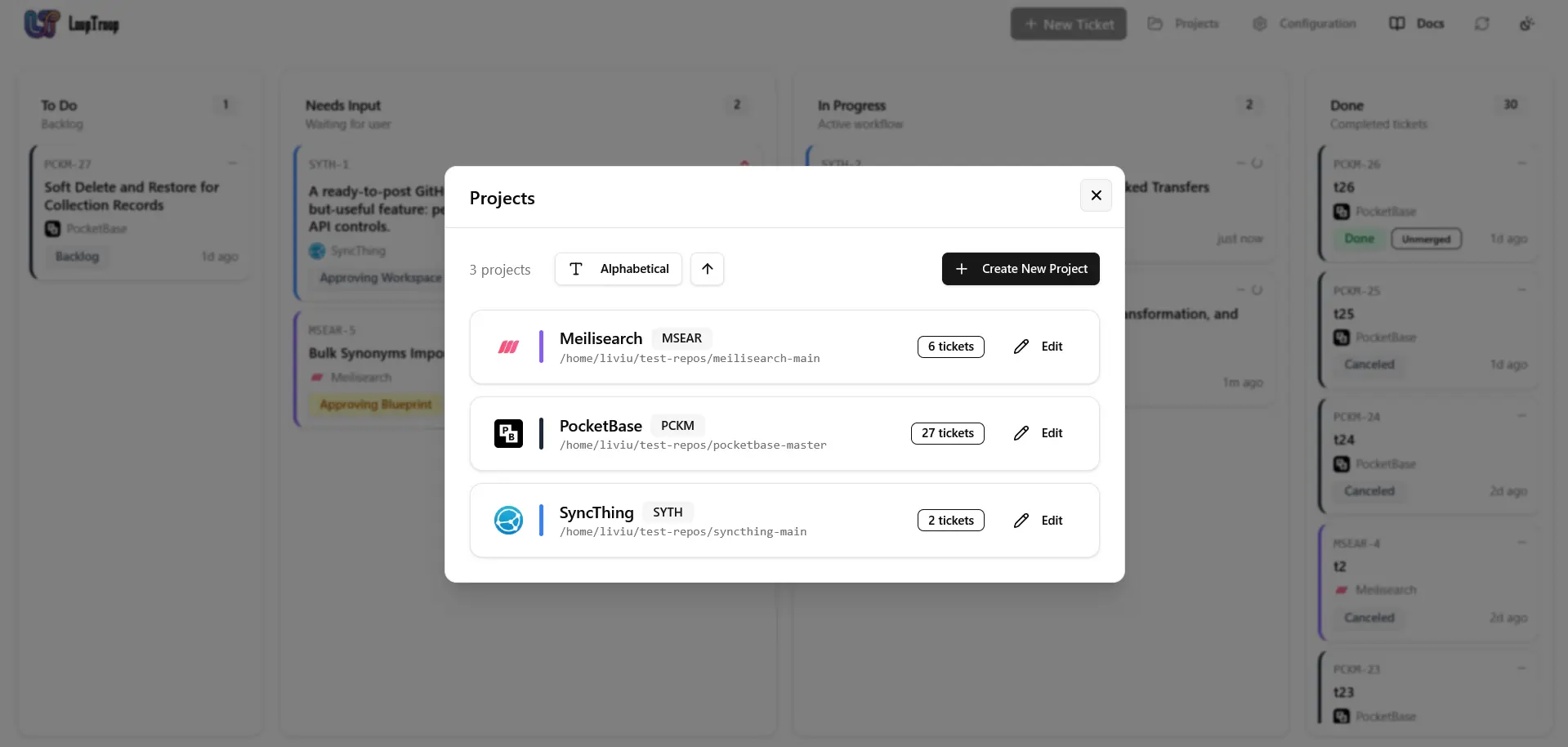
*Manage attached repositories, review ticket counts, and add new projects from the dashboard.*
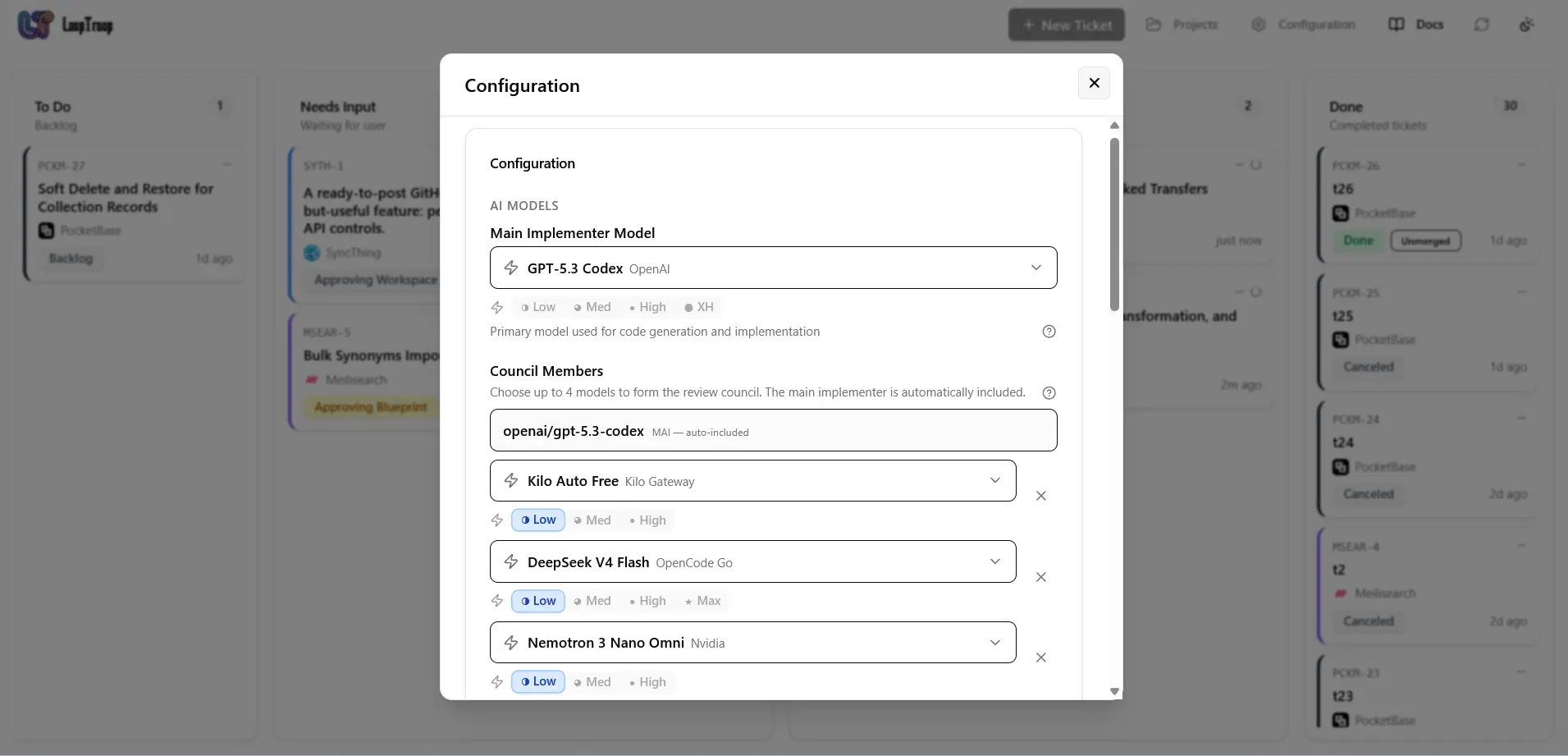
*Choose the main implementer model, council members, and effort levels for local orchestration.*
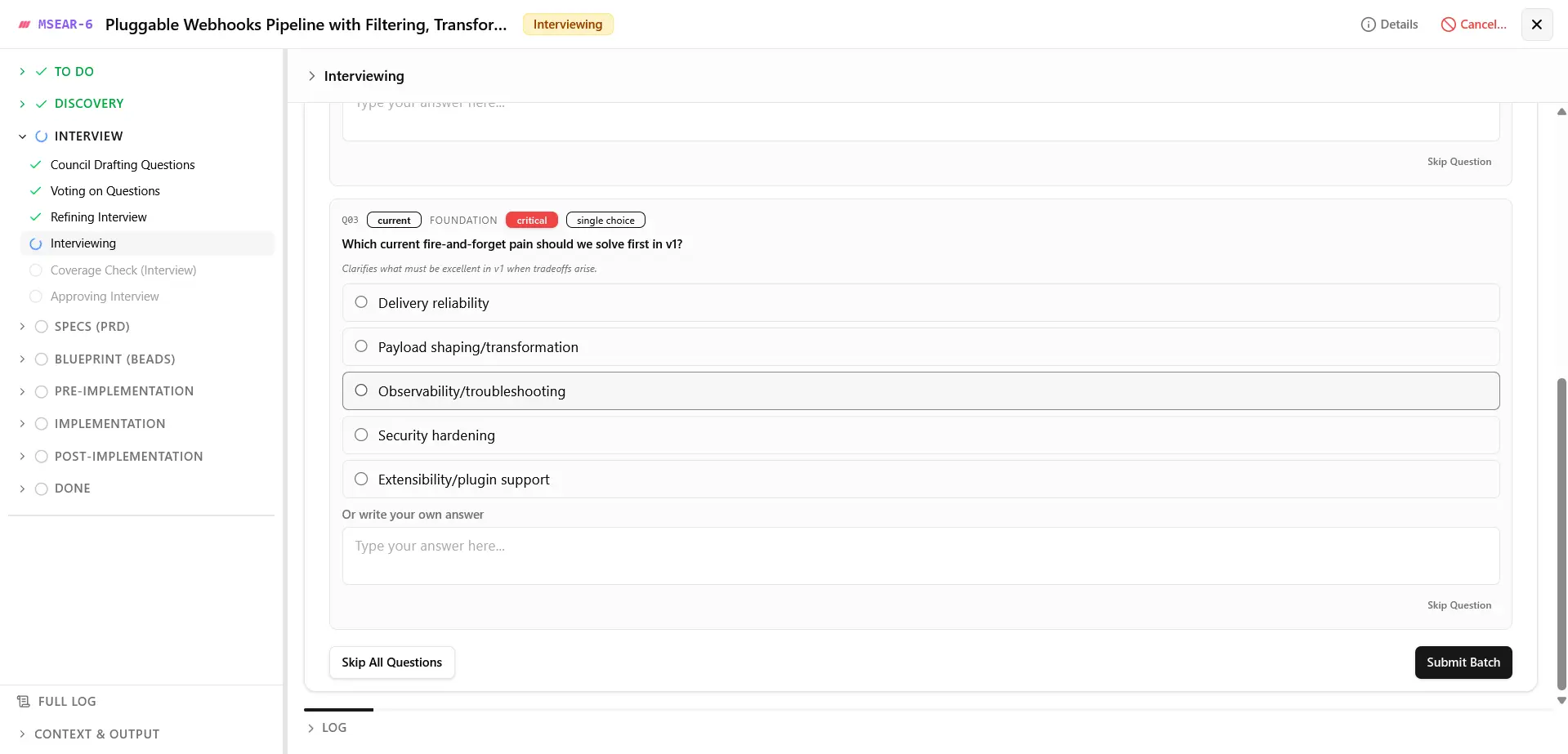
*Answer focused planning questions before specs and implementation plans are approved.*
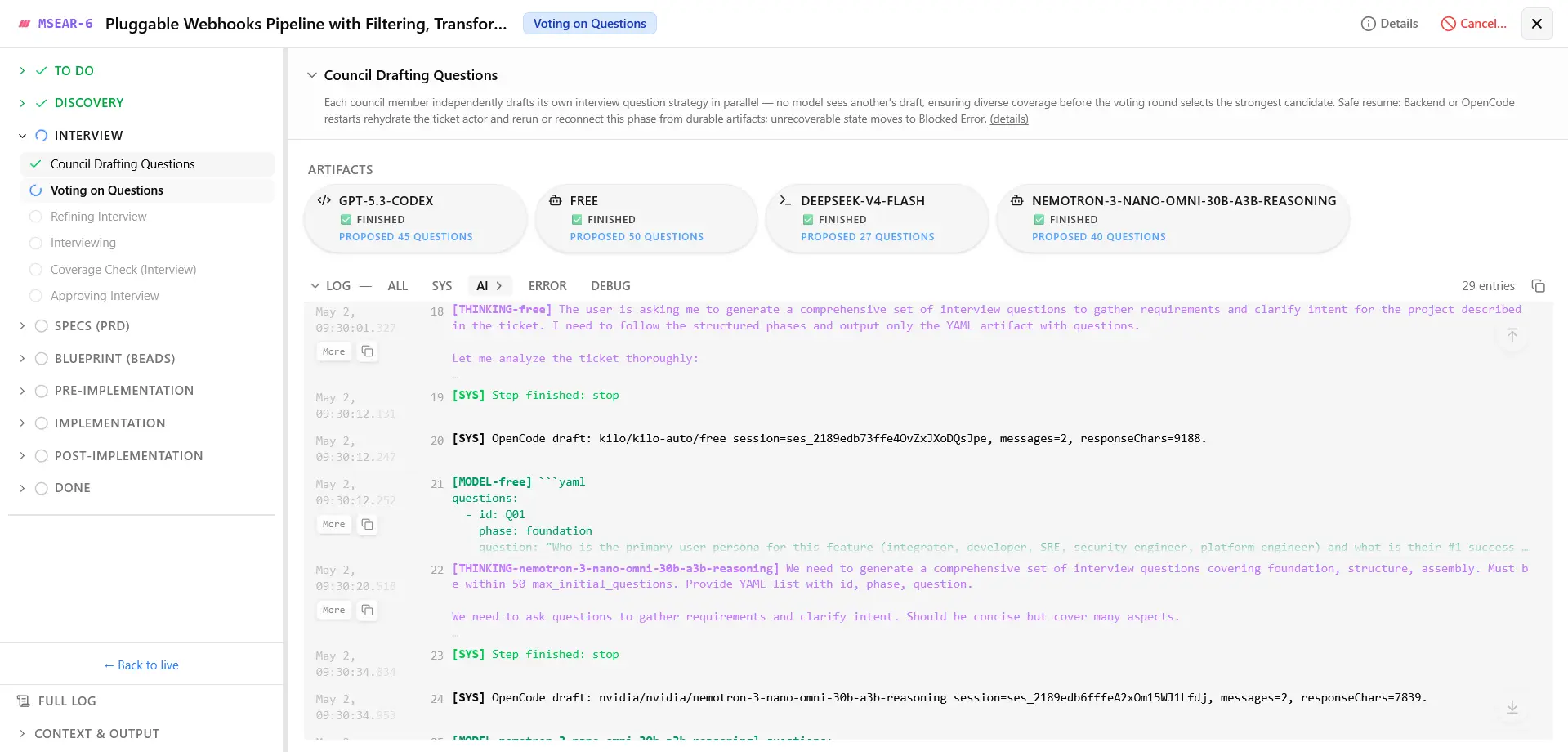
*Track council progress, generated artifacts, and live execution logs inside a ticket.*
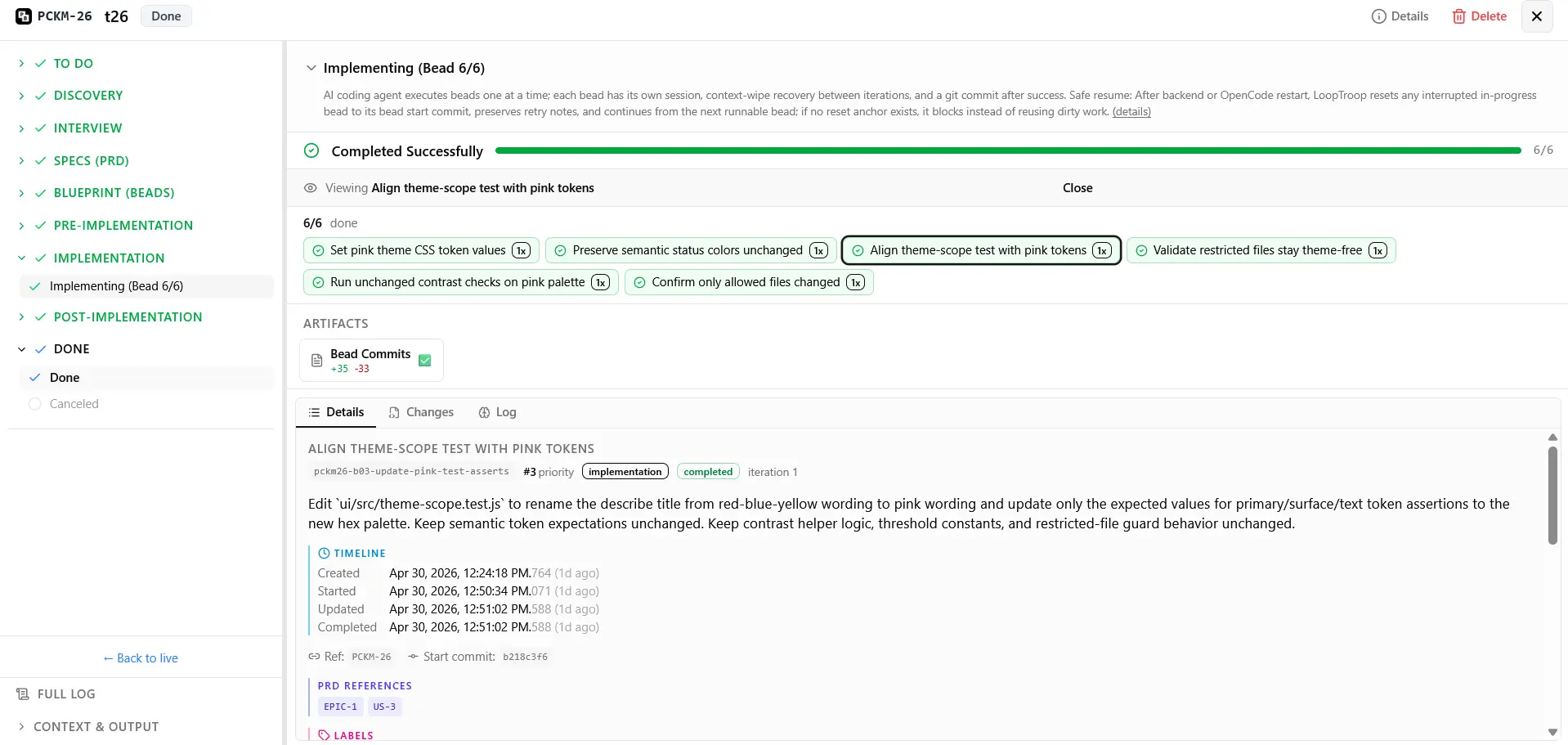
*Review bead completion, commits, changes, and final implementation details before closing the workflow.*
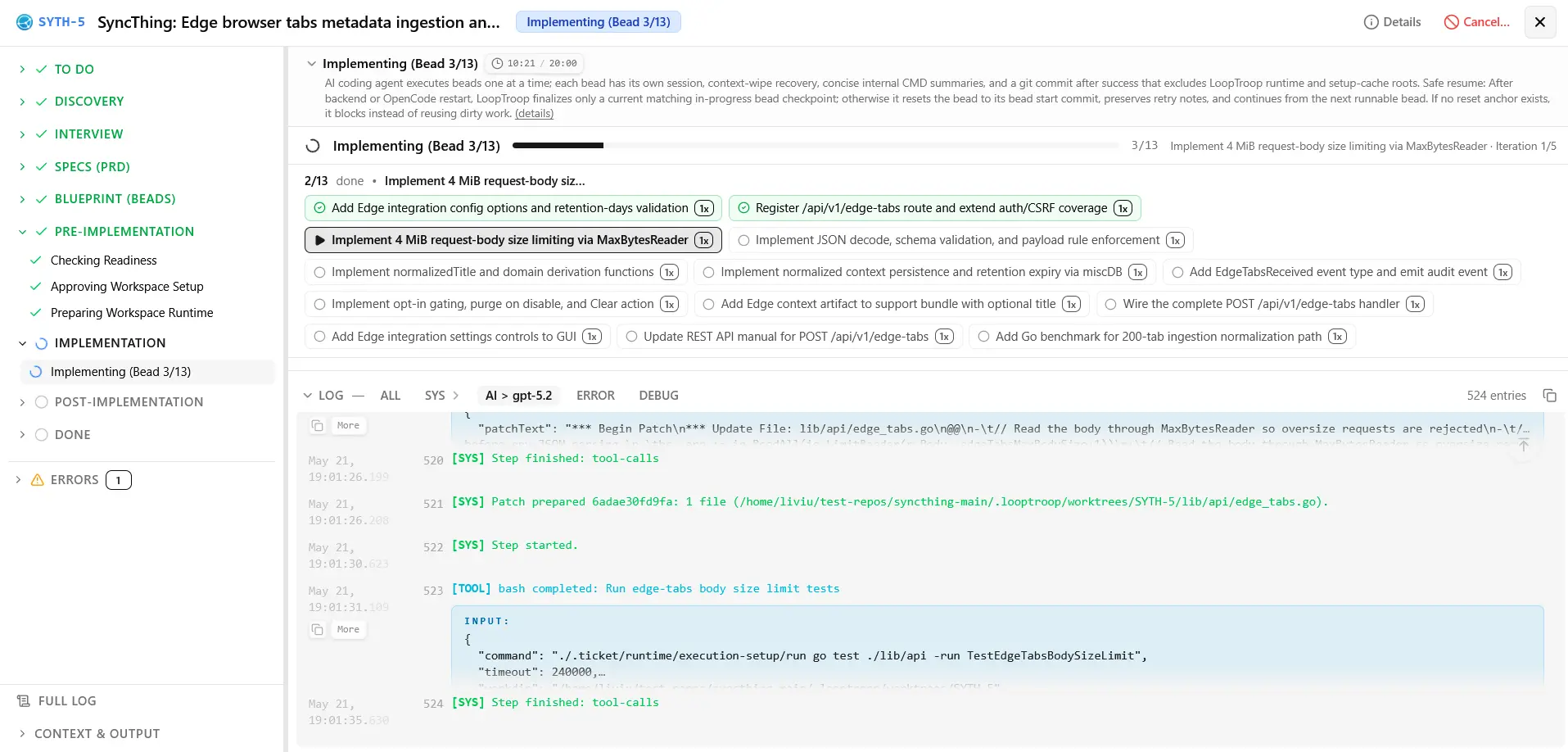
*Inspect bead-level progress, task status, and live execution logs while an implementation bead runs.*
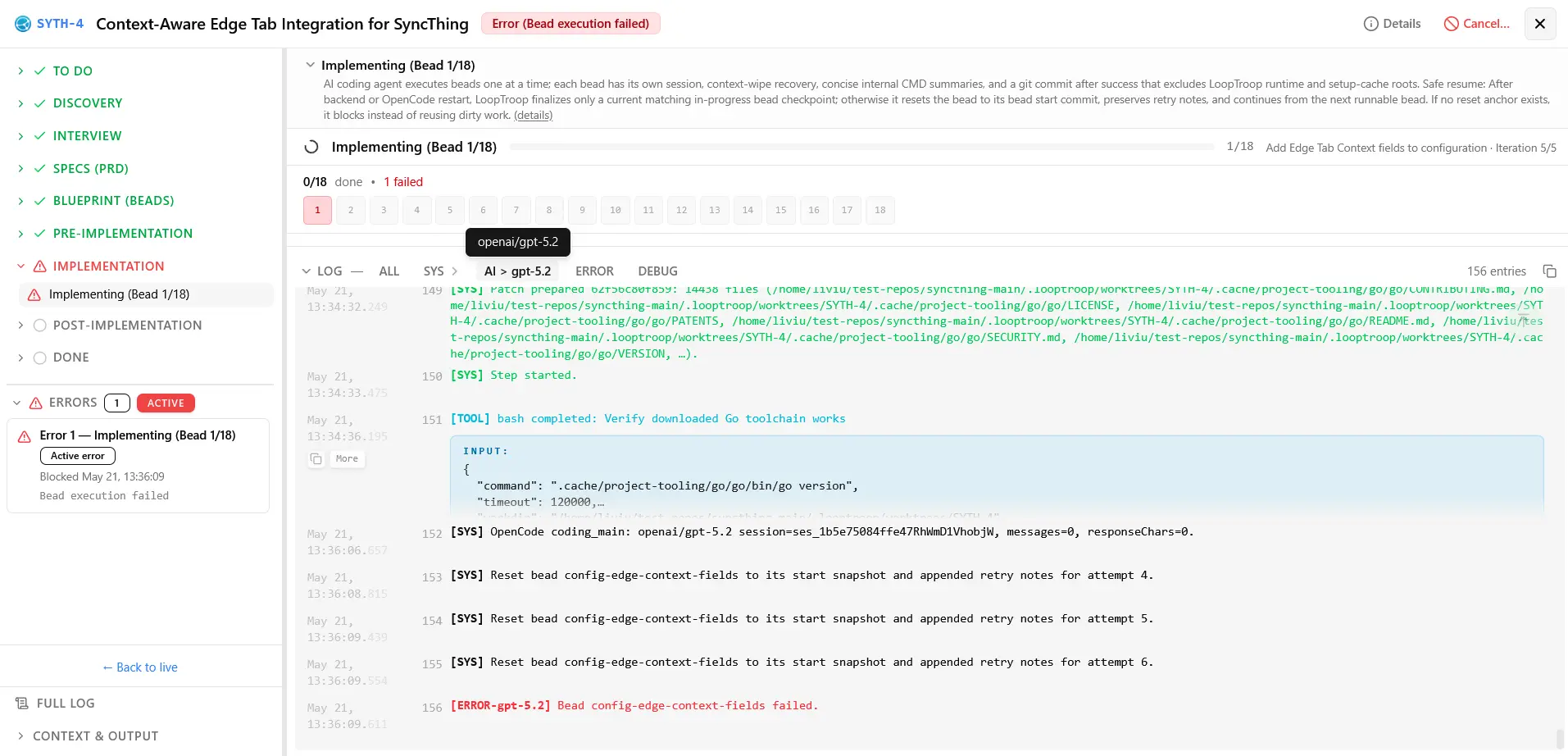
*Review the focused workspace view shown when an implementation bead is blocked by an error.*
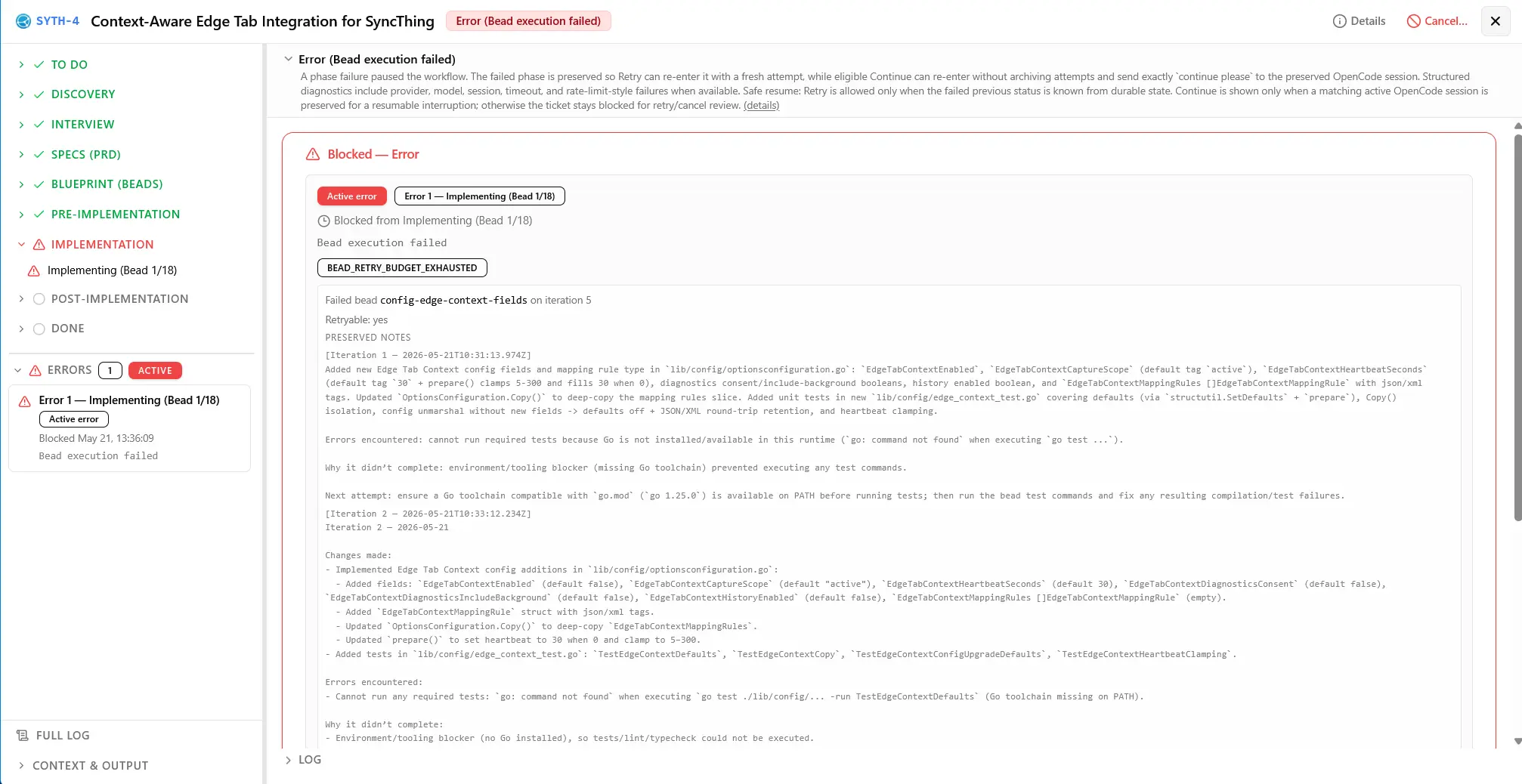
*Compare a different bead's error state, diagnostics, and recovery context before deciding whether to continue or retry.*
</details>
### 🎬 16 Min Deep Dive - Presentation & Full Ticket Demo
<details>
<summary><strong>Click to expand the presentation and demo</strong></summary>
[](https://www.youtube.com/watch?v=LYiYkooc_iY)
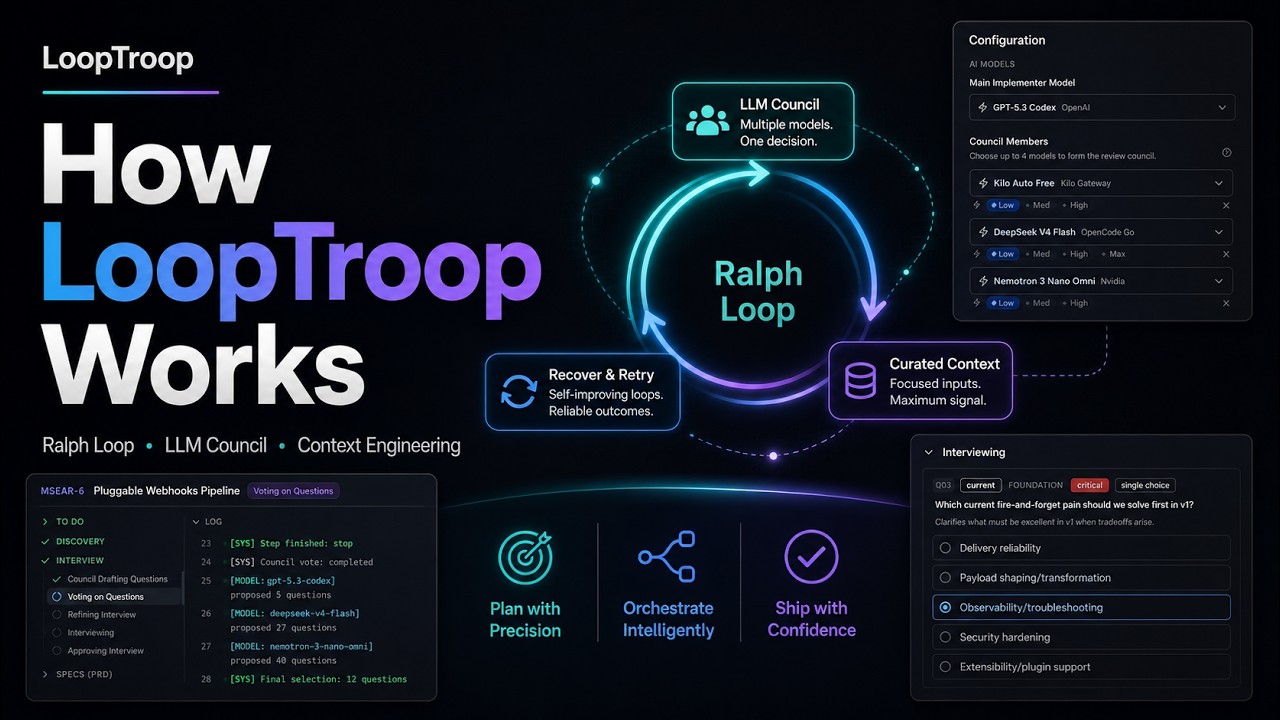
*Watch the full 16-minute presentation and ticket demo.*
</details>
---
## Quick start
```bash
curl -fsSL https://www.looptroop.ovh/install | sh
looptroop open
```
`open` starts LoopTroop in the background and opens the browser.
Configure a provider in OpenCode, choose a model in LoopTroop's Configuration
screen, attach a local repository with a GitHub origin, and create a ticket.
### Every way to install it
<details>
<summary><b>curl / PowerShell</b></summary>
```bash
curl -fsSL https://www.looptroop.ovh/install | sh
```
```powershell
irm https://www.looptroop.ovh/install.ps1 | iex
```
Requires Node 24.19.0 or newer. Installs the latest release through npm.
</details>
<details>
<summary><b>npm</b></summary>
```bash
npm install -g looptroop
npm install -g looptroop@latest # upgrade
```
Requires Node 24.19.0 or newer.
</details>
<details>
<summary><b>Homebrew</b> (macOS and Linux)</summary>
```bash
brew install looptroop-ai/tap/looptroop
brew upgrade looptroop # upgrade
```
Installs Node and `gh`; uses the OS's Git.
</details>
<details>
<summary><b>Scoop</b> (Windows)</summary>
```powershell
scoop bucket add looptroop https://github.com/looptroop-ai/scoop-bucket
scoop install looptroop
scoop update looptroop # upgrade
```
Installs Node, Git and `gh`.
</details>
<details>
<summary><b>Chocolatey</b> (Windows)</summary>
```powershell
choco install looptroop
choco upgrade looptroop # upgrade
```
Installs Node, Git and `gh`. New releases can take a few days to reach the feed.
</details>
<details>
<summary><b>WinGet</b> (Windows)</summary>
```powershell
winget install LoopTroopAI.LoopTroop
# Stop before upgrading so Windows can replace the executable.
looptroop stop
winget upgrade LoopTroopAI.LoopTroop
```
Includes Node; installs Git and `gh`. New releases can take a few days to reach
the feed.
</details>
<details>
<summary><b>bun</b></summary>
```bash
bun add -g looptroop
bun add -g looptroop@latest # upgrade
```
Requires bun and Node 24.19.0 or newer.
</details>
<details>
<summary><b>pnpm</b></summary>
```bash
pnpm add -g looptroop
pnpm add -g looptroop@latest # upgrade
```
Requires pnpm and Node 24.19.0 or newer. New releases may be delayed by pnpm's
24-hour publication-age check.
</details>
<details>
<summary><b>Yarn Classic</b> (Bash/zsh)</summary>
```bash
yarn global add looptroop
export PATH="$(yarn global bin):$PATH"
yarn global upgrade looptroop@latest # upgrade
```
Requires Yarn 1.x and Node 24.19.0 or newer. Add the PATH line to your shell
profile. For modern Yarn or PowerShell, use another install method.
</details>
<details>
<summary><b>Docker</b> (linux/amd64 and linux/arm64)</summary>
```bash
docker pull looptroopai/looptroop:latest
```
Includes Node, Git and `gh`. Connect an OpenCode server and mount your project
as described in [Installation](https://www.looptroop.ovh/docs/installation#running-in-a-container).
</details>
<details>
<summary><b>Standalone executable</b> (macOS, Linux and Windows)</summary>
Download an archive from [GitHub Releases](https://github.com/looptroop-ai/LoopTroop/releases/latest)
and extract it. Includes Node; requires Git and `gh`.
</details>
See [Installation](https://www.looptroop.ovh/docs/installation) for upgrades,
uninstalling, download verification, and channel availability.
### What you need besides LoopTroop
- **git**, and **`gh`** authenticated: a ticket checks both before it starts
coding, because it ends in a pull request. Installed for you via Homebrew, Scoop, Chocolatey, WinGet and the AUR;
**not** installed if you used npm, bun, pnpm, Yarn or the standalone
executable, which have no way to declare a dependency.
- **OpenCode**, with a configured provider and available model. LoopTroop starts
the installed CLI when no server is already reachable, and detects v1 or v2
automatically. It does not install OpenCode for you.
## What is LoopTroop?
LoopTroop is a **local GUI orchestrator for long-running, high-correctness AI software delivery**, taking you from a raw idea to merged code. It is free and fully open-source.
Unlike high-speed coding tools that optimize for immediate chat responses, LoopTroop is built for **complex, multi-file feature work** where alignment and correctness are paramount. It optimizes for a "slow and perfect" paradigm, intentionally sacrificing raw speed to deliver a final result that matches exactly how you envisioned it.
**Great Context Engineering = Zero AI Slop:** LoopTroop employs precise context curation at every stage, feeding the agent only the absolute **minimum** context it needs. See [Context Engineering](#context-engineering) below for details.
---
## How it works
```mermaid
flowchart LR
A["🎫 Ticket Input"] --> B["🔍 Codebase Discovery"]
B --> C["🏛️ LLM Council Planning<br/>(Interview, PRD & Beads)"]
C --> D["🛑 Human Approval Gate"]
D --> E["🧪 Isolated OpenCode Bead Execution<br/>(Git Worktree)"]
E --> F["✅ Final Tests"]
F --> H["🧭 Optional Manual QA<br/>(user runs the app)"]
H --> I["📦 Integration & PR Review"]
H -.->|"Failures become QA fix beads"| E
E -.->|"On Failure"| G["🔄 Ralph-Style Recovery Loop"]
G -.->|"Retry"| E
```
LoopTroop keeps workflow state outside the model, stores durable artifacts, and asks for approval at important boundaries. Optional Manual QA runs after final tests: you complete the checklist while manually controlling the app, then the ticket continues to integration. Failed checks create QA-fix beads, while improvements create new tickets.
## Core ideas
### Context Engineering
Context rot is the enemy of autonomous agents. Traditional agent loops suffer from it: excessive conversational history and irrelevant files overwhelm the model, causing code quality to degrade. Performance can drop severely when reaching just 40% of the maximum context window, resulting in missing files, broken imports, and "AI slop." [[note]](https://antekapetanovic.com/blog/context-engineering/ "Context Engineering: When \"You're Absolutely Right\" Means You're Absolutely Not")
LoopTroop solves this through precise context curation. Instead of sending full conversational transcripts, the engine isolates payloads to the active status. During execution, the agent only sees the specific active bead, its immediate file target, and the test file. During planning phases, it receives only the minimum context relevant to the current step.
This eliminates conversation pollution from previous execution attempts, prevents LLM drift and performance degradation, and keeps model focus high. Keeping the working context fresh is what makes multi-hour, multi-step engineering cycles actually work.
Read more: [Context Engineering](https://www.looptroop.ovh/docs/context-engineering)
### LLM Council
The LLM Council is LoopTroop's planning system. Instead of relying on a single model run, LoopTroop orchestrates multiple independent model instances that **draft** plans, **score** each other using a weighted rubric, and **vote** on proposals. The winner then **refines** its draft by synthesizing the strongest ideas from the losing drafts and **verifies** coverage before any execution begins.
This multi-role process (draft → vote → refine → verify) is used for:
- Interview questions
- PRD/Specs generation
- Bead/blueprint generation
Read more: [LLM Council](https://www.looptroop.ovh/docs/llm-council)
### Interview
Before writing a spec, the LLM Council compiles a list of targeted questions to resolve any ambiguities. This interactive session gathers requirements and clarifies intent. Because matching your vision is the goal, this phase can take over an hour by design.
You answer these questions directly in the Interview workspace to clarify edge cases, design decisions, and requirements, ensuring the model never operates on false assumptions. Although a final interview is created after the council's draft-vote-refine cycle is complete, the user still receives questions in batches that can adapt based on previous answers.
Read more: [Interview](https://www.looptroop.ovh/docs/interview)
### PRD (Product Requirements Document)
Once the interview phase is complete, the LLM Council translates your initial ticket and your interview answers into a structured Product Requirements Document consisting of Epics and User Stories, complete with highly decomposed implementation steps. This spec serves as the single source of truth for the implementation, detailing the technical approach, edge cases, scope, and expected validation steps before any coding starts. The PRD is stored as a durable artifact for later reference during bead execution.
Read more: [PRD](https://www.looptroop.ovh/docs/prd)
### Beads
LoopTroop implements **only the Beads methodology**, not the full external Beads Project. It extracts just the lightweight planning structure needed to bring immediate value to your repository.
Using Steve Yegge's *Beads Project* methodology, epics are split into "beads", the smallest, independently implementable units of work. Each bead contains:
- Clear purpose and objective
- Measurable acceptance criteria
- Necessary dependencies and prerequisite context
- Specific target files
- Expected validation and testing steps
A bead acts as a small, isolated implementation unit, allowing the execution agent to complete concrete tasks sequentially rather than attempting a massive, single-pass code rewrite.
Read more: [Beads](https://www.looptroop.ovh/docs/beads)
### Execution & Ralph-style recovery
The actual implementation is carried out by an AI coding agent (OpenCode) running in an isolated workspace. If the agent struggles, continuing the same conversation can make things worse. LoopTroop's retry mechanism (the "Ralph Loop") preserves a highly compact error trace from the failure, attempts a safe worktree reset, discards the contaminated session, and begins a fresh run with clean context plus a note from previous failures.
```text
fail ──> log failure trace ──> safe reset ──> retry fresh
```
This cycle repeats until all tests pass or retry limits are reached. **This can take hours (sometimes 10+ hours) by design.** It is built to run unattended (e.g., overnight).
Read more: [Beads & Execution](https://www.looptroop.ovh/docs/beads)
### Worktree isolation
LoopTroop runs execution steps inside isolated Git worktrees rather than modifying your active branch. This keeps your working copy clean and ensures reliable, inspectable diffs. Note that worktrees provide workspace isolation, not sandboxed host security.
When cleanup is run in its conservative mode, LoopTroop asks Git for ignored
untracked entries in a real worktree and preserves user files; only its own
`.ticket/` and `.looptroop/` roots are eligible for removal. A pre-start ticket
skeleton is checked directly instead of inheriting ignore rules from the parent
repository, and only its `.ticket/` root is eligible. The Free Disk Space action
uses this mode for completed and canceled ticket worktrees: protected worktrees
are skipped and reported with the reason, while eligible worktrees are removed.
An ignored file such as a local environment file therefore remains in place
without preventing other cleanup. If
Git yields while a worktree is being removed, a replacement directory is left
alone. The daemon also waits for detached Git and GitHub children during
shutdown and closes active SSE streams before waiting for its HTTP server, so a
connected browser cannot hold graceful shutdown open indefinitely. Startup
recovery refuses to overwrite a target that has advanced since a completed
fallback copy.
Only select repositories you trust. LoopTroop preserves repository-local Git
configuration, including `core.sshCommand`, so custom SSH wrappers keep working.
Git may execute those wrappers with your account's permissions during remote
operations, including connection checks. Worktree isolation does not restrict
what a wrapper can do on the host.
Read more: [System Architecture](https://www.looptroop.ovh/docs/system-architecture)
### Human approval gates
LoopTroop keeps you in control of critical state transitions. You actively review and sign off on planning specs, execution blueprints, and final pull request deliverables. *(Note: Human approval gates will become optional in future releases).*
For tickets with Manual QA enabled, LoopTroop prepares a checklist while you manually control the app and accept/reject/skip/create new tickets from the items.
Read more: [Ticket Flow](https://www.looptroop.ovh/docs/ticket-flow)
## Run it in a VM
The channel-specific install instructions appear above. Beyond the install
itself, LoopTroop needs a local repository with a GitHub origin, and **strongly
wants a VM or sandboxed development environment**.
### Why a VM?
LoopTroop is designed for serious agentic coding work that runs unattended. To make this possible, the orchestrator runs OpenCode in `dangerously-skip-permissions` (YOLO) mode, granting the agent full local execution rights without prompting for confirmation.
While this makes long-running autonomous tasks possible, it introduces real risks. AI agents are not perfect. If a generation goes wrong, the agent can execute commands that delete critical system folders, corrupt active configurations, or break your workspace. Git worktrees isolate your code changes, but they do not sandbox the command execution process itself. The agent runs with your local user privileges.
**Recommended setup: run LoopTroop inside a disposable VM, cloud dev machine, or sandboxed development environment.**
- Git worktrees protect your attached repository checkout
- Logs and artifacts help you inspect what happened
- A VM protects the rest of your computer
## Why not just use a coding agent directly?
Direct coding-agent loops are highly useful, but they degrade rapidly when task complexity or repository scale increases.
| Core Challenge | Direct Agent Behavior | LoopTroop's Structural Fix |
| :--- | :--- | :--- |
| **Flawed Planning** | A single model attempts to draft a multi-step plan in one pass, frequently missing structural edge cases. | **LLM Council Consensus:** Competing models draft, vote on, and synthesize a single, rigorous implementation plan. |
| **Monolithic Overload** | Direct agents try to solve a complex feature in a single massive prompt, leaving incomplete files or "TODO" placeholders. | **Atomic Bead Decompositions:** Automatically breaks down the feature into independent, test-backed "beads" to focus on smallest changes at a time. |
| **Single-Provider Bias** | Relying on one model makes your pipeline highly vulnerable to that specific model's logical blind spots and systemic failures. | **Cross-Model Councils:** Harnesses diverse providers and architectures (e.g., Anthropic, OpenAI, NVIDIA NIM) to critique and align code drafts. |
| **Context Rot** | Long-running chats suffer from token bloat and context degradation, leading to broken imports or forgotten criteria. | **Modern Context Engineering:** The environment strictly isolates context, feeding the agent only the absolute minimum context it needs at each step. |
| **Degenerate Retries** | When a command fails, the agent tries to fix it within the same polluted chat session, compounding previous errors. | **Ralph-Style Retries:** Discards the broken chat session entirely and retries the exact bead with a fresh context window (plus notes from previous failures). |
| **Risky Edits** | Code modifications are made directly in your active checkout, potentially leaving your main branch in an unstable state. | **Isolated Git Worktrees:** Executes all changes in dedicated, isolated worktrees away from your primary working branch. |
| **Opaque Execution** | Internal states, planning notes, and test outputs are lost inside unstructured chat history. | **Structured Durability:** Maintains state locally inside SQLite, JSONL logs, and easily inspectable `.ticket/**` YAML artifacts. |
## What LoopTroop is not
LoopTroop is not a magic autopilot. It does not remove the need to review code, inspect diffs, protect secrets, or run work in a safe environment. It is best understood as an orchestration layer around coding agents: planning, state, approvals, execution boundaries, retries, and delivery.
- **Cost-Sensitive Budgets:** Orchestrating multi-model councils and long retry loops uses a high volume of API tokens, though subscription plans from providers in OpenCode can help reduce costs.
- **Urgent or Quick Fixes:** If you need a trivial change completed in seconds, LoopTroop's overhead will feel slow.
- **Simple Tasks:** For quick edits or trivial apps, standard IDE chat tools or tools like Replit, Bolt, or Lovable are better fits.
## Documentation
The README gives a first-glance overview. The full docs are maintained in the public [LoopTroop-Website repository](https://github.com/looptroop-ai/LoopTroop-Website) and published at:
https://www.looptroop.ovh/docs/
Useful pages:
| Page | What it explains |
| --- | --- |
| [Installation](https://www.looptroop.ovh/docs/installation) | Every channel, what each installs, upgrading, uninstalling, and verifying a download |
| [CLI Reference](https://www.looptroop.ovh/docs/cli) | Every command and option, the `--json` output, and what running as a service means |
| [Getting Started](https://www.looptroop.ovh/docs/getting-started) | Setup, startup, ports, and first project attach |
| [Configuration](https://www.looptroop.ovh/docs/configuration) | All profile settings with defaults, ranges, and trade-offs |
| [Ticket Lifecycle Screenshots](https://www.looptroop.ovh/docs/ticket-lifecycle-screenshots) | Visual walkthrough of every workflow status with screenshots and action summaries |
| [LLM Council](https://www.looptroop.ovh/docs/llm-council) | Multi-model draft, vote, refine, and coverage planning |
| [Context Engineering](https://www.looptroop.ovh/docs/context-engineering) | Why prompts are built from minimal per-status context and what each status receives |
| [Beads & Execution](https://www.looptroop.ovh/docs/beads) | Bead execution, retries, resets, and context wipe notes |
When the app is running, the same docs are also available from the dashboard.
## Project status
LoopTroop is early alpha software, but it is usable for real work. The full ticket lifecycle is implemented, but some bugs are still likely. The core primitives (planning, execution, retries) are functional.
**Configured limitations:** In LoopTroop alpha, LLM Councils support 2 to 10 distinct models, including the main implementer. Each project may have only one active ticket in the execution band at a time; additional tickets must wait until it finishes or is canceled.
Roadmap: [Roadmap](https://www.looptroop.ovh/docs/roadmap)
## Contributing
Contributions, ideas, bug reports, and workflow feedback are welcome.
See [CONTRIBUTING.md](.github/CONTRIBUTING.md) for setup, issue, pull request, documentation, and changelog guidance. Please also follow the [Code of Conduct](.github/CODE_OF_CONDUCT.md).
历史前置条件说明(补充参考)
Node 24.19.0 或更新版本(npm/bun/pnpm/Yarn 渠道明确要求);已认证的 git 与 gh;已安装并配置服务商的 OpenCode 及可用模型;OpenCode 中配置的模型/API Key;模型调用会产生 Token 费用,价格待向服务商核验;建议在一次性虚拟机或沙箱环境运行;界面与文案语言待核验。
项目来源与清单版权许可
https://github.com/looptroop-ai/LoopTroop
整理来源:https://github.com/slavakurilyak/awesome-ai-agents
清单版权与许可:
MIT License
Copyright (c) 2024 Slava Kurilyak
Permission is hereby granted, free of charge, to any person obtaining a copy of this software and associated documentation files (the "Software"), to deal in the Software without restriction, including without limitation the rights to use, copy, modify, merge, publish, distribute, sublicense, and/or sell copies of the Software, and to permit persons to whom the Software is furnished to do so, subject to the following conditions:
The above copyright notice and this permission notice shall be included in all copies or substantial portions of the Software.
THE SOFTWARE IS PROVIDED "AS IS", WITHOUT WARRANTY OF ANY KIND, EXPRESS OR IMPLIED, INCLUDING BUT NOT LIMITED TO THE WARRANTIES OF MERCHANTABILITY, FITNESS FOR A PARTICULAR PURPOSE AND NONINFRINGEMENT. IN NO EVENT SHALL THE AUTHORS OR COPYRIGHT HOLDERS BE LIABLE FOR ANY CLAIM, DAMAGES OR OTHER LIABILITY, WHETHER IN AN ACTION OF CONTRACT, TORT OR OTHERWISE, ARISING FROM, OUT OF OR IN CONNECTION WITH THE SOFTWARE OR THE USE OR OTHER DEALINGS IN THE SOFTWARE.