 AI仙宝
项目介绍
Agent 配套工具 · 2026-11-09 更新 · 本站尚未实测
ClawMetry 是一款面向 AI Agent 运行过程的本地可观测性工具。按 README 描述,它读取本机编程 Agent 已经写出的会话文件,把时间线、工具调用,以及运行时暴露的 Token 和费用数据汇总到一个视图中,帮助区分“长时间运行但仍在推进”和“已经卡住”的任务。
README 声明支持 32 种 Agent 运行时,包括 Claude Code、OpenAI Codex、Hermes、OpenClaw 等,并称安装后可在本机打开仪表盘查看。需要注意的是,README 明确区分了开源应用可直接读取的运行时与需要付费组件的运行时:免费部分读取 OpenClaw、NVIDIA NemoClaw、Goose 和 Qwen Code;其余运行时由闭源的 clawmetry-pro 配套组件读取,需要试用或订阅方案,具体划分以仓库中的 docs/ENTITLEMENTS.md 为准。
核心能力
点击能力名称查看输入、输出和原文依据。
按 README 列出,仪表盘提供以下视图:
- 会话与记录:逐个回合回看每个 Agent 做了什么;
- 费用与 Token:按运行时、模型、会话和日期统计,并标记异常;
- Flow:以实时图展示消息经渠道、模型和工具的流转;
- Brain:实时展示推理与工具调用事件流;
- 上下文耗尽:按提供商计算窗口占用,区分压缩与强制溢出;
- 记忆与技能:展示各运行时实际加载的文件和技能;
- 健康与日志:磁盘、内存、错误率、限流与实时日志;
- 告警:预算上限、错误激增、Agent 离线等,可路由到 Slack、Discord、PagerDuty、Telegram、邮件;
- 审批:可选地拦截高风险工具调用,并在手机上批准。README 说明这些拦截规则默认关闭。
README 还说明,观察某个动作不等于能够阻止它,各运行时真实可用的控制能力需参考 docs/APPROVALS.md。
实际应用场景
适用场景
适合在同一台机器上使用多种编程 Agent、希望集中查看会话轨迹、费用去向、上下文占用和异常告警的开发者或团队。README 提到也可通过拦截器跟踪自建在 SDK 上的 Agent(见 docs/SDK_TRACKING.md),以及实验性的 Asimov 1 连接器,用于人形机器人相关场景,README 说明该支持为实验性质、物理硬件资格认证尚待完成。
若只使用免费范围内未覆盖的运行时,实际使用会依赖付费组件,需按官方方案核验收费方式和当期价格。
安装与接入
README 给出的主要方式为:
pip install clawmetry && clawmetry
安装后默认在本机 http://localhost:8900 打开。README 称其为零配置,会查找本机已有的 Agent 运行时并以只读方式读取。机器上暂无 Agent 时,可用 clawmetry --sample 打开三个标注为合成的示例会话。
README 另提供一行安装脚本:
curl -sSL https://raw.githubusercontent.com/vivekchand/clawmetry/main/install.sh | bash
要求 Python 3.8+,README 称支持 macOS、Linux 或 Windows,并需同一台机器上至少有一个 Agent 运行时。Docker 方式见 docs/DOCKER.md。README 还提到一个名为 agent-kill-switch 的 Skill,可通过 npx skills add vivekchand/clawmetry --skill agent-kill-switch 添加,由支持的 Agent 协助安装、汇报与审批操作;该 Skill 的具体行为建议查阅 skills/agent-kill-switch/SKILL.md 后再使用。
使用条件与限制
- 是否需要部署
- 需自行准备运行环境,具体要求见正文
- 是否需要注册
- 账号和认证要求见正文;未明确说明的项目仍待核验
- 是否需要 API Key
- 待核验
- 费用与额度
- 费用边界见正文,项目许可不代表模型或托管服务免费
- 所需权限
- 待核验
- 许可证与服务条款
- 待核验
权限费用与限制
数据出站:README 声明会话数据不会离开本机,除非运行 clawmetry connect。默认会执行匿名安装统计和 PyPI 版本检查,另外默认安装会查询一次公网 IP 用于启动横幅;二者可关闭且不携带会话内容,去向清单见 docs/EGRESS.md。使用 connect 时快照端到端加密,密钥留在本机、在浏览器中解密。README 也坦言无法证明所提供页面本身未被替换,自托管或纯本地可移除该依赖。
费用:README 价格表列出 Free 为 0 美元(仅 OpenClaw、NVIDIA NemoClaw、Goose、Qwen Code,本地)、Starter 为每节点每月 9 美元、Pro 为每节点每月 19 美元,并注明最新价格以 clawmetry.com/pricing 为准。自托管许可证密钥可在无云环境下使用(clawmetry license)。费用细节与免费/付费划分应以官方页面核验,本内容不保证上述价格为当前有效价格。
性能开销:README 给出会话文件跟踪为零侵入;HTTP 拦截器约 +0.44 ms/次 LLM 调用;前置工具钩子约 +44 ms/次;强制代理约 +9.7 ms/次;守护进程持续占用约一个核心的 12%,README 自述这超出其 5–10% 预算并作为待修问题公开。这些数据为项目方在其 Apple M2 Pro 上测得,非本目录实测。
平台限制:README 称代理在 Windows 上的开销约为 Linux 的七倍。国内网络环境下的可用性、访问延迟和部署地域资料未说明,待核验。
国内使用情况
网友核验 用户经验分享
与站长实测独立,不代表官方认证或本站已实测。
最近核验:暂无有效核验。参与人数按当前项目有效身份去重;不同核验项分别统计,不合并成用户总结果。仅统计审核通过且未过期的记录。
分项统计、有效期与样本量
| 核验项目 | 有效人数 | 成功 / 部分 / 失败 / 无法判断 | 成功率 | 最近核验 / 有效期 |
|---|---|---|---|---|
| 官方网站访问 | 0 | 0 / 0 / 0 / 0 | 样本不足 | 暂无 / 7 天 |
| GitHub 仓库访问 | 0 | 0 / 0 / 0 / 0 | 样本不足 | 暂无 / 7 天 |
| 安装与运行 | 0 | 0 / 0 / 0 / 0 | 样本不足 | 暂无 / 30 天 |
| 官方服务国内连接 / MCP 连接 | 0 | 0 / 0 / 0 / 0 | 样本不足 | 暂无 / 30 天 |
| 国内网络情况 | 0 | 0 / 0 / 0 / 0 | 样本不足 | 暂无 / 7 天 |
| 国内模型兼容性 | 0 | 0 / 0 / 0 / 0 | 样本不足 | 暂无 / 30 天 |
| 自定义 API | 0 | 0 / 0 / 0 / 0 | 样本不足 | 暂无 / 30 天 |
| 海外服务依赖 | 0 | 0 / 0 / 0 / 0 | 样本不足 | 暂无 / 30 天 |
| 海外账号要求 | 0 | 0 / 0 / 0 / 0 | 样本不足 | 暂无 / 30 天 |
| 中文界面 | 0 | 0 / 0 / 0 / 0 | 样本不足 | 暂无 / 30 天 |
| 客户端兼容性 | 0 | 0 / 0 / 0 / 0 | 样本不足 | 暂无 / 30 天 |
| 账号及费用信息 | 0 | 0 / 0 / 0 / 0 | 样本不足 | 暂无 / 30 天 |
成功率 = 成功 ÷(成功 + 部分成功 + 失败);无法判断不计入分母。至少 5 份可判断结果才显示成功率。账号、费用、海外依赖与语言等事实项,成功表示核查结论与资料吻合,具体观察另行统计;不表示免费或没有海外依赖。不同网络、客户端和版本的结果不能直接等同。
最近有效核验
暂无审核通过且未过期的网友核验。欢迎提交真实使用记录。
查看全部有效核验 →国内实测状态:国内可用性待核验。协议兼容和官方资料说明不等于国内网络可用。
- 官方网站访问
- 尚未实测 待核验
- GitHub 仓库访问
- 尚未实测 待核验
- 官方服务国内连接
- 尚未实测 待核验
- 国内网络情况
- 尚未实测 待核验
- 国内模型兼容性
- 尚未实测 待核验
- 自定义 API
- 尚未实测 待核验
- 海外服务依赖
- 尚未实测 待核验
- 海外账号要求
- 尚未实测 待核验
- 中文界面
- 尚未实测 待核验
- 国内最后核验时间
- 尚未实测
许可与国内使用
仓库 LICENSE 为 MIT 许可证(Copyright (c) 2025 Vivek Chand),适用于公开仓库中的代码。README 明确存在闭源的 clawmetry-pro 配套组件和付费订阅方案,MIT 许可并不覆盖这些商业模块、托管服务或第三方模型/Agent 运行时;各运行时的数据可得性、费用覆盖情况因运行时而异,README 指向 docs/compatibility.md。
README 说明上下文窗口表覆盖 Anthropic、OpenAI、Google、xAI、DeepSeek、Kimi、Qwen、Mistral、Llama 和 GLM 等提供商,其中 Qwen Code 属于免费可读运行时。仓库未说明国内网络访问 clawmetry.com、许可证校验或云同步服务的可用性,也未说明服务部署地域,均待核验。公开仓库及 MIT 许可不等于全部功能、商业模块或相关云服务免费可用。
项目资料与来源
字段依据与待核验事项
access:来源确认 · pip install clawmetry # then: clawmetry
project_type:来源确认 · reads the session files your coding agents already write
原始 README(折叠技术参考)
# ClawMetry [](https://pypi.org/project/clawmetry/) [](https://clickpy.clickhouse.com/dashboard/clawmetry) [](https://github.com/vivekchand/clawmetry/stargazers) [](https://opensource.org/licenses/MIT) [](https://scorecard.dev/viewer/?uri=github.com/vivekchand/clawmetry) [](SECURITY.md) [](docs/EGRESS.md) **An agent can make a hundred tool calls without making progress.** ClawMetry reads the session files your coding agents already write, and puts the timeline, the tool calls and whatever token and cost data the runtime exposes into one view — so you can tell a long run that is working from one that is stuck. Works with **32 AI agent runtimes** — Claude Code, OpenAI Codex, Hermes, OpenClaw & 28 more. One dashboard for your whole agent fleet. ([the full list](SUPPORTED_RUNTIMES.txt), generated from the catalogue.) > 🌐 **Read this in:** [English](README.md) · [简体中文](docs/i18n/zh-CN/README.md) · [日本語](docs/i18n/ja/README.md) · [한국어](docs/i18n/ko/README.md) · [Español](docs/i18n/es/README.md) · [Português (BR)](docs/i18n/pt-BR/README.md) · [Français](docs/i18n/fr/README.md) · [Deutsch](docs/i18n/de/README.md) · [हिन्दी](docs/i18n/hi/README.md) · [العربية](docs/i18n/ar/README.md) · [Русский](docs/i18n/ru/README.md) · [more →](docs/i18n/) One command. Zero config. Auto-detects everything. ```bash pip install clawmetry && clawmetry ``` Opens at **http://localhost:8900**. Zero config: it finds the agent runtimes you already have, reads them read-only, and changes nothing about how they run. 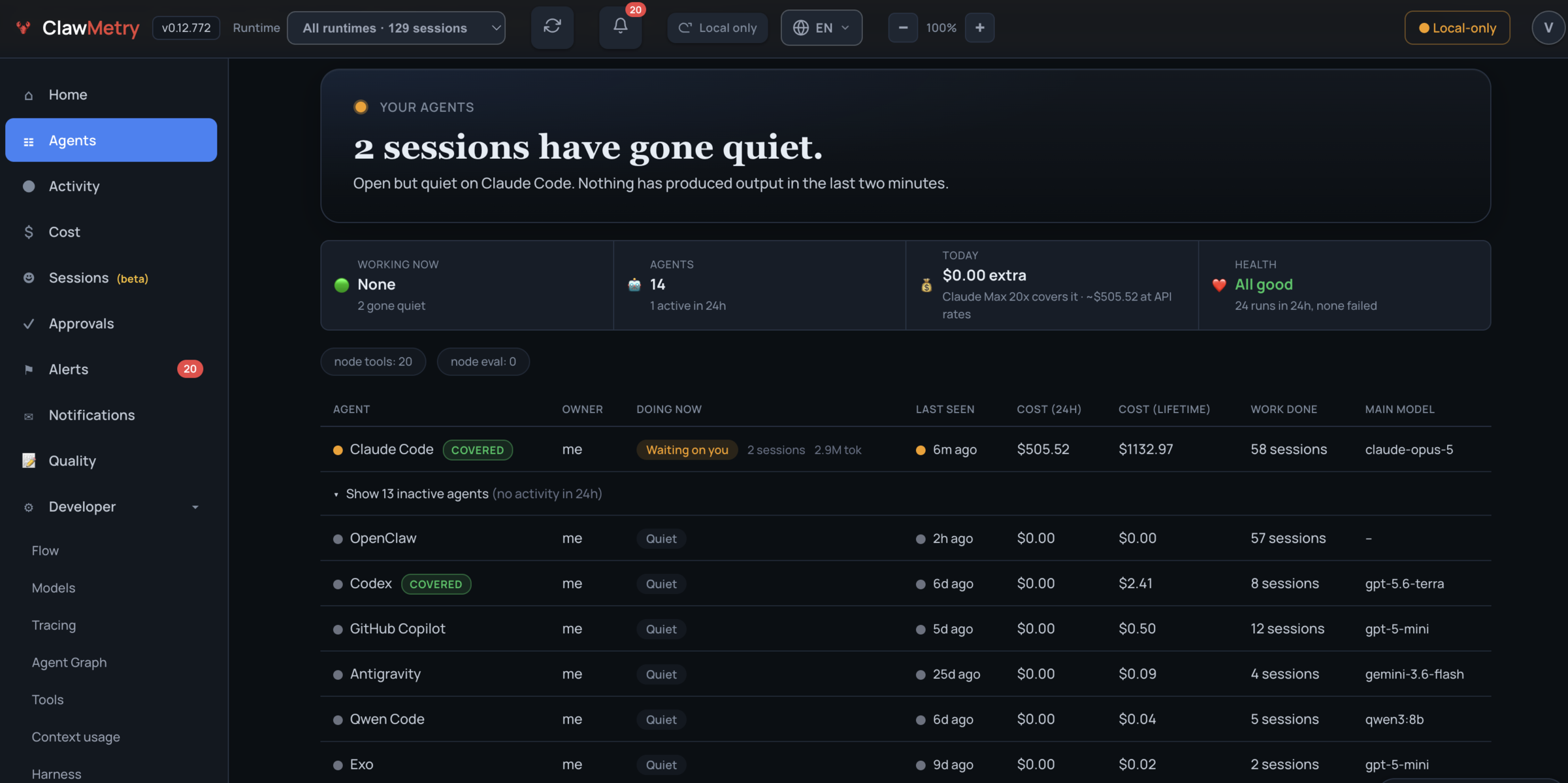 ## Before you install | | | |---|---| | **What it does** | Reads the session files and logs your agents already write. No SDK, no code change, no instrumentation in your app. | | **What you see** | Session timeline, tool-by-tool replay, token and cost breakdown, and trajectory signals (looping, repeated failures) — per runtime. | | **What's free** | `pip install clawmetry` reads **OpenClaw, NVIDIA NemoClaw, Goose and Qwen Code** with no account, no key and no network call. The other 28 — Claude Code, Codex, Cursor and the rest — are read by the closed-source `clawmetry-pro` companion, which arrives with the 7-day trial or a plan — see [docs/ENTITLEMENTS.md](docs/ENTITLEMENTS.md) for the exact split. | | **How to start** | `pip install clawmetry && clawmetry`, then open localhost:8900. No agents on this machine yet? `clawmetry --sample` opens on three labelled synthetic sessions. | | **What leaves your machine** | No session data, unless you run `clawmetry connect`. Two things do run by default, both opt-out and neither carrying session content: an anonymous install ping and a PyPI version check. Every destination is inventoried in [docs/EGRESS.md](docs/EGRESS.md), rebuilt from a wire capture rather than from reading comments. | Two limits worth knowing before you judge the output: runtimes expose very different data (some publish no cost at all — [the matrix](docs/compatibility.md) says which, per runtime), and observing an action is not the same as being able to block it ([which controls are real, per runtime](docs/APPROVALS.md)). ## Works with 32 agent runtimes **Free in the open source app:** 🦞 **[OpenClaw](https://clawmetry.com/runtimes/openclaw)** · 🟩 **[NVIDIA NemoClaw](https://clawmetry.com/nemoclaw)** · 🪿 **[Goose](https://clawmetry.com/runtimes/goose)** · ◈ **[Qwen Code](https://clawmetry.com/runtimes/qwen-code)** **On a paid plan:** ◆ **[Claude Code](https://clawmetry.com/runtimes/claude-code)** · **[Cursor](https://clawmetry.com/runtimes/cursor)** · 🐙 **[GitHub Copilot](https://clawmetry.com/runtimes/copilot)** · ⬡ **[OpenAI Codex](https://clawmetry.com/runtimes/codex)** · ♊ **[Gemini CLI](https://clawmetry.com/runtimes/gemini-cli)** · 💗 **[Lovable](https://clawmetry.com/runtimes/lovable)** · ⠕ **[Replit Agent](https://clawmetry.com/runtimes/replit)** · 🖇 **[Cline](https://clawmetry.com/runtimes/cline)** · 🙌 **[OpenHands](https://clawmetry.com/runtimes/openhands)** · 🧑💼 **[OpenWorker](https://clawmetry.com/runtimes/openworker)** · 🎭 **[Muse Code](https://clawmetry.com/runtimes/muse-code)** · 🏛️ **[OpenExecutive](https://clawmetry.com/runtimes/openexecutive)** · **[opencode](https://clawmetry.com/runtimes/opencode)** · **[Aider](https://clawmetry.com/runtimes/aider)** · 🔗 **[n8n](https://clawmetry.com/runtimes/n8n)** · 🅳 **[Devin](https://clawmetry.com/runtimes/devin)** · 🪐 **[Antigravity](https://clawmetry.com/runtimes/antigravity)** · **[Grok Build](https://clawmetry.com/runtimes/grok)** · 🤖 **[Grok Bot](https://clawmetry.com/runtimes/grok-bot)** · ⚡ **[Hermes](https://clawmetry.com/runtimes/hermes)** · **[Pi](https://clawmetry.com/runtimes/pi)** · **[Deep Agents](https://clawmetry.com/runtimes/deep-agents)** · 🌙 **[Kimi CLI](https://clawmetry.com/runtimes/kimi)** · 🐋 **[DeepSeek Harness](https://clawmetry.com/runtimes/deepseek-harness)** · 🦾 **[Exo](https://clawmetry.com/runtimes/exo)** · **[NanoClaw](https://clawmetry.com/runtimes/nanoclaw)** · **[PicoClaw](https://clawmetry.com/runtimes/picoclaw)** · **[QM](https://clawmetry.com/runtimes/qm)** Every runtime gets the same dashboard. Run several at once and the header switcher re-scopes every tab to one of them. Built your own agent on an SDK instead? The interceptor tracks its LLM calls too. See [docs/SDK_TRACKING.md](docs/SDK_TRACKING.md). Building with a humanoid robot? The free, open-source [Asimov 1 connector](docs/ASIMOV.md) imports Menlo SDK recordings and provides an optional observation collector and application tracing. This support is experimental. Physical hardware qualification is pending. [Jumper observation](docs/JUMPER.md) is also built into the same open-source package. Its application telemetry, task decisions and incidents appear in the shared Physical AI view. Mizu's separate scene and skills demo imports this built-in adapter; it is not another observer plugin to install. ## What you get - **Sessions & transcripts**: what each agent did, turn by turn, with replay - **Cost & tokens**: per runtime, model, session and day, with anomaly flags - **Flow**: live diagram of messages moving through channels, models and tools - **Brain**: the reasoning and tool-call event stream as it happens - **Context blowout**: window utilization sized per provider, compaction vs forced overflow, plus a per-runtime map of what we *can't* see ([how](docs/CONTEXT_BLOWOUT.md)) - **Memory & skills**: the files and skills each runtime actually loaded - **Health & logs**: disk, memory, error rates, rate limits, live log stream - **Alerts**: budget caps, error spikes, agent-offline, routed to Slack, Discord, PagerDuty, Telegram, Email - **Approvals**: pause risky tool calls *before* they run and approve from your phone ([how](docs/APPROVALS.md)) ## Context blowout, and what watching costs Two questions worth answering before you trust any agent-comparison tool. **How does it handle context-window blowout across runtimes?** A utilization percentage is only as honest as what it divides by. ClawMetry sizes the window per provider from [a table you can read and PR](clawmetry/context_windows.py), covering Anthropic, OpenAI, Google, xAI, DeepSeek, Kimi, Qwen, Mistral, Llama and GLM. It does not measure all 32 runtimes with one vendor's ruler. That matters: a 300K GPT-5 turn scored against Anthropic's 200K reads ">100%, blown" when it is really at 75% of GPT-5's 400K. The same ruler hides a genuinely overflowed 130K DeepSeek turn as a comfortable 65%. Every window ships with its provenance: `model_table`, `explicit_marker`, `observed_floor`, or an honest `default` when we don't know the model. A gauge built on a guess never renders with the same authority as one built on a lookup. ClawMetry can only see compaction events on some runtimes. So `GET /api/context-coverage` reports, per runtime, whether a **zero means "ran clean" or "we're blind"**. A `0` that actually means blind says so. [Full detail](docs/CONTEXT_BLOWOUT.md) **What does the instrumentation cost?** | Path | Added to your agent | Default? | |---|---|---| | Session-file tailing (all 32 runtimes) | **0**. Separate process, no ClawMetry code in your agent | on | | HTTP interceptor (`CLAWMETRY_INTERCEPT=1`) | **+0.44 ms** per LLM call, or 0.009% of a 5s call | off | | Pre-tool hook gate (warm cache) | **+44 ms** per gated tool call, over a 36 ms interpreter floor | off | | Enforcement proxy | **+9.7 ms** per LLM call | off | Daemon host cost: **2,762 events/sec** ingest, **710 bytes/event** on disk (67.7 MB per 100k events), and **~12% of one core** sustained on a busy install. That last number is over our own stated 5-10% budget, so it is published as a bug to chase rather than left off the page. Measured on an Apple M2 Pro with `benchmarks/overhead.py`. The harness runs each condition in a separate process, alternates their order, and **refuses to print a number when the rounds disagree on its sign**. Run it on your own machine in a minute: ```bash pip install clawmetry && python -m benchmarks.overhead ``` Every path is measured, including the hook gates and the enforcement proxy, and the harness runs on Linux, macOS and Windows in CI. Two results worth knowing: the proxy costs about seven times more on Windows than on Linux, and the daemon currently sustains about 12% of one core, over our own 5-10% budget. The raw JSON, the method, and what is still unmeasured are in [docs/OVERHEAD.md](docs/OVERHEAD.md). ## Pricing | Plan | What it covers | Price | |---|---|---| | **Free** | OpenClaw + NVIDIA NemoClaw + Goose + Qwen Code, full dashboard, local only | $0 | | **Starter** | Every other runtime above, fleet view, cloud sync | $9 per node / month | | **Pro** | Starter + control and evaluation: approvals, tool-risk policies, evals, anomaly detection, cost optimizer, OTel export, tamper-evident audit log | $19 per node / month | Annual plans, Enterprise and the current numbers live at **[clawmetry.com/pricing](https://clawmetry.com/pricing)**. Self-hosted license keys work without the cloud (`clawmetry license`). The exact free/paid split is in [docs/ENTITLEMENTS.md](docs/ENTITLEMENTS.md). ## Your data stays on your machine ClawMetry reads local session files and logs. **No session data leaves your box unless you run `clawmetry connect`** — no prompts, replies, tool arguments, file contents or log lines. When you do connect, the snapshot is end-to-end encrypted with a key that never leaves your machine, and decrypted in your browser. If a node has no key, the upload is skipped rather than sent in the clear, and no server response can turn that off. Two things do run by default before you connect, both opt-out and neither carrying session data: an anonymous install ping and a version check against PyPI. A default install also looks up your public IP once for a startup banner line. Every destination, what it carries and how to switch it off is listed in [docs/EGRESS.md](docs/EGRESS.md); self-hosted, repointed and air-gapped installs make no discretionary outbound calls at all. The decryption happens in your browser, in code we serve you. That used to be a promise; it is now something you can check. Every line that touches your key lives in one readable file, [`clawmetry/static/js/cm-e2e.js`](clawmetry/static/js/cm-e2e.js), which ships inside the wheel and is served verbatim, pinned with a Subresource Integrity hash. To confirm the browser runs what we published: ```bash curl -s https://app.clawmetry.com/static/js/cm-e2e.js -o served.js pip download --no-deps clawmetry==$(clawmetry --version | tr -d 'a-z ') -d /tmp/cm unzip -p /tmp/cm/clawmetry-*.whl clawmetry/static/js/cm-e2e.js > published.js diff served.js published.js && echo identical ``` What that does not prove: we serve the page that loads the file, so we could serve a different page. Integrity hashes protect you from a compromised CDN, not from the vendor. What you gain is that any substitution has to be deliberate, visible in the page source, and different from an artifact on PyPI that anyone can fetch. Self-hosting or staying local-only removes the dependency entirely. ## Install ```bash pip install clawmetry # then: clawmetry ``` Or the one-liner: `curl -sSL https://raw.githubusercontent.com/vivekchand/clawmetry/main/install.sh | bash` Needs Python 3.8+ on macOS, Linux or Windows, and at least one agent runtime on the same machine. Docker instructions: [docs/DOCKER.md](docs/DOCKER.md). Or let the agent set it up for you. The [`agent-kill-switch`](skills/agent-kill-switch/SKILL.md) skill teaches Claude Code, Codex, Cursor, Gemini CLI, Copilot or OpenCode to install ClawMetry, report what the agents on the machine are doing and spending, stop one session on request, and hold risky tool calls for approval: ```bash npx skills add vivekchand/clawmetry --skill agent-kill-switch ``` ## Docs | | | |---|---| | [Runtime compatibility](docs/compatibility.md) | What each adapter reads, and how to add a runtime | | [Context blowout](docs/CONTEXT_BLOWOUT.md) | Per-provider windows, compaction vs overflow, per-runtime coverage | | [Overhead](docs/OVERHEAD.md) | What instrumentation costs, measured, with the harness to reproduce it | | [Entitlements](docs/ENTITLEMENTS.md) | Free vs paid, tier matrix, license CLI | | [Approvals & policies](docs/APPROVALS.md) | Pre-execution gating, risk scoring, phone approvals | | [OpenTelemetry](docs/OPENTELEMETRY.md) | Export traces anywhere, ingest OTLP from anything | | [Bring your own agent](docs/BRING_YOUR_OWN_AGENT.md) | AWS AgentCore, Pydantic AI, LangChain end to end, with runnable examples | | [SDK tracking](docs/SDK_TRACKING.md) | Cost attribution for agents you built yourself | | [Chat channels](docs/CHANNELS.md) | The chat adapters shown in Flow | | [NemoClaw / OpenShell](docs/NEMOCLAW.md) | Sandboxed NVIDIA NemoClaw setups | | [Docker](docs/DOCKER.md) | Image, compose, volume mounts | | [Architecture](ARCHITECTURE.md) · [Development](docs/DEVELOPMENT.md) | How it works inside; running from source | | [Telemetry](docs/TELEMETRY.md) | The anonymous install and desktop-open pings, and how to turn them off | ## Screenshots Every number below is from one real machine, read-only, with nothing seeded. **It tells you when something is wrong, not just what happened.** Two anomaly banners at the top: spend running 7x the daily average, and a 4.2x cost spike. Below them, 324 of 667 recent sessions carrying a waste signal, itemised by cause. 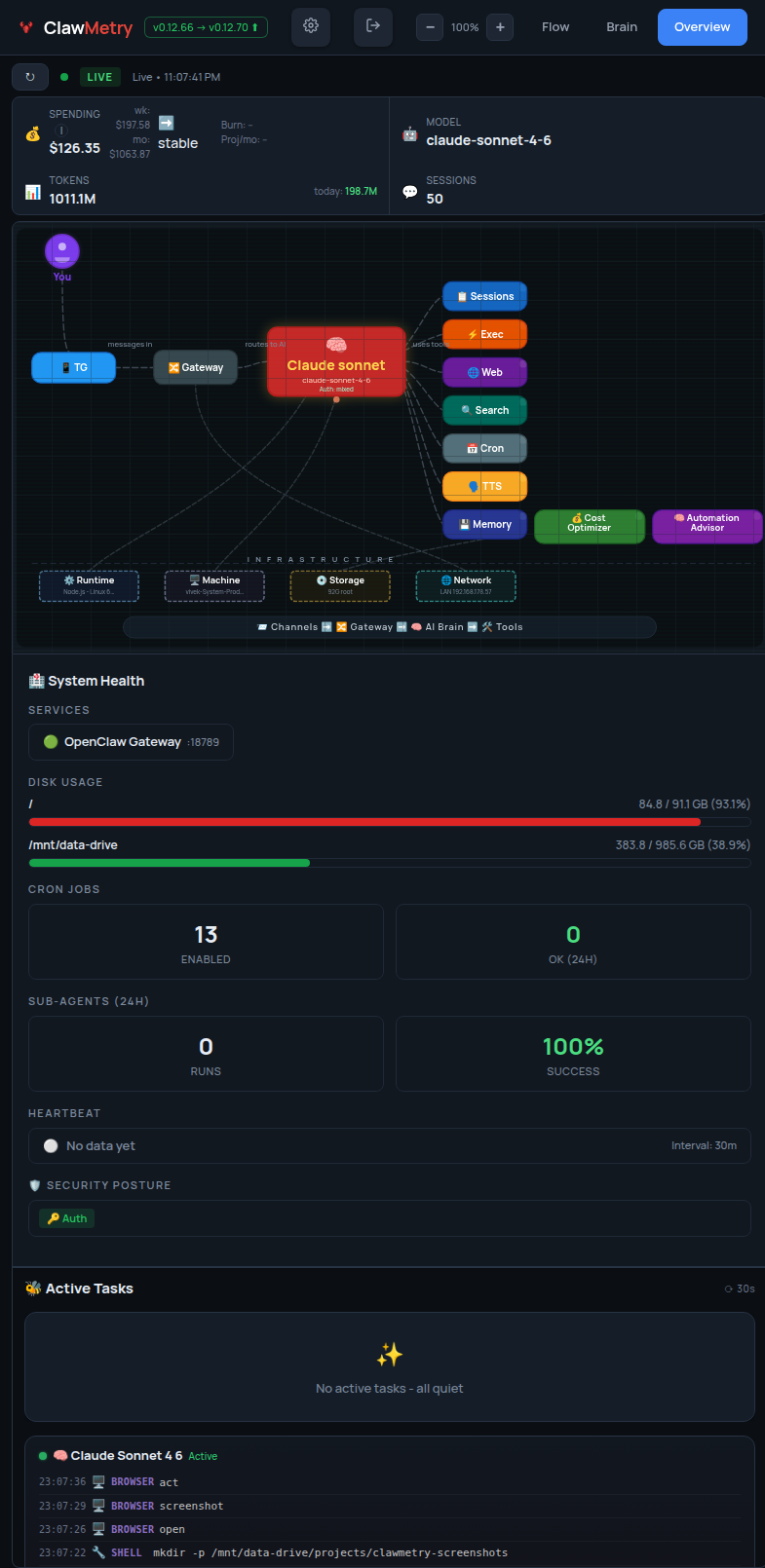 **It shows you where the money went, in every window.** $252.47 today, $513.15 this week, $1,312.92 this month, each with the tokens behind it and how much of it your subscription already covers. Below that, about $1,128/mo itemised as recoverable and $17,256/mo already saved by cache reuse. 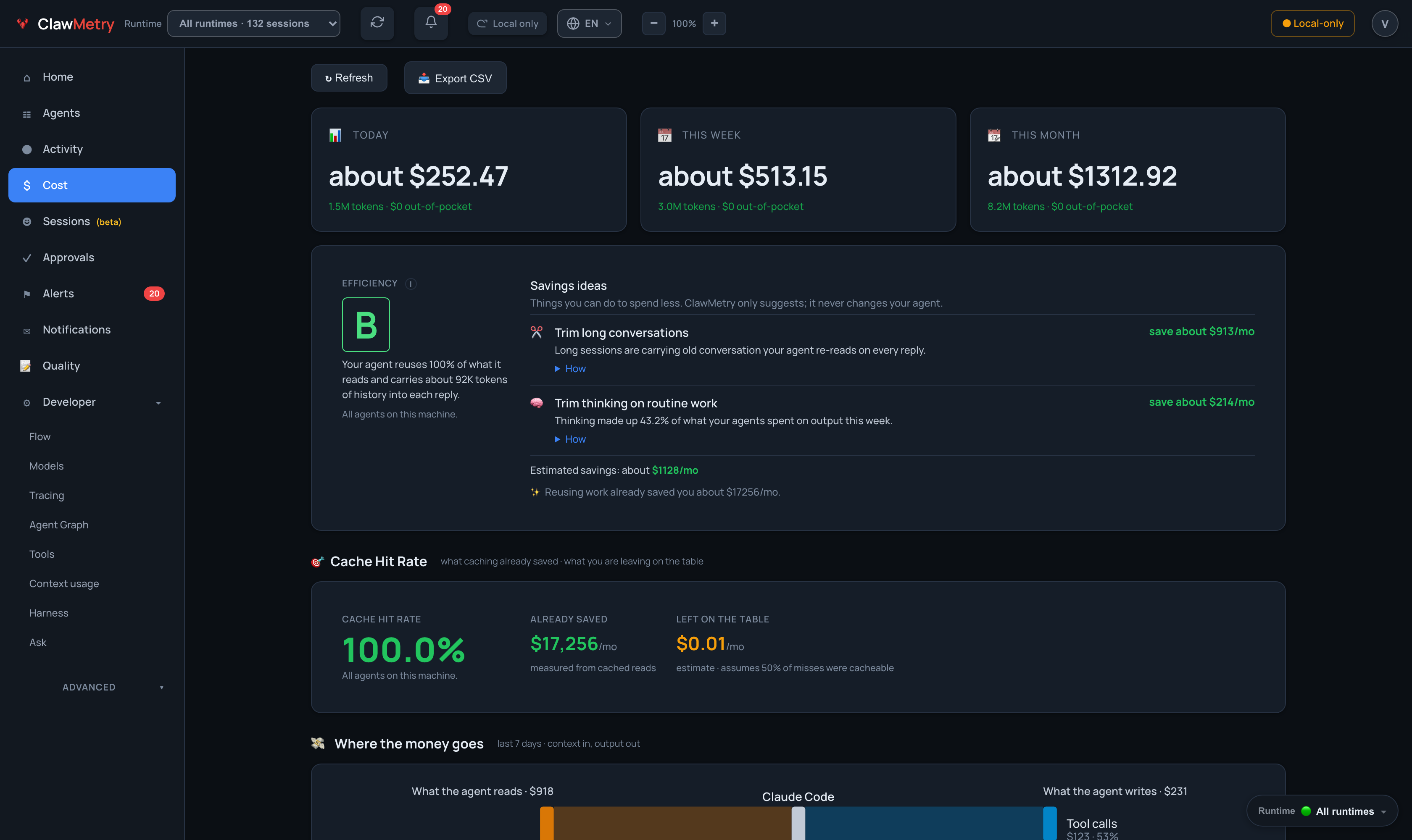 **It draws how a message becomes an answer.** The live flow diagram: you, the channel it arrived on, the gateway, the model answering right now, and every tool it reached for. Nodes light up as work moves through them. 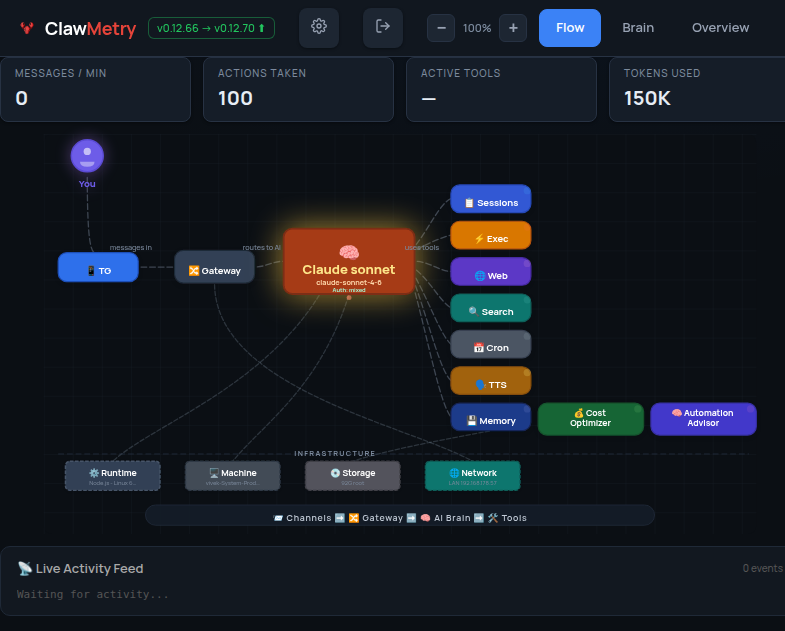 **Every agent on the machine, in one table.** What it runs, what it costs in the last 24 hours and over its lifetime, when it was last seen, who owns it, and whether a subscription is covering the bill. 14 agents here, 3 sessions working, 13 quiet. 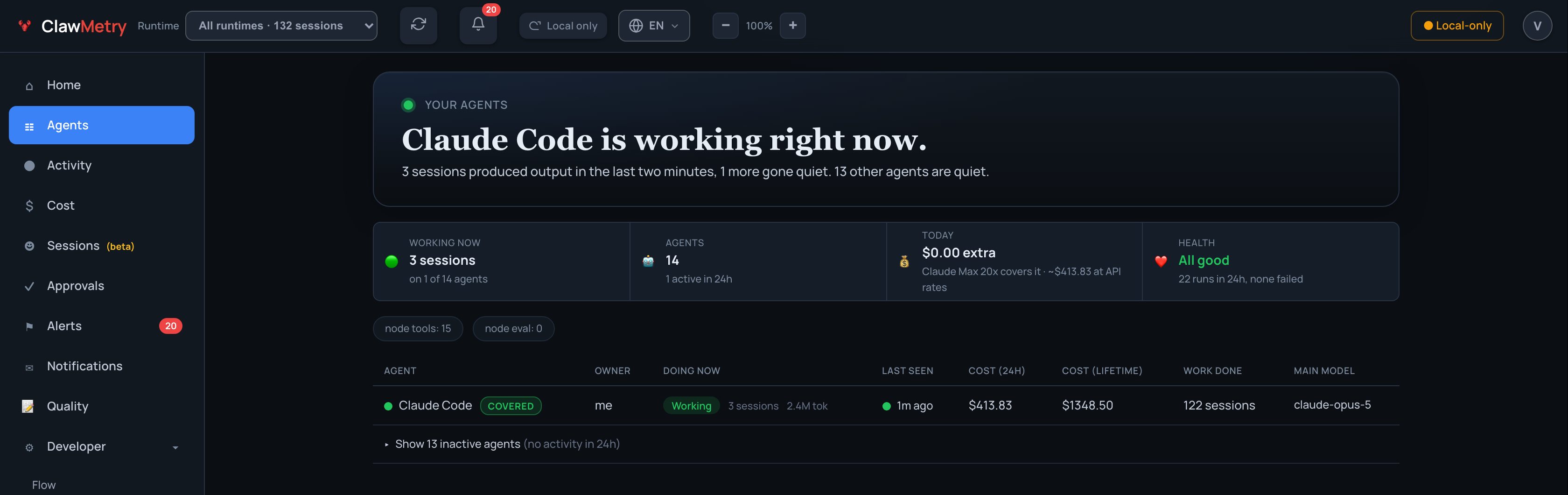 **It shows where a turn's time and money went, tool by tool.** One turn of a real session: 11 tools in 11.2 minutes for $1.16. Every Bash call and model call gets its own bar on the timeline, so the command that ran for 4.1 minutes and the one that ran for 226ms are told apart at a glance. 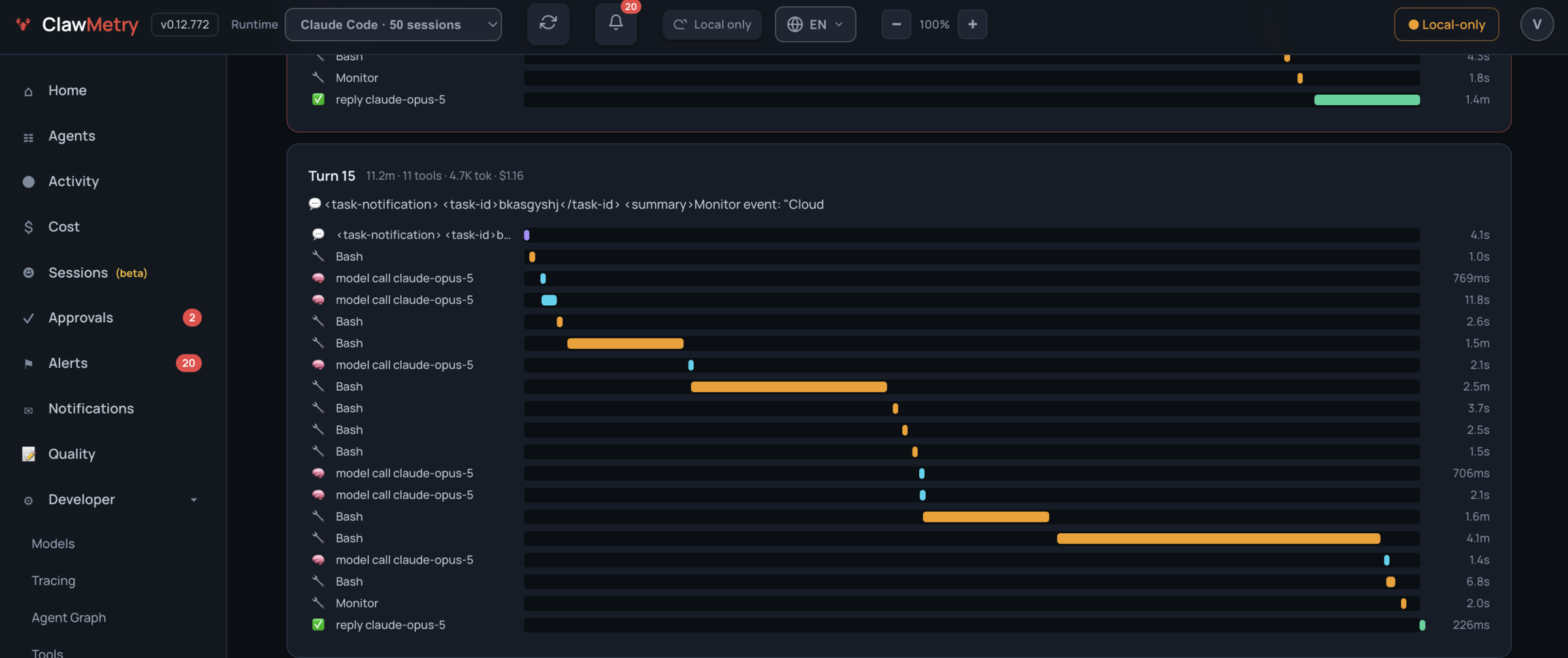 **It grades the work, not just the spend.** An A this week: 54 tasks came back clean, 2 rough ones cost $48.57, and the runs with too little activity to judge are left out of the grade instead of being counted as wins. Each rough run links to its trace. 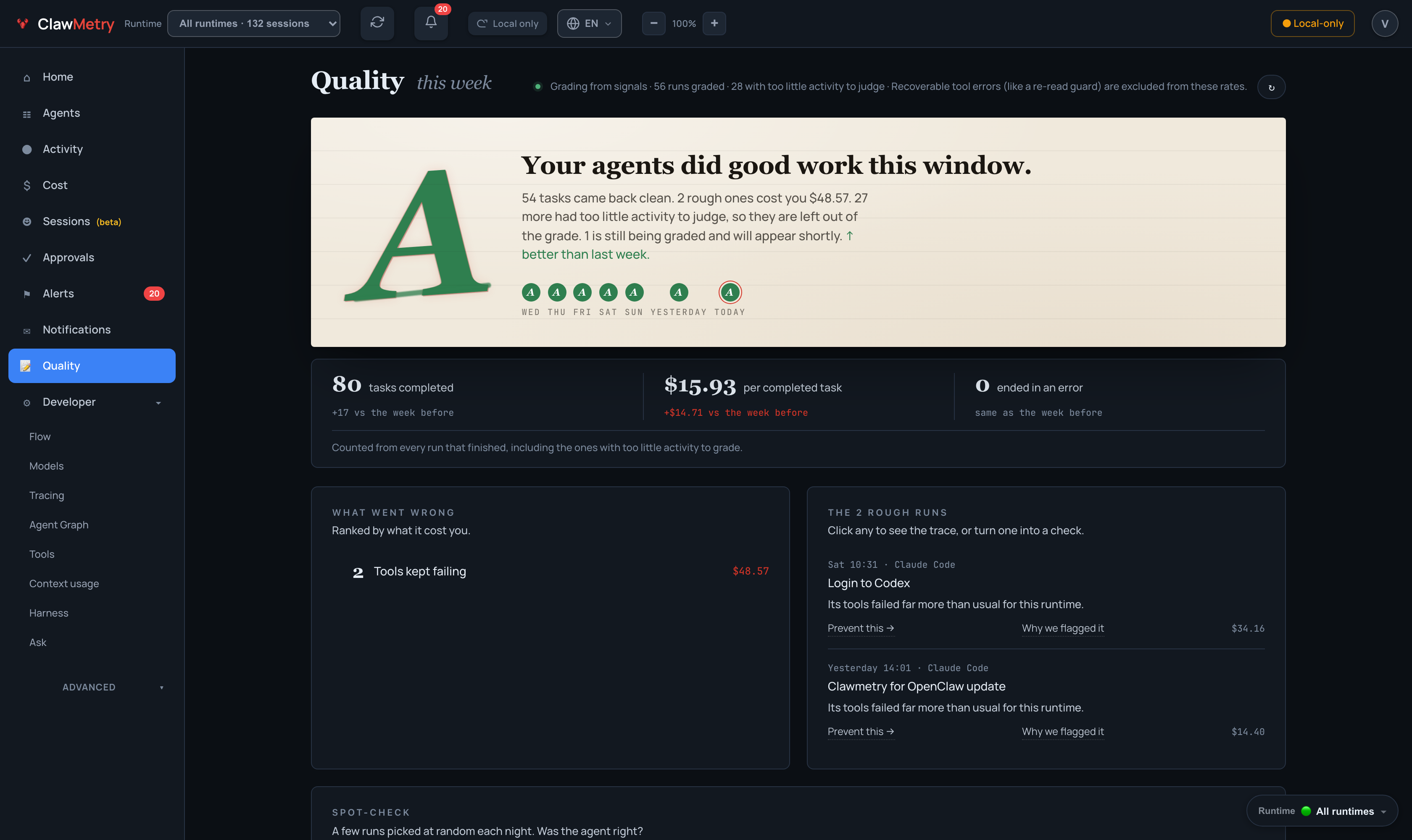 **It shows why the context window keeps filling up.** 715K of a 1M-token window on the latest turn, an 83.3% peak, 4 compactions that all fired proactively rather than on an overflow, and the utilisation of every turn behind it. 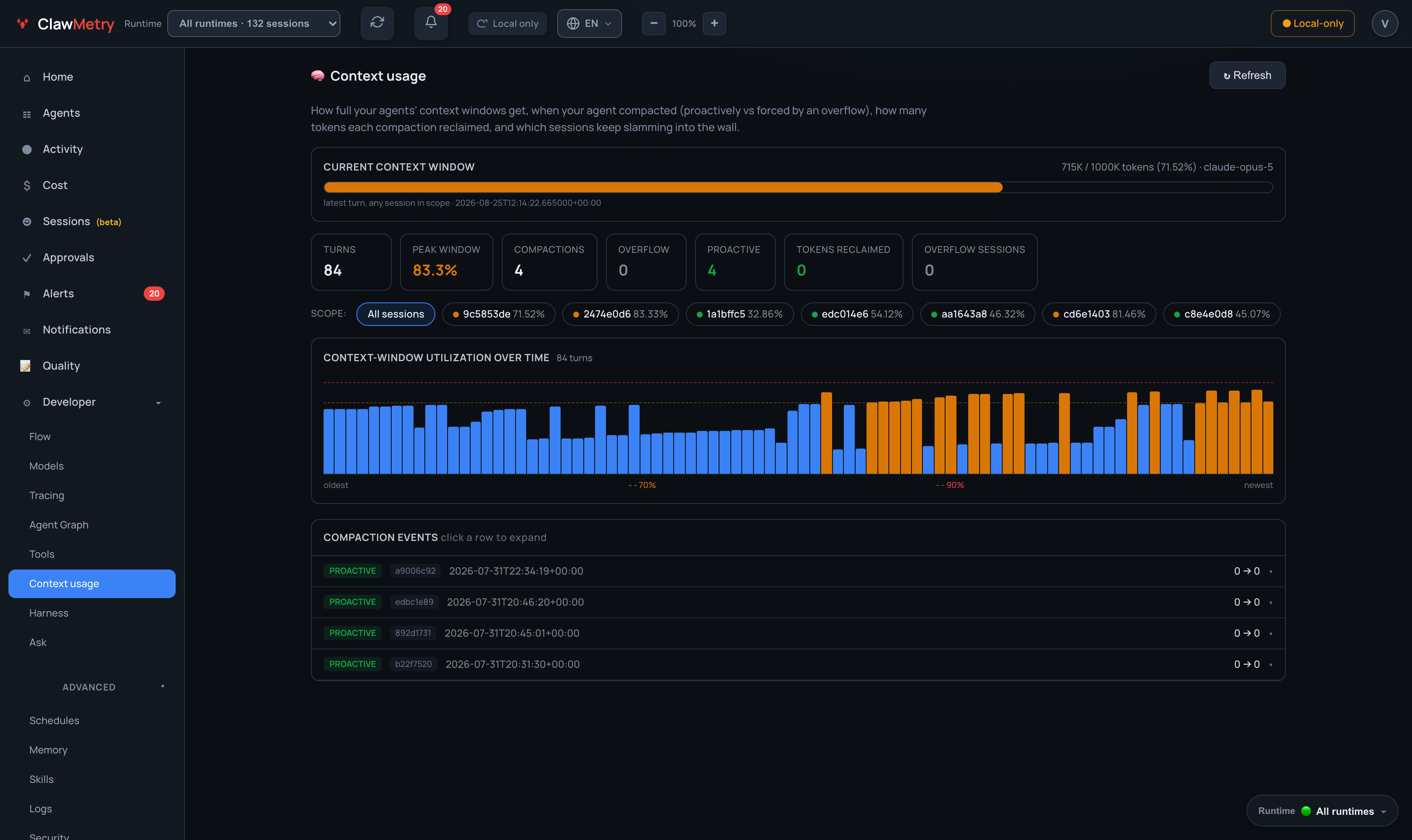 **Detection runs without you configuring anything.** The built-in detectors are on from install: agent went quiet, telemetry feed stopped, cost spike, token burst, errors climbing, error spike, budget threshold, threat signature matched, security tool finding, security posture changed. Your own rules are optional on top. 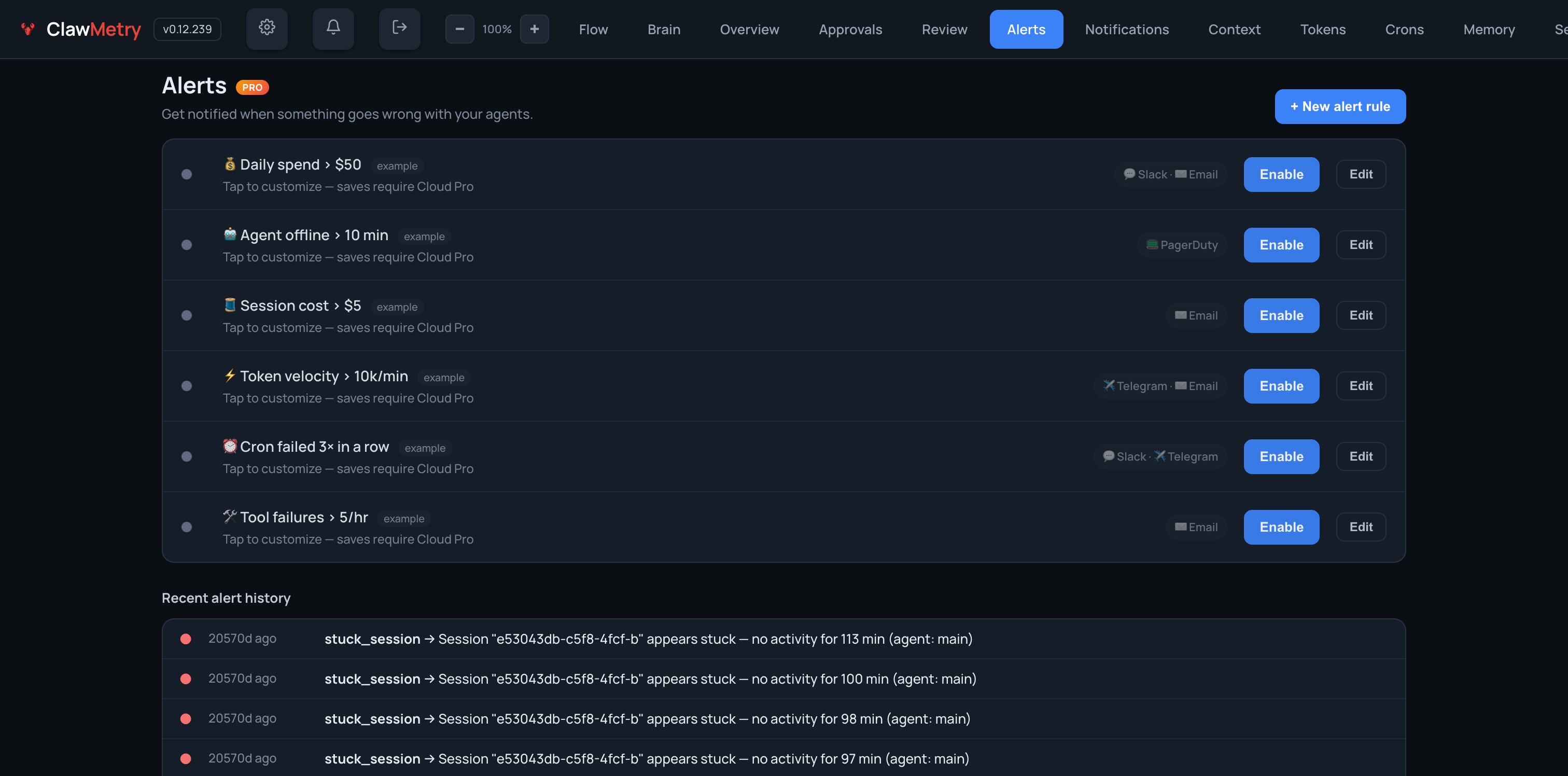 **Holding a risky call is opt-in, and ships off.** Recursive deletes, force pushes, sudo, secrets, package installs and outbound calls each get a rule you can turn on. Until you do, ClawMetry watches and changes nothing. Once one is on, matching calls wait here (or on your phone) for an approve or a deny. 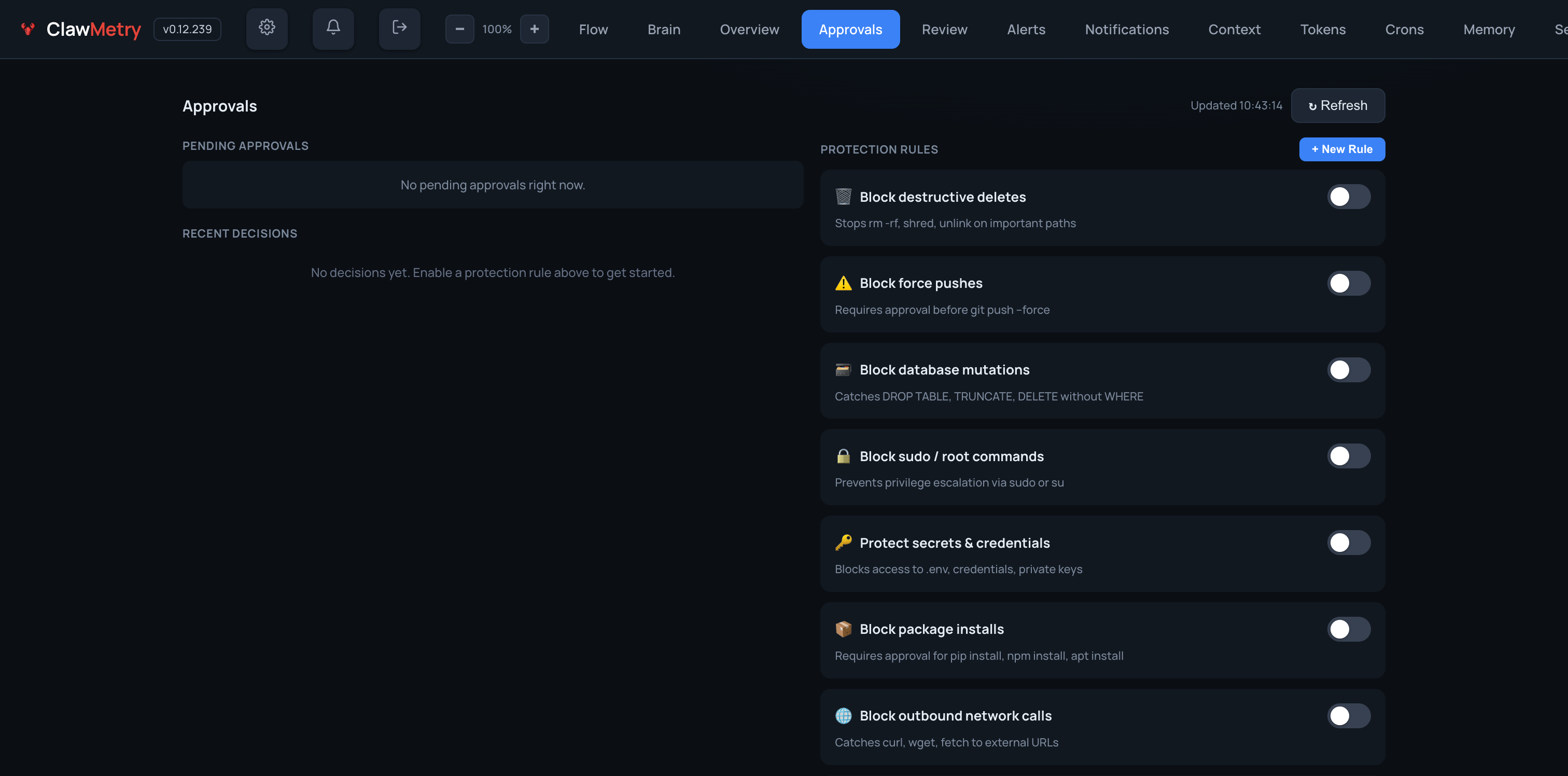 More, per runtime: [docs/RUNTIME_SCREENSHOTS.md](docs/RUNTIME_SCREENSHOTS.md). ## Recognition <a href="https://www.producthunt.com/products/clawmetry?embed=true&utm_source=badge-top-post-badge&utm_medium=badge&utm_campaign=badge-clawmetry-for-openclaw" target="_blank"><img src="https://api.producthunt.com/widgets/embed-image/v1/top-post-badge.svg?post_id=1081207&theme=light&period=daily&t=1771491508782" alt="ClawMetry - #5 Product of the Day on Product Hunt" width="250" height="54" /></a> ## Star History <a href="https://www.star-history.com/?repos=vivekchand%2Fclawmetry&type=date&legend=top-left"> <picture> <source media="(prefers-color-scheme: dark)" srcset="https://api.star-history.com/image?repos=vivekchand/clawmetry&type=date&theme=dark&legend=top-left" /> <source media="(prefers-color-scheme: light)" srcset="https://api.star-history.com/image?repos=vivekchand/clawmetry&type=date&legend=top-left" /> <img alt="Star History Chart" src="https://api.star-history.com/image?repos=vivekchand/clawmetry&type=date&legend=top-left" /> </picture> </a> ## License MIT · Built by [@vivekchand](https://github.com/vivekchand) · [clawmetry.com](https://clawmetry.com) <!-- osai-verify: f3ac716d40002c1ad6dd -->
历史前置条件说明(补充参考)
Python 3.8+;macOS、Linux 或 Windows(据 README);同一机器上至少一个受支持的 Agent 运行时;免费范围仅覆盖 OpenClaw、NVIDIA NemoClaw、Goose、Qwen Code,其余运行时需闭源 clawmetry-pro 组件与付费方案或试用;云端同步数据默认不上传,需主动运行 clawmetry connect;无需模型 API Key,费用统计读取运行时暴露的数据;国内网络访问官方网站、PyPI 下载与许可证校验可用性待核验。
项目来源与清单版权许可
https://github.com/vivekchand/clawmetry
整理来源:https://github.com/slavakurilyak/awesome-ai-agents
清单版权与许可:
MIT License
Copyright (c) 2024 Slava Kurilyak
Permission is hereby granted, free of charge, to any person obtaining a copy of this software and associated documentation files (the "Software"), to deal in the Software without restriction, including without limitation the rights to use, copy, modify, merge, publish, distribute, sublicense, and/or sell copies of the Software, and to permit persons to whom the Software is furnished to do so, subject to the following conditions:
The above copyright notice and this permission notice shall be included in all copies or substantial portions of the Software.
THE SOFTWARE IS PROVIDED "AS IS", WITHOUT WARRANTY OF ANY KIND, EXPRESS OR IMPLIED, INCLUDING BUT NOT LIMITED TO THE WARRANTIES OF MERCHANTABILITY, FITNESS FOR A PARTICULAR PURPOSE AND NONINFRINGEMENT. IN NO EVENT SHALL THE AUTHORS OR COPYRIGHT HOLDERS BE LIABLE FOR ANY CLAIM, DAMAGES OR OTHER LIABILITY, WHETHER IN AN ACTION OF CONTRACT, TORT OR OTHERWISE, ARISING FROM, OUT OF OR IN CONNECTION WITH THE SOFTWARE OR THE USE OR OTHER DEALINGS IN THE SOFTWARE.