 AI仙宝
项目介绍
Agent 智能体 · 2026-11-08 更新 · 本站尚未实测
Jev Social 是 socai-io 发布的开源项目,仓库描述为“Open-source, local-first social media research agent for Instagram, TikTok, and LinkedIn. Jev routes read-only steps; socai CLI captures cited browser evidence.”。其 README 说明,该项目把 Instagram、TikTok、LinkedIn 上的调研转化为带引用来源的报告,并使用用户自己的浏览器会话执行。
工作方式分为三层:Jev 决定下一步操作;本地 socai CLI 在用户已登录的 Chrome 中执行操作;系统根据抓取到的帖子、评论、媒体或明确失败状态重建下一步可选操作。README 明确说明 Jev 不选择任意 DOM 坐标,也不生成 shell 命令。
核心能力
点击能力名称查看输入、输出和原文依据。
- 平台操作:Instagram 支持搜索、打开主页与帖子卡片、打开指定帖子或 Reel 并读取评论、检查页面状态;TikTok 支持搜索、打开作者、读取指定视频与评论,并仅在调研目标明确要求时下载该视频媒体;LinkedIn 支持搜索人物、内容或公司,读取主页、公司或帖子,以及经历或教育信息。
- 决策约束:只提供已安装 socai CLI 暴露的命令;不支持、格式错误或置信度低的决策不会执行;已尝试操作会从下一步选择集中移除。
- 运行记录:保存每次选择、置信度、命令、结果摘要和耗时;遇到登录门槛、决策失败或步数限制时输出部分结果,而不声称成功。
- 报告生成:可使用 OpenRouter 密钥基于经过限定的证据载荷合成报告,若发现项缺少引用、包含外部 URL、原始 JSON 或本地路径则校验失败,回退到确定性证据报告。
- 可通过 GitHub CLI、skills.sh / Skills CLI 安装为 Skill,供 Codex、OpenCode、OpenClaw 等代理使用。
实际应用场景
适用场景
适合需要在自己已登录的浏览器中做公开社交内容调研、话题发现、人物或公司资料梳理,并希望保留来源链接与操作记录的用户。README 也将其定位为社交聆听、开源情报类用途的示例。
不适合作为绕过登录限制、批量抓取私密内容或自动化互动(点赞、关注、发帖)的工具;资料未提供此类能力。商业或敏感调研应使用独立浏览器配置或测试账号,这是 README 的建议。
安装与接入
前置环境:Node 22+、一个决策提供方(OpenRouter 上的 Jev 或本地回环的 Kev 服务器),以及当前版本的 socai CLI;Chrome 需已登录目标平台。快速路径无需克隆仓库,README 给出的命令为:
npx github:socai-io/jev-social#v0.1.13 onboard
npx github:socai-io/jev-social#v0.1.13
在 macOS 与 Windows 上,引导流程可安装缺失的官方 socai CLI;Linux 需先自行安装并放入 PATH 或设置 SOCAI_BIN。非交互安装需显式 --install 标志。第二条命令打开仅限回环地址的演示界面(README 称 http://127.0.0.1:8766)。
也可从源码安装(git clone、npm install、npm start -- onboard、npm start)。如需接入 Codex、OpenCode、OpenClaw,README 给出对应的 gh skill install 或 npx skills add 命令。Kev、Simple Jev 本地端点的接入方式见 README,要求本地纯 HTTP 回环地址与精确路径。
GitHub 上的 MCP 配置与 server 配置均返回 404,仓库是否提供 MCP 服务待核验。
使用条件与限制
- 是否需要部署
- 需自行准备运行环境,具体要求见正文
- 是否需要注册
- 账号和认证要求见正文;未明确说明的项目仍待核验
- 是否需要 API Key
- 待核验
- 费用与额度
- 费用边界见正文,项目许可不代表模型或托管服务免费
- 所需权限
- 待核验
- 许可证与服务条款
- 待核验
权限费用与限制
- 密钥与费用:默认决策提供方为 OpenRouter,引导时会要求 OpenRouter 密钥;README 称报告模型默认
openai/gpt-4o-mini,可能产生正常提供方用量费用。项目开源不等于模型调用或平台服务免费,具体价格待向相应官方核验。 - 数据流:决策请求包含完整调研目标、平台、操作标签、来源 URL、历史操作摘要与短可见文本;报告合成使用单独的有界证据载荷。设置
OPENROUTER_REPORT_MODEL=off可关闭第二次模型调用。 - 遥测:项目默认对每个子进程设置
SOCAI_TELEMETRY=0;README 提到在已审计版本的 CLI 中开启遥测可能包含搜索文本、操作目标、设备上下文与云账户字段,服务端保留期限未文档化。 - 本地数据:检查点位于
${JEV_SOCIAL_HOME:-~/.jev-social},无自动清理计划;TikTok 媒体下载仅在目标明确要求离线副本时成为可选项,且无二次确认。 - 仅有单次记录观察(如 63.969 秒的 Instagram 运行),README 明确这不是基准或延迟保证;公开基准结果尚未发布。
国内使用情况
网友核验 用户经验分享
与站长实测独立,不代表官方认证或本站已实测。
最近核验:暂无有效核验。参与人数按当前项目有效身份去重;不同核验项分别统计,不合并成用户总结果。仅统计审核通过且未过期的记录。
分项统计、有效期与样本量
| 核验项目 | 有效人数 | 成功 / 部分 / 失败 / 无法判断 | 成功率 | 最近核验 / 有效期 |
|---|---|---|---|---|
| 官方网站访问 | 0 | 0 / 0 / 0 / 0 | 样本不足 | 暂无 / 7 天 |
| GitHub 仓库访问 | 0 | 0 / 0 / 0 / 0 | 样本不足 | 暂无 / 7 天 |
| 安装与运行 | 0 | 0 / 0 / 0 / 0 | 样本不足 | 暂无 / 30 天 |
| 官方服务国内连接 / MCP 连接 | 0 | 0 / 0 / 0 / 0 | 样本不足 | 暂无 / 30 天 |
| 国内网络情况 | 0 | 0 / 0 / 0 / 0 | 样本不足 | 暂无 / 7 天 |
| 国内模型兼容性 | 0 | 0 / 0 / 0 / 0 | 样本不足 | 暂无 / 30 天 |
| 自定义 API | 0 | 0 / 0 / 0 / 0 | 样本不足 | 暂无 / 30 天 |
| 海外服务依赖 | 0 | 0 / 0 / 0 / 0 | 样本不足 | 暂无 / 30 天 |
| 海外账号要求 | 0 | 0 / 0 / 0 / 0 | 样本不足 | 暂无 / 30 天 |
| 中文界面 | 0 | 0 / 0 / 0 / 0 | 样本不足 | 暂无 / 30 天 |
| 客户端兼容性 | 0 | 0 / 0 / 0 / 0 | 样本不足 | 暂无 / 30 天 |
| 账号及费用信息 | 0 | 0 / 0 / 0 / 0 | 样本不足 | 暂无 / 30 天 |
成功率 = 成功 ÷(成功 + 部分成功 + 失败);无法判断不计入分母。至少 5 份可判断结果才显示成功率。账号、费用、海外依赖与语言等事实项,成功表示核查结论与资料吻合,具体观察另行统计;不表示免费或没有海外依赖。不同网络、客户端和版本的结果不能直接等同。
最近有效核验
暂无审核通过且未过期的网友核验。欢迎提交真实使用记录。
查看全部有效核验 →国内实测状态:国内可用性待核验。协议兼容和官方资料说明不等于国内网络可用。
- 官方网站访问
- 尚未实测 待核验
- GitHub 仓库访问
- 尚未实测 待核验
- 官方服务国内连接
- 尚未实测 待核验
- 国内网络情况
- 尚未实测 待核验
- 国内模型兼容性
- 尚未实测 待核验
- 自定义 API
- 尚未实测 待核验
- 海外服务依赖
- 尚未实测 待核验
- 海外账号要求
- 尚未实测 待核验
- 中文界面
- 尚未实测 待核验
- 国内最后核验时间
- 尚未实测
许可与国内使用
仓库包含 MIT License 文件,版权声明为 2026 jev-social contributors;可据此判断为 MIT 许可。README 未说明在中国大陆网络环境下的可用性、平台访问限制或代理要求,相关内容待核验。项目依赖 Chrome 已登录会话、Node 与境外模型服务(默认 OpenRouter),实际可用性需按当地网络与平台条款自行确认。仓库资料未显示已归档或停止维护,archived 为 false;但版本迭代与后续维护状态以仓库实时信息为准。
项目资料与来源
字段依据与待核验事项
access:来源确认 · With Node 22+ and Chrome already signed in to Instagram, TikTok, or LinkedIn:
project_type:来源确认 · Jev chooses each next operation: search, open a particular post or profile, read comments, explicitly requested TikTok media download, or finish.
原始 README(折叠技术参考)
<img src="https://raw.githubusercontent.com/socai-io/jev-social/main/docs/banner.png" alt="Jev Social — Jev × socai" width="100%" />
# Jev Social — browser-grounded social research
**Turn Instagram, TikTok, and LinkedIn into source-cited reports through your own browser.**
[](https://github.com/socai-io/jev-social)
[](https://skills.sh/socai-io/jev-social/jev-social)
[](https://github.com/socai-io/jev-social/actions/workflows/test.yml)
[](https://github.com/socai-io/jev-social/releases/latest)
[](LICENSE)
<a href="https://ossdrop.com/tool/jev-social"><img src="https://ossdrop.com/badge/jev-social" alt="#1 Tool of the Day on OSSDrop" width="250" height="56"></a>
Jev chooses each next operation: search, open a particular post or profile, read comments, explicitly requested TikTok media download, or finish. The local `socai CLI` executes the selected command in your real Chrome. Each result goes back to Jev before the next decision.
<p>
<img src="https://raw.githubusercontent.com/socai-io/jev-social/main/docs/platforms/instagram.png" height="32" alt="Instagram">
<img src="https://raw.githubusercontent.com/socai-io/jev-social/main/docs/platforms/tiktok.png" height="32" alt="TikTok">
<img src="https://raw.githubusercontent.com/socai-io/jev-social/main/docs/platforms/linkedin.svg" height="32" alt="LinkedIn">
</p>
[⭐ Star Jev Social](https://github.com/socai-io/jev-social) · [OpenAI Decisions API: where Jev Social fits](#decision-apis-are-becoming-a-category) · [Watch the recorded run](https://socai-io.github.io/jev-social/recorded-run/) · [Live site](https://socai-io.github.io/jev-social/) · [Social research guide](https://socai-io.github.io/jev-social/social-research/) · [Security and data flow](SECURITY.md) · [Real 64-second Jev report](docs/example-report.md) · [Recorded TikTok video evidence](docs/tiktok-evidence.md) · [Discord](https://discord.gg/CpQdA7bwt8) · [Jev](https://typesafe.ai/)
## Try it
With Node 22+ and Chrome already signed in to Instagram, TikTok, or LinkedIn:
```bash
npx github:socai-io/jev-social#v0.1.13 onboard
npx github:socai-io/jev-social#v0.1.13
```
With the default OpenRouter provider, onboarding prompts for the OpenRouter key. On macOS and Windows, onboarding can also install the official `socai CLI` when it is missing. On Linux, install a current `socai CLI` from source first, then put it on `PATH` or set `SOCAI_BIN`. Unattended or non-interactive installation requires the explicit `--install` flag. The second command opens the loopback-only demo.
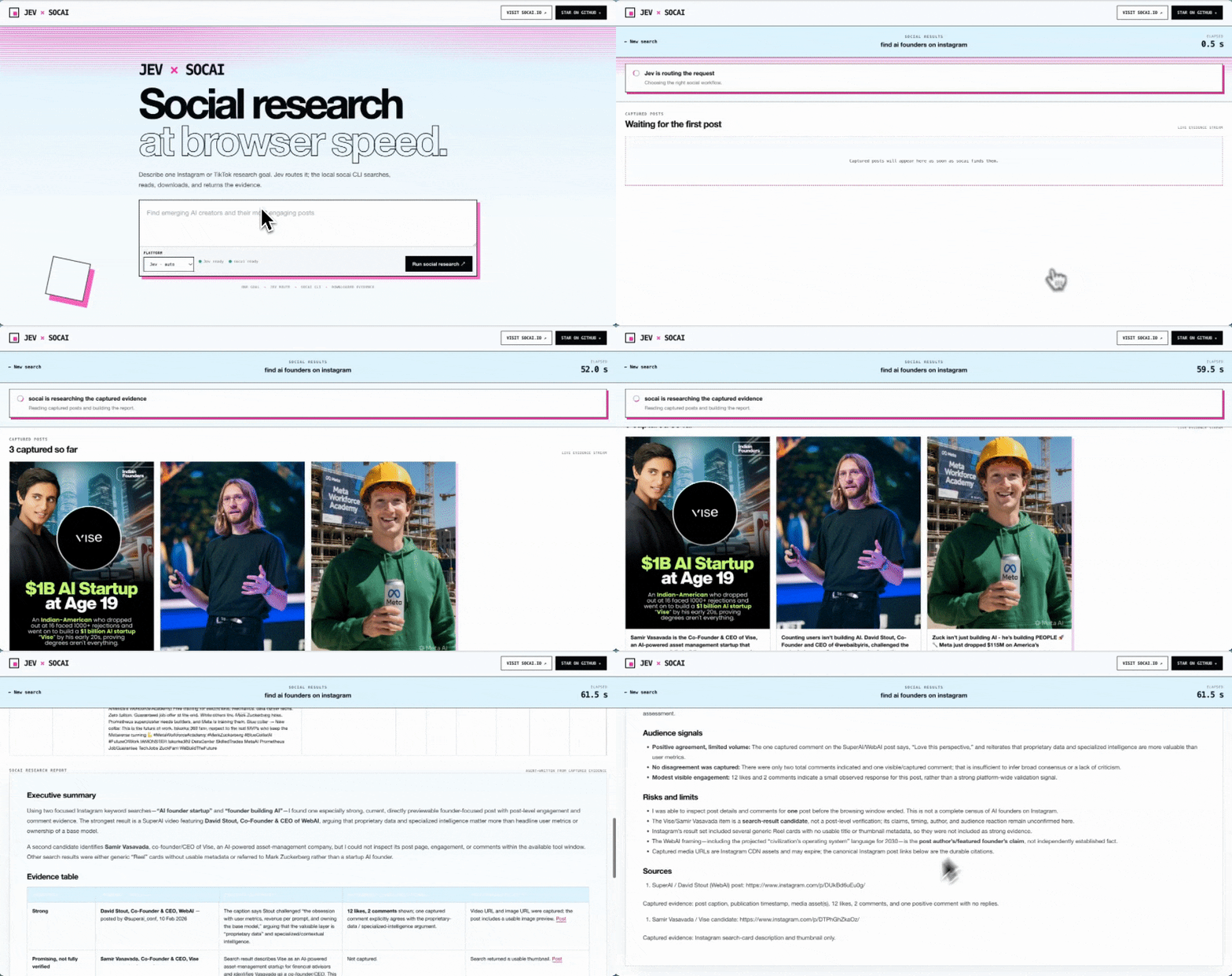
The recording above shows the earlier routing-only prototype. Current runs include a history of every operation chosen by Jev.
## Decision APIs are becoming a category
[OpenAI introduced the Decisions API in its DevDay 2026 recap](https://openai.com/zh-Hans-CN/index/devday-2026-recap/). That makes narrow, machine-consumable decisions a broader API category. Jev Social demonstrates the layer that still has to exist after a decision: rebuild choices from live browser state, execute one bounded operation, and retain the observed evidence.
Jev Social currently uses TypeSafe Jev through OpenRouter. OpenAI Decisions API support is not yet wired; compatibility will only be claimed after a public request and response contract can be tested end to end.
| Layer | Jev Social boundary |
| --- | --- |
| Decide | TypeSafe Jev selects one typed operation from the current allowlist |
| Execute | `socai CLI` runs that exact operation in the user's authenticated Chrome session |
| Verify | The next choice set is rebuilt from captured posts, comments, media, or an explicit failure state |
## Why this pairing
Jev chooses from a changing list of concrete, read-only operations. The list includes exact targets discovered in previous results, so Jev decides which post to open and which `socai CLI` operation to run. The local CLI handles the underlying navigation, clicks, scrolling, and extraction; Jev does not choose arbitrary DOM coordinates or generate shell commands.
```text
"find handmade art on Instagram"
│
▼
Jev chooses the platform
│
▼
Jev chooses an operation ◄──── observed results
│ ▲
├─ search │
├─ open a selected profile │
├─ open a selected post │
├─ read comments / download │
│ └──── socai CLI ─────┘
└─ finish → cards · table · evidence report
```
https://github.com/user-attachments/assets/4849e0f3-87d5-4a0d-8e0b-2a58e3d0267a
This video also predates the per-operation Jev loop.
## Available operations
| Platform | Jev can select |
| --- | --- |
| Instagram | Search, open a profile and its post cards, open a specific post/reel and read comments, inspect page state |
| TikTok | Search, open an author, read a selected video and its comments, download that video's media only when the goal explicitly requests it, inspect page state |
| LinkedIn | Search people/content/companies, read a selected profile/company/post, read experience or education, inspect page state |
Only commands exposed by the installed socai CLI are offered. Targets come from captured results or explicit URLs in the user's request. Unsupported, malformed, and low-confidence decisions do not execute. Previously attempted operations are removed from the next choice set.
The run stores each choice, confidence, command, observed result summary, and elapsed time. Login/access gates, decision failures, and step limits produce partial results rather than a success claim. After collection, Jev Social can use the existing OpenRouter key to synthesize a concise report from a bounded, sanitized evidence payload. Every accepted finding must cite a captured source; foreign URLs, missing citations, raw JSON, and local paths fail validation and fall back to the deterministic evidence report. Report sections stream into the fixed panel while captured cards stay visible, and the downloaded `report.md` is the same Markdown shown in the browser. The synthesizer has no browser or shell tools and does not depend on `socai research`.
The report model defaults to `openai/gpt-4o-mini` and may incur normal provider usage. Set `OPENROUTER_REPORT_MODEL` to another available model, or set it to `off` to keep report generation fully deterministic. Speed varies with the number of chosen operations, the live site, and the selected report model.
## Privacy and local data
- Jev Social does not read or copy the browser cookie store directly. The installed `socai CLI` uses the Chrome profile you selected; use a separate profile or test account for sensitive research.
- OpenRouter is the default decision provider. Decision requests contain the full research goal plus the requested platform, current action labels, source URLs, earlier action summaries, and short visible-text excerpts. The application does not intentionally add cookies, downloaded media, raw CLI JSON, or filesystem fields, but user input and visible social content are untrusted and can themselves contain personal or path-like text. Optional report synthesis receives a separate bounded, sanitized evidence payload; set `OPENROUTER_REPORT_MODEL=off` to disable that second model call. A configured Kev or Simple Jev endpoint keeps decision requests on the explicit loopback server and never receives the OpenRouter key.
- Jev Social has no analytics endpoint of its own and sets `SOCAI_TELEMETRY=0` for every spawned `socai CLI` process by default. Set `SOCAI_TELEMETRY=1` only to opt in explicitly. In the audited `socai v0.6.1` contract, enabled CLI events can include search text, action targets, device context, and available cloud-account fields before the socai.io proxy forwards them to Axiom; the OpenRouter key itself is filtered from the child environment. A separately running socai desktop app has its own process-level setting. Exact fields, narrower controls, version scope, and the undocumented server-side retention period are detailed in the security policy.
- Recoverable checkpoints live under `${JEV_SOCIAL_HOME:-~/.jev-social}`; `socai` stores its own evidence and downloaded media separately. There is no automatic cleanup schedule. Stop the app, inspect the run, and remove only the specific checkpoint or evidence directory you no longer need.
- TikTok media download becomes an available action only when the research goal explicitly requests an offline copy. That intent is retained in the operation history; there is no second confirmation after the explicit request.
The complete field limits, file permissions, provider-retention boundary, browser-session boundary, and recovery procedure are documented in [Security and data flow](SECURITY.md#data-flow-credentials-and-retention).
## Local Reel imports
The import-only API accepts versioned, already processed Reel collections and
stores their normalized transcripts, classifications and nullable metrics in the
isolated local state directory. See the [version 1 contract](docs/reels-import.md)
for the schema, identity rules, endpoints and offline validation. A library UI
and automated collection are outside this first slice.
## Recorded evidence
| Recorded run | Captured result | Elapsed time | Verification boundary |
| --- | --- | ---: | --- |
| [Instagram Jev research loop](docs/example-report.md) | Four captured records after two searches and one post-detail read | 63.969 s | Sanitized public copy; one opened post is separated from three discovery cards |
| [TikTok CLI search](docs/tiktok-evidence.md#search) | Five public TikTok result URLs | 7.570 s | socai CLI timing, not Jev decision-loop timing |
| [TikTok video detail](docs/tiktok-evidence.md#video-detail-and-media-download) | Metadata, a 7,988,959-byte MP4, and a 95,592-byte poster | 38.263 s | Partial run: media succeeded, comments were unavailable |
These are individual local observations, not a benchmark or guaranteed latency. Live-site behavior, network conditions, login state, and the operations Jev selects can change the total time.
## Reproducible benchmark
v0.1.8 includes fixed Instagram, TikTok, and LinkedIn tasks plus a privacy-safe collector and p50/p95 summary generator. Once the runner initializes, every research attempt stays in the dataset, including access gates, interruptions, empty results, and failures. Exact task/environment groups—including the Jev Social runtime—remain `INCOMPLETE` until they contain at least ten distinct runs.
No live benchmark results are published yet. The commands, row contract, timing definitions, and publication gate are documented in [benchmark/README.md](benchmark/README.md).
## Run it
Node 22+, a decision provider (OpenRouter Jev or a loopback Kev server), and a current `socai CLI`.
Fastest OpenRouter path — no repository clone required. With the default OpenRouter provider, onboarding prompts for the OpenRouter key. On macOS and Windows, onboarding can also install the official `socai CLI` when it is missing. On Linux, install a current `socai CLI` from source first, then put it on `PATH` or set `SOCAI_BIN`.
```bash
npx github:socai-io/jev-social#v0.1.13 onboard
npx github:socai-io/jev-social#v0.1.13
```
To let Codex invoke the same browser-grounded workflow through GitHub CLI 2.101 or newer:
```bash
gh skill install socai-io/jev-social jev-social@v0.1.13 --agent codex --scope user
```
Or install it from the [skills.sh directory](https://skills.sh/socai-io/jev-social/jev-social) with the cross-agent Skills CLI:
```bash
npx skills add https://github.com/socai-io/jev-social/tree/v0.1.13/skills/jev-social --skill jev-social
```
For OpenCode, install the tested v0.1.13 skill into its natively discovered project skill directory:
```bash
npx skills add https://github.com/socai-io/jev-social/tree/v0.1.13/skills/jev-social --agent opencode
```
For OpenClaw, install the v0.1.13 skill from its immutable Skill commit into the current workspace:
```bash
npx skills add https://github.com/socai-io/jev-social/tree/5b8fcf3fa99bb01924d77598d54085eb8841162b/skills/jev-social --skill jev-social --agent openclaw --copy
```
The skill pins the documented Jev Social CLI release, preserves its read-only and login-gate boundaries, and returns source-linked evidence instead of raw run JSON. Platform availability is checked against the installed socai CLI before a run.
## Ecosystem
The released Jev Social Skill is also available in [Build with Claude](https://github.com/davepoon/buildwithclaude/tree/5864a032c1656350343fa982246ca9ffdd889c34/plugins/all-skills/skills/jev-social). That catalog copy pins the v0.1.10 runtime and preserves the same read-only boundaries.
[Agentic Awesome Skills](https://github.com/sickn33/agentic-awesome-skills/blob/463b781eb48c8b3a48869090a2dbd56eeb41e7c3/skills/jev-social/SKILL.md) independently distributes a v0.1.10 catalog copy. Its catalog marks the workflow `critical` risk and requires explicit approval before the first remote package fetch; inclusion is not a security endorsement.
[Hermes Jev Skills](https://github.com/kerpopule/hermes-jev-skills/blob/650090df0737d42806c90f6cecfea731ef753abb/skills/jev-social-research/SKILL.md) ships a separate bounded social-research workflow and links Jev Social as a related runnable implementation. It is not the Jev Social runtime and has its own privacy and execution contract.
To work from a source checkout instead:
On macOS and Windows, onboarding can install a missing `socai CLI`. On Linux, install a current `socai CLI` separately, then put it on `PATH` or set `SOCAI_BIN` before onboarding.
```bash
git clone https://github.com/socai-io/jev-social.git
cd jev-social
npm install
npm start -- onboard
npm start
```
To run v0.1.13 through local [Kev](https://github.com/jaredpalmer/kev), start its TypeSafe-compatible server on loopback, then launch the tagged Jev Social release without an OpenRouter key:
```bash
# Terminal 1
git clone https://github.com/jaredpalmer/kev.git
cd kev
git checkout 2855ba2a55a80579176a459f78b95d03548cabb5
uv sync --extra serve
uv run --extra serve python -m kev.serve --run jaredpalmer/kev-4b@139fdd94f1b6a6ad80cc15e08fcb99cac885a101 --port 8009
# Terminal 2
export JEV_SOCIAL_SYSTEM_ONE_URL=http://127.0.0.1:8009/v1/systemone
export JEV_SOCIAL_SYSTEM_ONE_MODEL=kev-latest
export JEV_SOCIAL_SYSTEM_ONE_TIMEOUT_MS=120000
export OPENROUTER_REPORT_MODEL=off
npx github:socai-io/jev-social#v0.1.13
```
The local endpoint must be plain HTTP on `localhost`, `127.0.0.1`, or `::1`, with the exact `/v1/systemone` path. Jev Social does not send the OpenRouter key to it, rejects redirects and oversized responses, and keeps the same typed choice validation. Local inference allows up to 120 seconds by default; lower it with `JEV_SOCIAL_SYSTEM_ONE_TIMEOUT_MS`. `OPENROUTER_REPORT_MODEL=off` uses the deterministic source-linked report; the browser and social-platform traffic still runs through local `socai` and Chrome.
[Simple Jev](https://github.com/featherless-ai/simple-jev) is also compatible when it is self-hosted on loopback with a Choice-capable model. The [tested setup and compatibility matrix](docs/simple-jev.md) pin the evaluated Jev Social release, Simple Jev source, and model revision; the recorded decision timings are not browser-speed claims.
Opens `http://127.0.0.1:8766`. Loopback only. Leave the platform on **Jev · auto**, type a goal, watch the timer.
```bash
npm start -- search "find emerging design creators on Instagram" --platform auto --limit 4
npm start -- search "find AI wearable trends on TikTok" --platform auto --limit 4
npm start -- search "find AI product managers in San Francisco on LinkedIn" --platform auto --limit 4
npm start -- search "find handmade art on Instagram and read the comments" --limit 4 --max-steps 12
```
`--limit` is the target result count and per-search/profile collection size (1–100). All captured records are retained, including intermediate profile cards. `--max-steps` bounds the decision loop (1–30, default 12); each selected operation or finish decision consumes one step. The HTTP search endpoints also accept `maxSteps`.
For browser connection checks, platform login barriers, and safe status diagnostics, see [Troubleshooting](https://github.com/socai-io/jev-social/blob/main/docs/troubleshooting.md).
## Contribute
New contributors can start with the current [good first issues](https://github.com/socai-io/jev-social/issues?q=is%3Aissue%20state%3Aopen%20label%3A%22good%20first%20issue%22). Read [CONTRIBUTING.md](https://github.com/socai-io/jev-social/blob/main/CONTRIBUTING.md) for the offline test and privacy requirements before opening a pull request.
---
If this is useful, [star Jev Social](https://github.com/socai-io/jev-social) or [join the Discord](https://discord.gg/CpQdA7bwt8).
历史前置条件说明(补充参考)
Node 22+;Chrome 已登录目标平台;默认需 OpenRouter API Key(或本地回环 Kev/Simple Jev 服务);当前版本 socai CLI(macOS/Windows 可由引导安装,Linux 需自行安装并配置 PATH 或 SOCAI_BIN);非交互安装需 --install 标志;费用随模型提供方产生,价格待核验;中国大陆网络可用性待核验。
项目来源与清单版权许可
https://github.com/socai-io/jev-social
整理来源:https://github.com/slavakurilyak/awesome-ai-agents
清单版权与许可:
MIT License
Copyright (c) 2024 Slava Kurilyak
Permission is hereby granted, free of charge, to any person obtaining a copy of this software and associated documentation files (the "Software"), to deal in the Software without restriction, including without limitation the rights to use, copy, modify, merge, publish, distribute, sublicense, and/or sell copies of the Software, and to permit persons to whom the Software is furnished to do so, subject to the following conditions:
The above copyright notice and this permission notice shall be included in all copies or substantial portions of the Software.
THE SOFTWARE IS PROVIDED "AS IS", WITHOUT WARRANTY OF ANY KIND, EXPRESS OR IMPLIED, INCLUDING BUT NOT LIMITED TO THE WARRANTIES OF MERCHANTABILITY, FITNESS FOR A PARTICULAR PURPOSE AND NONINFRINGEMENT. IN NO EVENT SHALL THE AUTHORS OR COPYRIGHT HOLDERS BE LIABLE FOR ANY CLAIM, DAMAGES OR OTHER LIABILITY, WHETHER IN AN ACTION OF CONTRACT, TORT OR OTHERWISE, ARISING FROM, OUT OF OR IN CONNECTION WITH THE SOFTWARE OR THE USE OR OTHER DEALINGS IN THE SOFTWARE.