 AI仙宝
项目介绍
Agent 配套工具 · 2026-11-09 更新 · 本站尚未实测
本仓库是一个受 Perplexity 启发的“答案引擎”示例项目,提供代码与说明,用于构建能按用户问题返回来源、答案、图片、视频和追问的 Web 应用。README 说明其整合 Groq、Mistral AI 的 Mixtral、Langchain.JS、Brave Search、Serper API 与 OpenAI,定位为面向自然语言处理与搜索技术开发者的起点项目。仓库语言为 TypeScript,许可证为 MIT。
需要明确的是,这是可自行部署的应用代码,不是现成可订阅的在线问答产品,也不是 MCP 服务或可下载的工作流文件。
核心能力
点击能力名称查看输入、输出和原文依据。
- 依据查询聚合搜索结果并生成带来源的回答,同时展示图片与视频结果。
- 生成追问问题;README 注明使用 Ollama 推理时会跳过追问推理步骤。
- 技术栈包括 Next.js、Tailwind CSS、Vercel AI SDK、Langchain.JS、Cheerio 与 OpenAI Embeddings。
- 函数调用(Beta)支持地图与地点(Serper Locations API)、购物(Serper Shopping API)、TradingView 股票数据(免费组件)、Spotify(免费 API),在配置中启用后生效。
- 可选 Ollama 推理与嵌入,README 标注为“部分支持”;可选 Upstash Redis 限流与语义缓存。
- 另有仅后端版本,位于
express-api目录,README 称其为可参考的独立版本。
实际应用场景
适用场景
适合希望学习或二次开发检索增强问答界面的开发者,例如搭建内部知识检索演示、带来源引用的问答前端、多模型与搜索 API 编排实验。README 的路线图仍包含文档上传与文档检索 RAG、在界面中选择模型与参数、为 Ollama 增加追问支持等未完成项,说明功能边界仍在演进,不宜按成熟生产系统预期。
安装与接入
README 给出的前置条件包括从 OpenAI、Groq、Brave Search、Serper 获取 API Key;非 Docker 方式需安装 Node.js 与 npm,Docker 方式需安装 Docker 与 docker compose。
克隆与进入目录:
git clone https://github.com/developersdigest/llm-answer-engine.git
cd llm-answer-engine
Docker 方式需先编辑 docker-compose.yml 填入 API Key,再启动服务。非 Docker 方式安装依赖后可创建 .env 并填入 OPENAI_API_KEY、GROQ_API_KEY、BRAVE_SEARCH_API_KEY、SERPER_API,然后运行开发服务器。具体命令与 app/config.tsx 中的配置项请以 README 原文为准,本页不拼接未确认命令。
README 另提供 Vercel 一键部署按钮,并提示需填全部 API Key。问题排查方面,README 说明 Next.js 14.1.x 需要 Node.js >= 18.17.0。
使用条件与限制
- 是否需要部署
- 需自行准备运行环境,具体要求见正文
- 是否需要注册
- 账号和认证要求见正文;未明确说明的项目仍待核验
- 是否需要 API Key
- 待核验
- 费用与额度
- 费用边界见正文,项目许可不代表模型或托管服务免费
- 所需权限
- 待核验
- 许可证与服务条款
- 待核验
权限费用与限制
OpenAI、Groq、Brave Search、Serper 等均为第三方服务,需自备账号与 API Key,其可用性、计费、速率限制与数据处理条款需向各服务方核验;本项目开源不等于这些服务免费。Upstash Redis 限流与语义缓存在 README 中被称为有免费额度,具体额度待核验。Ollama 为可选本地推理方式,需自行在本机运行模型。
README 未说明多用户鉴权、密钥托管安全方案或生产部署建议,相关安全评估待核验。代码以 MIT 许可证发布,第三方模型、搜索 API 与托管平台受各自条款约束。README 未涉及中国大陆网络可用性与国内模型适配,相关情况待核验。
国内使用情况
网友核验 用户经验分享
与站长实测独立,不代表官方认证或本站已实测。
最近核验:暂无有效核验。参与人数按当前项目有效身份去重;不同核验项分别统计,不合并成用户总结果。仅统计审核通过且未过期的记录。
分项统计、有效期与样本量
| 核验项目 | 有效人数 | 成功 / 部分 / 失败 / 无法判断 | 成功率 | 最近核验 / 有效期 |
|---|---|---|---|---|
| 官方网站访问 | 0 | 0 / 0 / 0 / 0 | 样本不足 | 暂无 / 7 天 |
| GitHub 仓库访问 | 0 | 0 / 0 / 0 / 0 | 样本不足 | 暂无 / 7 天 |
| 安装与运行 | 0 | 0 / 0 / 0 / 0 | 样本不足 | 暂无 / 30 天 |
| 官方服务国内连接 / MCP 连接 | 0 | 0 / 0 / 0 / 0 | 样本不足 | 暂无 / 30 天 |
| 国内网络情况 | 0 | 0 / 0 / 0 / 0 | 样本不足 | 暂无 / 7 天 |
| 国内模型兼容性 | 0 | 0 / 0 / 0 / 0 | 样本不足 | 暂无 / 30 天 |
| 自定义 API | 0 | 0 / 0 / 0 / 0 | 样本不足 | 暂无 / 30 天 |
| 海外服务依赖 | 0 | 0 / 0 / 0 / 0 | 样本不足 | 暂无 / 30 天 |
| 海外账号要求 | 0 | 0 / 0 / 0 / 0 | 样本不足 | 暂无 / 30 天 |
| 中文界面 | 0 | 0 / 0 / 0 / 0 | 样本不足 | 暂无 / 30 天 |
| 客户端兼容性 | 0 | 0 / 0 / 0 / 0 | 样本不足 | 暂无 / 30 天 |
| 账号及费用信息 | 0 | 0 / 0 / 0 / 0 | 样本不足 | 暂无 / 30 天 |
成功率 = 成功 ÷(成功 + 部分成功 + 失败);无法判断不计入分母。至少 5 份可判断结果才显示成功率。账号、费用、海外依赖与语言等事实项,成功表示核查结论与资料吻合,具体观察另行统计;不表示免费或没有海外依赖。不同网络、客户端和版本的结果不能直接等同。
最近有效核验
暂无审核通过且未过期的网友核验。欢迎提交真实使用记录。
查看全部有效核验 →国内实测状态:国内可用性待核验。协议兼容和官方资料说明不等于国内网络可用。
- 官方网站访问
- 尚未实测 待核验
- GitHub 仓库访问
- 尚未实测 待核验
- 官方服务国内连接
- 尚未实测 待核验
- 国内网络情况
- 尚未实测 待核验
- 国内模型兼容性
- 尚未实测 待核验
- 自定义 API
- 尚未实测 待核验
- 海外服务依赖
- 尚未实测 待核验
- 海外账号要求
- 尚未实测 待核验
- 中文界面
- 尚未实测 待核验
- 国内最后核验时间
- 尚未实测
许可与国内使用
仓库 LICENSE 为 MIT License,版权归 Developers Digest(2024)。该许可覆盖仓库代码本身;所使用的 Groq、OpenAI、Brave Search、Serper、Upstash、Ollama 等外部服务与模型各有独立授权与费用规则,需分别核验。公开仓库不代表相关服务或全部功能免费。中国大陆访问这些境外 API 的稳定性与合规性、是否支持国内模型与服务部署地域,资料均未说明,使用前请自行核验。
项目资料与来源
字段依据与待核验事项
access:来源确认 · git clone https://github.com/developersdigest/llm-answer-engine.git
project_type:来源确认 · Designed to efficiently return sources, answers, images, videos, and follow-up questions based on user queries
原始 README(折叠技术参考)
<h1 align="center">Perplexity-Inspired LLM Answer Engine</h1>
<div>
<div align="center">
<a href="https://twitter.com/dev__digest">
<img src="https://img.shields.io/badge/X/Twitter-000000?style=for-the-badge&logo=x&logoColor=white" />
</a>
<a href="https://www.youtube.com/@developersdigest">
<img src="https://img.shields.io/badge/YouTube-FF0000?style=for-the-badge&logo=youtube&logoColor=white" />
</a>
</div>
<div align="center">
<a href="https://trendshift.io/repositories/8642" target="_blank"><img src="https://trendshift.io/api/badge/repositories/8642" alt="developersdigest%2Fllm-answer-engine | Trendshift" style="width: 250px; height: 55px;" width="250" height="55"/></a>
</div>
</div>
<div align="center">
<img src="https://media0.giphy.com/media/v1.Y2lkPTc5MGI3NjExcjVodHcyZWd0MDJtd2RiN2xqbGdtOTdrYzZiMnhlMmZidDRzYm15dSZlcD12MV9pbnRlcm5hbF9naWZfYnlfaWQmY3Q9Zw/PXkHjFlbgty03C6TAL/giphy.gif"><br>
</div>
This repository contains the code and instructions needed to build a sophisticated answer engine that leverages the capabilities of [Groq](https://www.groq.com/), [Mistral AI's Mixtral](https://mistral.ai/news/mixtral-of-experts/), [Langchain.JS](https://js.langchain.com/docs/), [Brave Search](https://search.brave.com/), [Serper API](https://serper.dev/), and [OpenAI](https://openai.com/). Designed to efficiently return sources, answers, images, videos, and follow-up questions based on user queries, this project is an ideal starting point for developers interested in natural language processing and search technologies.
## YouTube Tutorials
<div style="display: flex; justify-content: center; align-items: center;">
<a href="https://youtu.be/43ZCeBTcsS8">
<img src="https://img.youtube.com/vi/43ZCeBTcsS8/0.jpg" alt="Tutorial 2" style="width: 24%; height: auto;">
</a>
<a href="https://youtu.be/kFC-OWw7G8k">
<img src="https://img.youtube.com/vi/kFC-OWw7G8k/0.jpg" alt="Tutorial 1" style="width: 24%; height: auto;">
</a>
<a href="https://youtu.be/kV2U7ttqE-g">
<img src="https://img.youtube.com/vi/kV2U7ttqE-g/0.jpg" alt="Tutorial 3" style="width: 24%; height: auto;">
</a>
<a href="https://youtu.be/3_aNVu6EU3Y">
<img src="https://img.youtube.com/vi/3_aNVu6EU3Y/0.jpg" alt="Tutorial 4" style="width: 24%; height: auto;">
</a>
</div>
## Technologies Used
- **Next.js**: A React framework for building server-side rendered and static web applications.
- **Tailwind CSS**: A utility-first CSS framework for rapidly building custom user interfaces.
- **Vercel AI SDK**: The Vercel AI SDK is a library for building AI-powered streaming text and chat UIs.
- **Groq & Mixtral**: Technologies for processing and understanding user queries.
- **Langchain.JS**: A JavaScript library focused on text operations, such as text splitting and embeddings.
- **Brave Search**: A privacy-focused search engine used for sourcing relevant content and images.
- **Serper API**: Used for fetching relevant video and image results based on the user's query.
- **OpenAI Embeddings**: Used for creating vector representations of text chunks.
- **Cheerio**: Utilized for HTML parsing, allowing the extraction of content from web pages.
- **Ollama (Optional)**: Used for streaming inference and embeddings.
- **Upstash Redis Rate Limiting (Optional)**: Used for setting up rate limiting for the application.
- **Upstash Semantic Cache (Optional)**: Used for caching data for faster response times.
## Getting Started
### Prerequisites
- Obtain API keys from OpenAI, Groq, Brave Search, and Serper.
#### Prerequisites for Non-Docker Installation
- Ensure Node.js and npm are installed on your machine.
#### Prerequisites for Docker Installation
- Ensure Docker and docker compose are installed on your machine.
### Obtaining API Keys
- **OpenAI API Key**: [Generate your OpenAI API key here](https://platform.openai.com/account/api-keys).
- **Groq API Key**: [Get your Groq API key here](https://console.groq.com/keys).
- **Brave Search API Key**: [Obtain your Brave Search API key here](https://brave.com/search/api/).
- **Serper API Key**: [Get your Serper API key here](https://serper.dev/).
### Quick Clone and Deploy
Simple, Easy, Fast and Free - deploy to vercel
> Make Sure to fill all the API Keys required for the Installation.
[](https://vercel.com/new/clone?repository-url=https%3A%2F%2Fgithub.com%2Fdevelopersdigest%2Fllm-answer-engine&env=OPENAI_API_KEY,GROQ_API_KEY,BRAVE_SEARCH_API_KEY,SERPER_API&envDescription=ALL%20API%20KEYS%20are%20needed%20for%20this%20application.%20If%20you%20are%20not%20using%20OpenAI%20KEY%20and%20Using%20Groq%20Instead%2C%20then%20just%20enter%20a%20random%20string%20in%20the%20OpenAI%20Key%20section%20so%20it%20wont%20generate%20any%20error%20while%20building%20the%20project.&project-name=llm-answer-engine&repository-name=llm-answer-engine&skippable-integrations=1)
### Installation
1. Clone the repository:
```
git clone https://github.com/developersdigest/llm-answer-engine.git
```
2. Move in the directory
```
cd llm-answer-engine
```
#### Docker Installation
3. Edit the `docker-compose.yml` file and add your API keys
4. Running the Server
To start the server, execute:
```
docker compose up -d #for v2
```
or
```
docker-compose up -d #for v1
```
the server will be listening on the specified port.
#### Non-Docker Installation
3. Install the required dependencies:
```
npm install
```
or
```
bun install
```
4. Create a `.env` file in the root of your project and add your API keys:
```
OPENAI_API_KEY=your_openai_api_key
GROQ_API_KEY=your_groq_api_key
BRAVE_SEARCH_API_KEY=your_brave_search_api_key
SERPER_API=your_serper_api_key
```
5. Running the Server
To start the server, execute:
```
npm run dev
```
or
```
bun run dev
```
the server will be listening on the specified port.
## Editing the Configuration
The configuration file is located in the `app/config.tsx` file. You can modify the following values
- useOllamaInference: false,
- useOllamaEmbeddings: false,
- inferenceModel: 'mixtral-8x7b-32768',
- inferenceAPIKey: process.env.GROQ_API_KEY,
- embeddingsModel: 'text-embedding-3-small',
- textChunkSize: 800,
- textChunkOverlap: 200,
- numberOfSimilarityResults: 2,
- numberOfPagesToScan: 10,
- nonOllamaBaseURL: 'https://api.groq.com/openai/v1'
- useFunctionCalling: true
- useRateLimiting: false
- useSemanticCache: false
- usePortkey: false
### Function Calling Support (Beta)
Currently, function calling is supported with the following capabilities:
- Maps and Locations (Serper Locations API)
- Shopping (Serper Shopping API)
- TradingView Stock Data (Free Widget)
- Spotify (Free API)
- Any functionality that you would like to see here, please open an issue or submit a PR.
- To enable function calling and conditional streaming UI (currently in beta), ensure useFunctionCalling is set to true in the config file.
### Ollama Support (Partially supported)
Currently, streaming text responses are supported for Ollama, but follow-up questions are not yet supported.
Embeddings are supported, however, time-to-first-token can be quite long when using both a local embedding model as well as a local model for the streaming inference. I recommended decreasing a number of the RAG values specified in the `app/config.tsx` file to decrease the time-to-first-token when using Ollama.
To get started, make sure you have the Ollama running model on your local machine and set within the config the model you would like to use and set use OllamaInference and/or useOllamaEmbeddings to true.
Note: When 'useOllamaInference' is set to true, the model will be used for both text generation, but it will skip the follow-up questions inference step when using Ollama.
More info: https://ollama.com/blog/openai-compatibility
### Roadmap
- [] Add document upload + RAG for document search/retrieval
- [] Add a settings component to allow users to select the model, embeddings model, and other parameters from the UI
- [] Add support for follow-up questions when using Ollama
- [Complete] Add support diffusion models (Fal.AI SD3 to start), accessible via '@ mention'
- [Complete] Add AI Gateway to support multiple models and embeddings. (OpenAI, Azure OpenAI, Anyscale, Google Gemini & Palm, Anthropic, Cohere, Together AI, Perplexity, Mistral, Nomic, AI21, Stability AI, DeepInfra, Ollama, etc)
```https://github.com/Portkey-AI/gateway```
- [Complete] Add support for semantic caching to improve response times
- [Complete] Add support for dynamic and conditionally rendered UI components based on the user's query
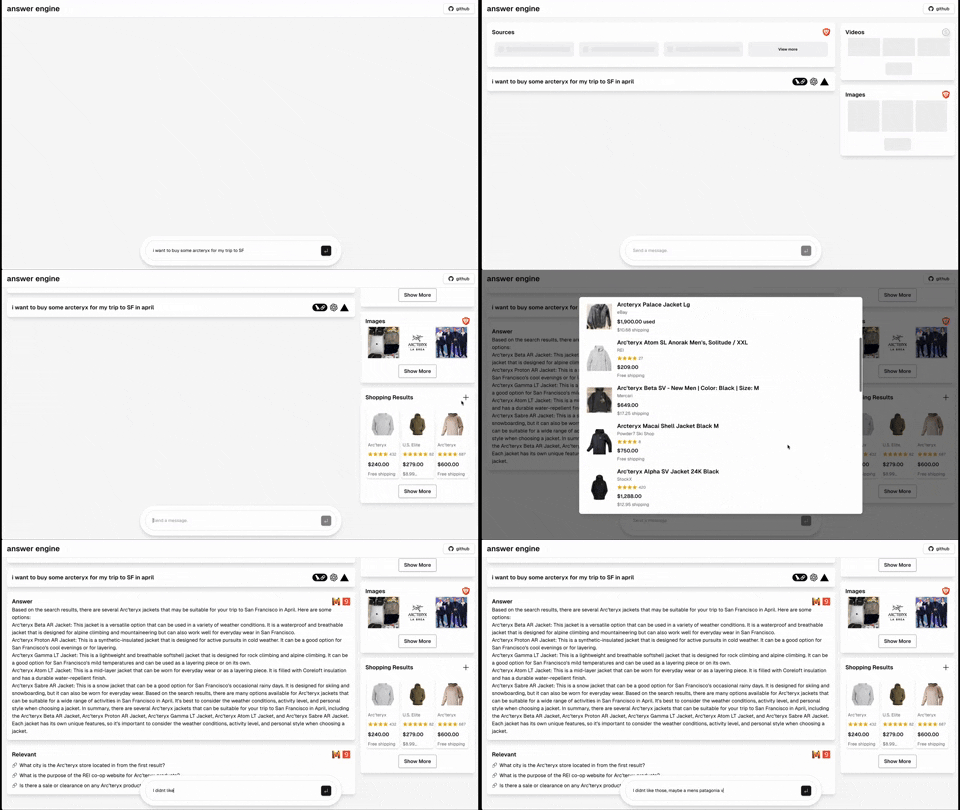
- [Completed] Add dark mode support based on the user's system preference
### Backend + Node Only Express API
[Watch the express tutorial here](https://youtu.be/43ZCeBTcsS8) for a detailed guide on setting up and running this project.
In addition to the Next.JS version of the project, there is a backend only version that uses Node.js and Express. Which is located in the 'express-api' directory. This is a standalone version of the project that can be used as a reference for building a similar API. There is also a readme file in the 'express-api' directory that explains how to run the backend version.
### Upstash Redis Rate Limiting
[Watch the Upstash Redis Rate Limiting tutorial here](https://youtu.be/3_aNVu6EU3Y) for a detailed guide on setting up and running this project.
Upstash Redis Rate Limiting is a free tier service that allows you to set up rate limiting for your application. It provides a simple and easy-to-use interface for configuring and managing rate limits. With Upstash, you can easily set limits on the number of requests per user, IP address, or other criteria. This can help prevent abuse and ensure that your application is not overwhelmed with requests.
## Contributing
Contributions to the project are welcome. Feel free to fork the repository, make your changes, and submit a pull request. You can also open issues to suggest improvements or report bugs.
## License
This project is licensed under the MIT License.
[](https://star-history.com/#developersdigest/llm-answer-engine&Date)
I'm the developer behind Developers Digest. If you find my work helpful or enjoy what I do, consider supporting me. Here are a few ways you can do that:
- **Patreon**: Support me on Patreon at [patreon.com/DevelopersDigest](https://www.patreon.com/DevelopersDigest)
- **Buy Me A Coffee**: You can buy me a coffee at [buymeacoffee.com/developersdigest](https://www.buymeacoffee.com/developersdigest)
- **Website**: Check out my website at [developersdigest.tech](https://developersdigest.tech)
- **Github**: Follow me on GitHub at [github.com/developersdigest](https://github.com/developersdigest)
- **Twitter**: Follow me on Twitter at [twitter.com/dev__digest](https://twitter.com/dev__digest)
## Troubleshooting
### Node.js version
This project uses Next.js 14.1.x which requires **Node.js >= 18.17.0**.
If you see `npm ERR! code EBADENGINE` / `Unsupported engine`, upgrade Node (e.g. via nvm):
```bash
nvm install 18.17.0
nvm use 18.17.0
```
### npm install / npm ci dependency resolution
If `npm install`/`npm ci` fails with a peer dependency conflict around `zod`, ensure you are using an up-to-date Node/npm and the repo dependencies (this repo pins `zod` to a compatible version).
历史前置条件说明(补充参考)
Node.js >= 18.17.0 与 npm(或 bun)用于非 Docker 安装;或 Docker 与 docker compose。需自备 OpenAI、Groq、Brave Search、Serper 的 API Key;可选本地 Ollama 模型与 Upstash Redis。各第三方服务费用、额度与区域可用性待核验。
项目来源与清单版权许可
https://github.com/developersdigest/llm-answer-engine
https://github.com/developersdigest
整理来源:https://github.com/slavakurilyak/awesome-ai-agents
清单版权与许可:
MIT License
Copyright (c) 2024 Slava Kurilyak
Permission is hereby granted, free of charge, to any person obtaining a copy of this software and associated documentation files (the "Software"), to deal in the Software without restriction, including without limitation the rights to use, copy, modify, merge, publish, distribute, sublicense, and/or sell copies of the Software, and to permit persons to whom the Software is furnished to do so, subject to the following conditions:
The above copyright notice and this permission notice shall be included in all copies or substantial portions of the Software.
THE SOFTWARE IS PROVIDED "AS IS", WITHOUT WARRANTY OF ANY KIND, EXPRESS OR IMPLIED, INCLUDING BUT NOT LIMITED TO THE WARRANTIES OF MERCHANTABILITY, FITNESS FOR A PARTICULAR PURPOSE AND NONINFRINGEMENT. IN NO EVENT SHALL THE AUTHORS OR COPYRIGHT HOLDERS BE LIABLE FOR ANY CLAIM, DAMAGES OR OTHER LIABILITY, WHETHER IN AN ACTION OF CONTRACT, TORT OR OTHERWISE, ARISING FROM, OUT OF OR IN CONNECTION WITH THE SOFTWARE OR THE USE OR OTHER DEALINGS IN THE SOFTWARE.