 AI仙宝
项目介绍
Agent 开发框架 · 2026-11-09 更新 · 本站尚未实测
DB-GPT 是 eosphoros-ai 组织维护的开源「agentic AI data assistant」(智能体式数据分析助手),面向「AI + Data」场景。按 README 描述,它可以帮助用户连接数据库、CSV/Excel 文件、数据仓库与知识库,用自然语言提问后由 AI 自主编写 SQL、编写并执行 Python 代码,最终产出图表、仪表盘、HTML 报告与分析摘要。
除直接使用外,DB-GPT 同时是一个构建 AI 原生数据智能体、工作流与应用(agents、AWEL、RAG、多模型支持)的平台。需要注意的是,它是一个需要自行部署的软件/框架级项目,不是可直接安装到某个客户端里的插件,也没有在本次资料中看到 MCP 配置或工作流文件下载。
核心能力
点击能力名称查看输入、输出和原文依据。
- 智能体式分析:任务规划、分步执行、工具调用、迭代推理。
- SQL 与代码执行:自然语言转 SQL、基于 Python 的数据清洗与变换、指标计算、图表生成。
- 多源数据接入:关系型数据库、CSV/Excel、文档、知识库,以及混合来源的工作流。
- Skills 与 Agent:可复用 skills、领域工作流、agent 编排与可定制执行流程。
- 报表与决策支持:数据库画像报告、财务分析报告、可视化报告与仪表盘、业务摘要与洞察。
- 安全执行:README 声明提供沙箱化代码执行与受控工具调用;具体沙箱实现与隔离强度需以官方文档核验。
README 列出支持的模型厂商包括 DeepSeek、Qwen、GLM、Llama、Gemma、Yi、Starling、SOLAR、Mixtral、Phi 等,并经由 SMMF 模块提供更多模型支持;安装脚本还给出 OpenAI、Kimi(Moonshot)、MiniMax 的配置档位。Text2SQL 微调支持 LLaMA、BLOOM、Baichuan、InternLM、Qwen、XVERSE、ChatGLM2 等模型。
实际应用场景
适用场景
- 对 CSV/Excel 做探索性分析与可视化报告;
- 连接业务数据库,用自然语言提问并自动生成 SQL(Text2SQL);
- 生成数据库画像、财务分析等结构化报告;
- 把领域知识、分析方法封装成可复用 skill,供团队重复执行;
- 在自有环境中搭建团队内部的 AI 数据分析助手。
安装与接入
README 提供三种获取方式:
- 一键安装脚本(macOS 与 Linux),原文命令为
curl -fsSL https://raw.githubusercontent.com/eosphoros-ai/DB-GPT/main/scripts/install/install.sh | bash;也可在命令前附加OPENAI_API_KEY、MOONSHOT_API_KEY或MINIMAX_API_KEY环境变量并指定--profile openai|kimi|minimax。 - PyPI 安装:需 Python 3.10+ 与 uv(推荐)或 pip,执行
uv pip install dbgpt-app或pip install dbgpt-app,随后用dbgpt start启动,首次运行会进入交互式配置向导。 - Docker、本地 GPU 模型(vLLM、llama.cpp)或源码部署:README 未给出具体命令,指向官方安装文档(docs.dbgpt.cn)。
安装后按原文启动方式为 cd ~/.dbgpt/DB-GPT && uv run dbgpt start webserver --profile <profile>,并在浏览器访问 http://localhost:5670。README 徽标中列有 Windows,但正文脚本标注为 macOS 与 Linux,Windows 具体支持程度待核验。
使用条件与限制
- 是否需要部署
- 需自行准备运行环境,具体要求见正文
- 是否需要注册
- 账号和认证要求见正文;未明确说明的项目仍待核验
- 是否需要 API Key
- 待核验
- 费用与额度
- 费用边界见正文,项目许可不代表模型或托管服务免费
- 所需权限
- 待核验
- 许可证与服务条款
- 待核验
权限费用与限制
- 该项目需要访问你的数据库、文件与代码执行环境,接入前应确认权限范围与数据合规要求。
- 使用云端模型 API(如 OpenAI、Moonshot、MiniMax、DashScope 等)会产生第三方模型调用费用,价格需向各厂商核验;本地模型则涉及硬件资源。
- 仓库代码采用 MIT 许可,不等于模型权重、云服务或托管服务免费或可任意商用,第三方模型须遵守其各自许可。
- README 未说明是否存在商业版模块或收费标准,费用与授权边界待向官方核验。
- 沙箱隔离强度、多租户与权限管理能力须以官方文档核验,不宜据此宣称满足生产级安全要求。
国内使用情况
网友核验 用户经验分享
与站长实测独立,不代表官方认证或本站已实测。
最近核验:暂无有效核验。参与人数按当前项目有效身份去重;不同核验项分别统计,不合并成用户总结果。仅统计审核通过且未过期的记录。
分项统计、有效期与样本量
| 核验项目 | 有效人数 | 成功 / 部分 / 失败 / 无法判断 | 成功率 | 最近核验 / 有效期 |
|---|---|---|---|---|
| 官方网站访问 | 0 | 0 / 0 / 0 / 0 | 样本不足 | 暂无 / 7 天 |
| GitHub 仓库访问 | 0 | 0 / 0 / 0 / 0 | 样本不足 | 暂无 / 7 天 |
| 安装与运行 | 0 | 0 / 0 / 0 / 0 | 样本不足 | 暂无 / 30 天 |
| 官方服务国内连接 / MCP 连接 | 0 | 0 / 0 / 0 / 0 | 样本不足 | 暂无 / 30 天 |
| 国内网络情况 | 0 | 0 / 0 / 0 / 0 | 样本不足 | 暂无 / 7 天 |
| 国内模型兼容性 | 0 | 0 / 0 / 0 / 0 | 样本不足 | 暂无 / 30 天 |
| 自定义 API | 0 | 0 / 0 / 0 / 0 | 样本不足 | 暂无 / 30 天 |
| 海外服务依赖 | 0 | 0 / 0 / 0 / 0 | 样本不足 | 暂无 / 30 天 |
| 海外账号要求 | 0 | 0 / 0 / 0 / 0 | 样本不足 | 暂无 / 30 天 |
| 中文界面 | 0 | 0 / 0 / 0 / 0 | 样本不足 | 暂无 / 30 天 |
| 客户端兼容性 | 0 | 0 / 0 / 0 / 0 | 样本不足 | 暂无 / 30 天 |
| 账号及费用信息 | 0 | 0 / 0 / 0 / 0 | 样本不足 | 暂无 / 30 天 |
成功率 = 成功 ÷(成功 + 部分成功 + 失败);无法判断不计入分母。至少 5 份可判断结果才显示成功率。账号、费用、海外依赖与语言等事实项,成功表示核查结论与资料吻合,具体观察另行统计;不表示免费或没有海外依赖。不同网络、客户端和版本的结果不能直接等同。
最近有效核验
暂无审核通过且未过期的网友核验。欢迎提交真实使用记录。
查看全部有效核验 →国内实测状态:国内可用性待核验。协议兼容和官方资料说明不等于国内网络可用。
- 官方网站访问
- 尚未实测 待核验
- GitHub 仓库访问
- 尚未实测 待核验
- 官方服务国内连接
- 尚未实测 待核验
- 国内网络情况
- 尚未实测 待核验
- 国内模型兼容性
- 尚未实测 待核验
- 自定义 API
- 尚未实测 待核验
- 海外服务依赖
- 尚未实测 待核验
- 海外账号要求
- 尚未实测 待核验
- 中文界面
- 尚未实测 待核验
- 国内最后核验时间
- 尚未实测
许可与国内使用
仓库采用 MIT License(Copyright (c) 2023 magic.chen),可自由使用、修改与再分发,需保留版权与许可声明。README 声明支持的模型中包含 DeepSeek、Qwen、GLM、Yi 等国内模型,并提供 Kimi、MiniMax 的配置档位;但官网域名 dbgpt.cn 不代表服务部署在中国境内,实际托管与数据流向需自行核验。国内网络访问脚本、模型仓库与外部 API 的可用性待核验。
项目资料与来源
字段依据与待核验事项
access:来源确认 · Get DB-GPT running in minutes with the one-line installer (macOS & Linux):
project_type:来源确认 · DB-GPT is an open-source **agentic AI data assistant** for the next generation of **AI + Data** products.
原始 README(折叠技术参考)
# <img src="./assets/LOGO_SMALL.png" alt="Logo" style="vertical-align: middle; height: 24px;" /> DB-GPT: Open-Source Agentic AI Data Assistant
<p align="left">
<img src="./assets/dbgpt_vision.png" width="100%" />
</p>
<div align="center">
<p>
<a href="https://github.com/eosphoros-ai/DB-GPT">
<img alt="stars" src="https://img.shields.io/github/stars/eosphoros-ai/db-gpt?style=social" />
</a>
<a href="https://github.com/eosphoros-ai/DB-GPT">
<img alt="forks" src="https://img.shields.io/github/forks/eosphoros-ai/db-gpt?style=social" />
</a>
<a href="http://dbgpt.cn/">
<img alt="Official Website" src="https://img.shields.io/badge/Official%20website-DB--GPT-blue?style=flat&labelColor=3366CC" />
</a>
<a href="https://opensource.org/licenses/MIT">
<img alt="License: MIT" src="https://img.shields.io/github/license/eosphoros-ai/db-gpt?style=flat&labelColor=009966&color=009933" />
</a>
<a href="https://github.com/eosphoros-ai/DB-GPT/releases">
<img alt="Release Notes" src="https://img.shields.io/github/v/release/eosphoros-ai/db-gpt?style=flat&labelColor=FF9933&color=FF6633" />
</a>
<a href="https://github.com/eosphoros-ai/DB-GPT/issues">
<img alt="Open Issues" src="https://img.shields.io/github/issues-raw/eosphoros-ai/db-gpt?style=flat&labelColor=666666&color=333333" />
</a>
<a href="https://x.com/DBGPT_AI">
<img alt="X (formerly Twitter) Follow" src="https://img.shields.io/twitter/follow/DBGPT_AI" />
</a>
<a href="https://medium.com/@dbgpt0506">
<img alt="Medium Follow" src="https://badgen.net/badge/Medium/DB-GPT/333333?icon=medium&labelColor=666666" />
</a>
<a href="https://space.bilibili.com/3537113070963392">
<img alt="Bilibili Space" src="https://img.shields.io/badge/dynamic/json?url=https%3A%2F%2Fapi.bilibili.com%2Fx%2Frelation%2Fstat%3Fvmid%3D3537113070963392&query=data.follower&style=flat&logo=bilibili&logoColor=white&label=Bilibili%20Fans&labelColor=F37697&color=6495ED" />
</a>
<a href="https://join.slack.com/t/slack-inu2564/shared_invite/zt-29rcnyw2b-N~ubOD9kFc7b7MDOAM1otA">
<img alt="Slack" src="https://img.shields.io/badge/Slack-Join%20us-5d6b98?style=flat&logo=slack&labelColor=7d89b0" />
</a>
<a href="https://codespaces.new/eosphoros-ai/DB-GPT">
<img alt="Open in GitHub Codespaces" src="https://github.com/codespaces/badge.svg" />
</a>
</p>
[](README.md)
[](README.zh.md)
[](README.ja.md)
[**Documents**](http://docs.dbgpt.cn/docs/overview/) | [**Contact Us**](https://github.com/eosphoros-ai/DB-GPT/blob/main/README.zh.md#%E8%81%94%E7%B3%BB%E6%88%91%E4%BB%AC) | [**Community**](https://github.com/eosphoros-ai/community) | [**Paper**](https://arxiv.org/pdf/2312.17449.pdf)
</div>
> **An open-source AI data assistant that connects to your data, writes SQL and code, runs skills in sandboxed environments, and turns analysis into reports, insights, and action.**

## What is DB-GPT?
DB-GPT is an open-source **agentic AI data assistant** for the next generation of **AI + Data** products.
It helps users and teams:
- connect to **databases, CSV / Excel files, warehouses, and knowledge bases**
- ask questions in natural language and let AI **write SQL autonomously**
- run **Python- and code-driven analysis** workflows
- load and execute reusable **skills** for domain-specific tasks
- generate **charts, dashboards, HTML reports, and analysis summaries**
- execute tasks safely in **sandboxed environments**
DB-GPT is also a platform for building **AI-native data agents, workflows, and applications** with agents, AWEL, RAG, and multi-model support.
## Why DB-GPT?
### 1. Agentic data analysis
Plan tasks, break work into steps, call tools, and complete analysis workflows end to end.

### 2. Autonomous SQL + code execution
Generate SQL and code to query data, clean datasets, compute metrics, and produce outputs.


### 3. Multi-source data access
Work across structured and unstructured sources, including databases, spreadsheets, documents, and knowledge bases.

### 4. Skills-driven extensibility
Package domain knowledge, analysis methods, and execution workflows into reusable skills.

### 5. Sandboxed execution
Run code and tools in isolated environments for safer, more reliable analysis.

## What you can do with DB-GPT
- **Analyze CSV / Excel files** and generate visual reports
- **Connect to databases** and produce profiling reports
- Ask business questions in natural language and let AI **write SQL automatically**
- Perform **financial report analysis** with code, charts, and narrative summaries
- Create and reuse **SQL analysis skills** and domain workflows
- Combine **code, SQL, retrieval, and tools** in a single agentic workflow
- Build next-generation **AI + Data assistants** for your team or product
## Product Workflow
### Explore data
Connect files, databases, and knowledge bases in one workspace.
### Plan and execute
Let AI reason through the task, write SQL and code, and execute step by step.
### Use skills
Load reusable skills for repeatable business analysis workflows.
### Generate reports
Produce charts, dashboards, HTML reports, and decision-ready outputs.
## Quick Start
Get DB-GPT running in minutes with the one-line installer (macOS & Linux):
```bash
curl -fsSL https://raw.githubusercontent.com/eosphoros-ai/DB-GPT/main/scripts/install/install.sh | bash
```
Or specify a profile and API key directly:
```bash
curl -fsSL https://raw.githubusercontent.com/eosphoros-ai/DB-GPT/main/scripts/install/install.sh \
| OPENAI_API_KEY=sk-xxx bash -s -- --profile openai
```
For Kimi 2.5 via Moonshot API:
```bash
curl -fsSL https://raw.githubusercontent.com/eosphoros-ai/DB-GPT/main/scripts/install/install.sh \
| MOONSHOT_API_KEY=sk-xxx bash -s -- --profile kimi
```
For MiniMax via the OpenAI-compatible API:
```bash
curl -fsSL https://raw.githubusercontent.com/eosphoros-ai/DB-GPT/main/scripts/install/install.sh \
| MINIMAX_API_KEY=sk-xxx bash -s -- --profile minimax
```
Already have a local DB-GPT checkout? Reuse it instead of cloning `~/.dbgpt/DB-GPT`:
```bash
OPENAI_API_KEY=sk-xxx \
bash scripts/install/install.sh --profile openai --repo-dir "$(pwd)" --yes
```
Or reuse your local repo with Kimi 2.5:
```bash
MOONSHOT_API_KEY=sk-xxx \
bash scripts/install/install.sh --profile kimi --repo-dir "$(pwd)" --yes
```
Or reuse your local repo with MiniMax:
```bash
MINIMAX_API_KEY=sk-xxx \
bash scripts/install/install.sh --profile minimax --repo-dir "$(pwd)" --yes
```
After installation, start the server with the generated profile config:
```bash
cd ~/.dbgpt/DB-GPT && uv run dbgpt start webserver --profile <profile>
```
Then open [http://localhost:5670](http://localhost:5670).
> **Prefer to review the script first?**
> ```bash
> curl -fsSL https://raw.githubusercontent.com/eosphoros-ai/DB-GPT/main/scripts/install/install.sh -o install.sh
> less install.sh
> bash install.sh --profile openai
> ```
### Install via PyPI
Install DB-GPT from PyPI and start it with a single command — no source checkout required.
> **Prerequisites:** Python **3.10+** and [uv](https://docs.astral.sh/uv/getting-started/installation/) (recommended) or pip.
**1. Install**
```bash
# Recommended: use uv
uv pip install dbgpt-app
# Or with pip
pip install dbgpt-app
```
The default installation includes the core framework (CLI, FastAPI, Agent), OpenAI-compatible LLM support, DashScope / Tongyi support, RAG document parsing, and ChromaDB vector store.
**2. Start**
```bash
dbgpt start
```
On first run, an interactive setup wizard will guide you through choosing an LLM provider and entering your API key. Once complete, the web server starts automatically.
**3. Open the Web UI**
Visit [http://localhost:5670](http://localhost:5670) — you're all set! 🎉
### Advanced Installation


For Docker, local GPU models (vLLM, llama.cpp), or manual source-code setup, see the full docs:
- [**Install**](http://docs.dbgpt.cn/docs/installation)
- [Docker](http://docs.dbgpt.cn/docs/installation/docker)
- [Source Code](http://docs.dbgpt.cn/docs/getting-started/deploy/source-code)
- [**Quickstart**](http://docs.dbgpt.cn/docs/overview)
- [**Application**](http://docs.dbgpt.cn/docs/use_cases)
- [Development Guide](http://docs.dbgpt.cn/docs/cookbook/app/data_analysis_app_develop)
- [AWEL Flow Usage](http://docs.dbgpt.cn/docs/application/awel_flow_usage)
- [**Debugging**](http://docs.dbgpt.cn/docs/operation_manual/advanced_tutorial/debugging)
- [**Advanced Usage**](http://docs.dbgpt.cn/docs/application/advanced_tutorial/cli)
- [SMMF](http://docs.dbgpt.cn/docs/application/advanced_tutorial/smmf)
- [Finetune](http://docs.dbgpt.cn/docs/application/fine_tuning_manual/dbgpt_hub)
- [AWEL](http://docs.dbgpt.cn/docs/awel/tutorial)
## Core Capabilities
### Agentic Analysis
- task planning
- step-by-step execution
- tool use
- iterative reasoning
### SQL + Code Execution
- natural language to SQL
- Python-based analysis and transformation
- metric calculation
- chart generation
### Multi-Source Data Access
- relational databases
- CSV / Excel
- documents
- knowledge bases
- mixed-source workflows
### Skills and Agents
- reusable skills
- domain workflows
- agent orchestration
- customizable execution flows
### Reporting and Decision Support
- database profiling reports
- financial analysis reports
- visual reports and dashboards
- summaries and business insights
### Safe Execution
- sandboxed code execution
- controlled tool use
- reproducible outputs and artifacts
#### Text2SQL Finetune
| LLM | Supported |
|:-----------:|:-----------:|
| LLaMA | ✅ |
| LLaMA-2 | ✅ |
| BLOOM | ✅ |
| BLOOMZ | ✅ |
| Falcon | ✅ |
| Baichuan | ✅ |
| Baichuan2 | ✅ |
| InternLM | ✅ |
| Qwen | ✅ |
| XVERSE | ✅ |
| ChatGLM2 | ✅ |
[More Information about Text2SQL finetune](https://github.com/eosphoros-ai/DB-GPT-Hub)
### Supported Models
<table>
<thead>
<tr>
<th>Provider</th>
<th>Supported</th>
<th>Models</th>
</tr>
</thead>
<tbody>
<tr>
<td align="center" valign="middle">DeepSeek</td>
<td align="center" valign="middle">✅</td>
<td>
🔥🔥🔥 <a href="https://huggingface.co/deepseek-ai/DeepSeek-R1-0528">DeepSeek-R1-0528</a><br/>
🔥🔥🔥 <a href="https://huggingface.co/deepseek-ai/DeepSeek-V3-0324">DeepSeek-V3-0324</a><br/>
🔥🔥🔥 <a href="https://huggingface.co/deepseek-ai/DeepSeek-R1">DeepSeek-R1</a><br/>
🔥🔥🔥 <a href="https://huggingface.co/deepseek-ai/DeepSeek-V3">DeepSeek-V3</a><br/>
🔥🔥🔥 <a href="https://huggingface.co/deepseek-ai/DeepSeek-R1-Distill-Llama-70B">DeepSeek-R1-Distill-Llama-70B</a><br/>
🔥🔥🔥 <a href="https://huggingface.co/deepseek-ai/DeepSeek-R1-Distill-Qwen-32B">DeepSeek-R1-Distill-Qwen-32B</a><br/>
🔥🔥🔥 <a href="https://huggingface.co/deepseek-ai/DeepSeek-Coder-V2-Instruct">DeepSeek-Coder-V2-Instruct</a><br/>
</td>
</tr>
<tr>
<td align="center" valign="middle">Qwen</td>
<td align="center" valign="middle">✅</td>
<td>
🔥🔥🔥 <a href="https://huggingface.co/Qwen/Qwen3-235B-A22B">Qwen3-235B-A22B</a><br/>
🔥🔥🔥 <a href="https://huggingface.co/Qwen/Qwen3-30B-A3B">Qwen3-30B-A3B</a><br/>
🔥🔥🔥 <a href="https://huggingface.co/Qwen/Qwen3-32B">Qwen3-32B</a><br/>
🔥🔥🔥 <a href="https://huggingface.co/Qwen/QwQ-32B">QwQ-32B</a><br/>
🔥🔥🔥 <a href="https://huggingface.co/Qwen/Qwen2.5-Coder-32B-Instruct">Qwen2.5-Coder-32B-Instruct</a><br/>
🔥🔥🔥 <a href="https://huggingface.co/Qwen/Qwen2.5-Coder-14B-Instruct">Qwen2.5-Coder-14B-Instruct</a><br/>
🔥🔥🔥 <a href="https://huggingface.co/Qwen/Qwen2.5-72B-Instruct">Qwen2.5-72B-Instruct</a><br/>
🔥🔥🔥 <a href="https://huggingface.co/Qwen/Qwen2.5-32B-Instruct">Qwen2.5-32B-Instruct</a><br/>
</td>
</tr>
<tr>
<td align="center" valign="middle">GLM</td>
<td align="center" valign="middle">✅</td>
<td>
🔥🔥🔥 <a href="https://huggingface.co/THUDM/GLM-Z1-32B-0414">GLM-Z1-32B-0414</a><br/>
🔥🔥🔥 <a href="https://huggingface.co/THUDM/GLM-4-32B-0414">GLM-4-32B-0414</a><br/>
🔥🔥🔥 <a href="https://huggingface.co/THUDM/glm-4-9b-chat">Glm-4-9b-chat</a>
</td>
</tr>
<tr>
<td align="center" valign="middle">Llama</td>
<td align="center" valign="middle">✅</td>
<td>
🔥🔥🔥 <a href="https://huggingface.co/meta-llama/Meta-Llama-3.1-405B-Instruct">Meta-Llama-3.1-405B-Instruct</a><br/>
🔥🔥🔥 <a href="https://huggingface.co/meta-llama/Meta-Llama-3.1-70B-Instruct">Meta-Llama-3.1-70B-Instruct</a><br/>
🔥🔥🔥 <a href="https://huggingface.co/meta-llama/Meta-Llama-3.1-8B-Instruct">Meta-Llama-3.1-8B-Instruct</a><br/>
🔥🔥🔥 <a href="https://huggingface.co/meta-llama/Meta-Llama-3-70B-Instruct">Meta-Llama-3-70B-Instruct</a><br/>
🔥🔥🔥 <a href="https://huggingface.co/meta-llama/Meta-Llama-3-8B-Instruct">Meta-Llama-3-8B-Instruct</a>
</td>
</tr>
<tr>
<td align="center" valign="middle">Gemma</td>
<td align="center" valign="middle">✅</td>
<td>
🔥🔥🔥 <a href="https://huggingface.co/google/gemma-2-27b-it">gemma-2-27b-it</a><br>
🔥🔥🔥 <a href="https://huggingface.co/google/gemma-2-9b-it">gemma-2-9b-it</a><br>
🔥🔥🔥 <a href="https://huggingface.co/google/gemma-7b-it">gemma-7b-it</a><br>
🔥🔥🔥 <a href="https://huggingface.co/google/gemma-2b-it">gemma-2b-it</a>
</td>
</tr>
<tr>
<td align="center" valign="middle">Yi</td>
<td align="center" valign="middle">✅</td>
<td>
🔥🔥🔥 <a href="https://huggingface.co/01-ai/Yi-1.5-34B-Chat">Yi-1.5-34B-Chat</a><br/>
🔥🔥🔥 <a href="https://huggingface.co/01-ai/Yi-1.5-9B-Chat">Yi-1.5-9B-Chat</a><br/>
🔥🔥🔥 <a href="https://huggingface.co/01-ai/Yi-1.5-6B-Chat">Yi-1.5-6B-Chat</a><br/>
🔥🔥🔥 <a href="https://huggingface.co/01-ai/Yi-34B-Chat">Yi-34B-Chat</a>
</td>
</tr>
<tr>
<td align="center" valign="middle">Starling</td>
<td align="center" valign="middle">✅</td>
<td>
🔥🔥🔥 <a href="https://huggingface.co/Nexusflow/Starling-LM-7B-beta">Starling-LM-7B-beta</a>
</td>
</tr>
<tr>
<td align="center" valign="middle">SOLAR</td>
<td align="center" valign="middle">✅</td>
<td>
🔥🔥🔥 <a href="https://huggingface.co/upstage/SOLAR-10.7B-Instruct-v1.0">SOLAR-10.7B</a>
</td>
</tr>
<tr>
<td align="center" valign="middle">Mixtral</td>
<td align="center" valign="middle">✅</td>
<td>
🔥🔥🔥 <a href="https://huggingface.co/mistralai/Mixtral-8x7B-Instruct-v0.1">Mixtral-8x7B</a>
</td>
</tr>
<tr>
<td align="center" valign="middle">Phi</td>
<td align="center" valign="middle">✅</td>
<td>
🔥🔥🔥 <a href="https://huggingface.co/collections/microsoft/phi-3-6626e15e9585a200d2d761e3">Phi-3</a>
</td>
</tr>
</tbody>
</table>
- [More Supported LLMs](http://docs.dbgpt.cn/docs/modules/smmf)
### Privacy and Security
We protect data privacy and execution safety through private model deployment, proxy desensitization, and sandboxed execution mechanisms.
### Data Sources
- [Datasources](http://docs.dbgpt.cn/docs/modules/connections)
## Vision
We believe the future of data products goes beyond dashboards.
The next generation of **AI + Data** products will be:
- **agentic**
- **multi-source**
- **skill-driven**
- **sandboxed**
- capable of writing **SQL and code**
- able to turn analysis into **reports, decisions, and action**
DB-GPT aims to help developers and enterprises build that future.
## Contribution
- To check detailed guidelines for new contributions, please refer [how to contribute](https://github.com/eosphoros-ai/DB-GPT/blob/main/CONTRIBUTING.md)
### Contributors Wall
<a href="https://github.com/eosphoros-ai/DB-GPT/graphs/contributors">
<img src="https://contrib.rocks/image?repo=eosphoros-ai/DB-GPT&max=200" />
</a>
## Licence
The MIT License (MIT)
## DISCKAIMER
- [disckaimer](./DISCKAIMER.md)
## Citation
If you want to understand the overall architecture of DB-GPT, please cite <a href="https://arxiv.org/abs/2312.17449" target="_blank">Paper</a> and <a href="https://arxiv.org/abs/2404.10209" target="_blank">Paper</a>
If you want to learn about using DB-GPT for Agent development, please cite the <a href="https://arxiv.org/abs/2412.13520" target="_blank">Paper</a>
```bibtex
@article{xue2023dbgpt,
title={DB-GPT: Empowering Database Interactions with Private Large Language Models},
author={Siqiao Xue and Caigao Jiang and Wenhui Shi and Fangyin Cheng and Keting Chen and Hongjun Yang and Zhiping Zhang and Jianshan He and Hongyang Zhang and Ganglin Wei and Wang Zhao and Fan Zhou and Danrui Qi and Hong Yi and Shaodong Liu and Faqiang Chen},
year={2023},
journal={arXiv preprint arXiv:2312.17449},
url={https://arxiv.org/abs/2312.17449}
}
@misc{huang2024romasrolebasedmultiagentdatabase,
title={ROMAS: A Role-Based Multi-Agent System for Database monitoring and Planning},
author={Yi Huang and Fangyin Cheng and Fan Zhou and Jiahui Li and Jian Gong and Hongjun Yang and Zhidong Fan and Caigao Jiang and Siqiao Xue and Faqiang Chen},
year={2024},
eprint={2412.13520},
archivePrefix={arXiv},
primaryClass={cs.AI},
url={https://arxiv.org/abs/2412.13520},
}
@inproceedings{xue2024demonstration,
title={Demonstration of DB-GPT: Next Generation Data Interaction System Empowered by Large Language Models},
author={Siqiao Xue and Danrui Qi and Caigao Jiang and Wenhui Shi and Fangyin Cheng and Keting Chen and Hongjun Yang and Zhiping Zhang and Jianshan He and Hongyang Zhang and Ganglin Wei and Wang Zhao and Fan Zhou and Hong Yi and Shaodong Liu and Hongjun Yang and Faqiang Chen},
year={2024},
booktitle = "Proceedings of the VLDB Endowment",
url={https://arxiv.org/abs/2404.10209}
}
```
## Contact Information
Thanks to everyone who has contributed to DB-GPT! Your ideas, code, comments, and even sharing them at events and on social platforms can make DB-GPT better.
We are working on building a community, if you have any ideas for building the community, feel free to contact us.
- [Github Issues](https://github.com/eosphoros-ai/DB-GPT/issues) ⭐️:For questions about using GB-DPT, see the CONTRIBUTING.
- [Github Discussions](https://github.com/orgs/eosphoros-ai/discussions) ⭐️:Share your experience or unique apps.
- [Twitter](https://x.com/DBGPT_AI) ⭐️:Please feel free to talk to us.
[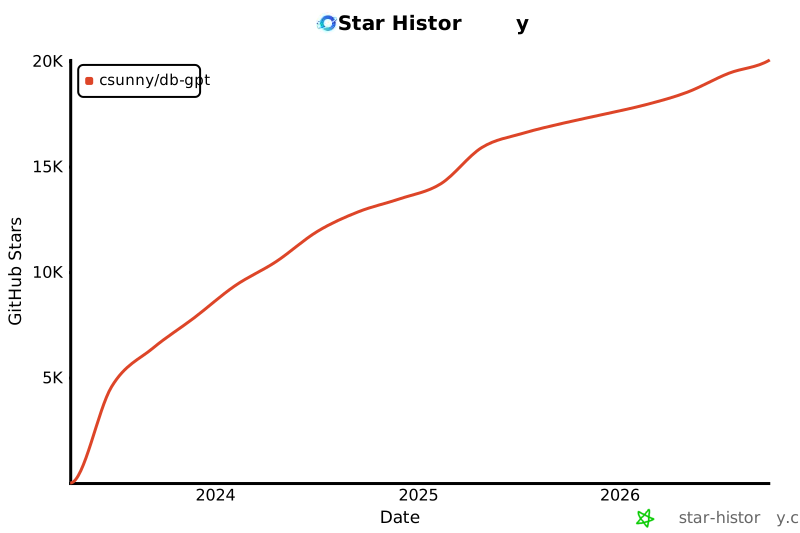](https://star-history.com/#csunny/DB-GPT)
历史前置条件说明(补充参考)
Python 3.10+(PyPI 安装方式);uv 或 pip;macOS 或 Linux 运行一键脚本;Docker、本地 GPU 模型需参考官方文档;至少一个模型提供商的 API Key(如 OpenAI、Moonshot、MiniMax、DashScope),或本地模型及相应硬件;数据库/文件访问权限;云端模型 API 费用待向厂商核验;Windows 支持情况待核验;国内网络访问可用性待核验。
项目来源与清单版权许可
https://github.com/eosphoros-ai/DB-GPT
https://github.com/eosphoros-ai
整理来源:https://github.com/slavakurilyak/awesome-ai-agents
清单版权与许可:
MIT License
Copyright (c) 2024 Slava Kurilyak
Permission is hereby granted, free of charge, to any person obtaining a copy of this software and associated documentation files (the "Software"), to deal in the Software without restriction, including without limitation the rights to use, copy, modify, merge, publish, distribute, sublicense, and/or sell copies of the Software, and to permit persons to whom the Software is furnished to do so, subject to the following conditions:
The above copyright notice and this permission notice shall be included in all copies or substantial portions of the Software.
THE SOFTWARE IS PROVIDED "AS IS", WITHOUT WARRANTY OF ANY KIND, EXPRESS OR IMPLIED, INCLUDING BUT NOT LIMITED TO THE WARRANTIES OF MERCHANTABILITY, FITNESS FOR A PARTICULAR PURPOSE AND NONINFRINGEMENT. IN NO EVENT SHALL THE AUTHORS OR COPYRIGHT HOLDERS BE LIABLE FOR ANY CLAIM, DAMAGES OR OTHER LIABILITY, WHETHER IN AN ACTION OF CONTRACT, TORT OR OTHERWISE, ARISING FROM, OUT OF OR IN CONNECTION WITH THE SOFTWARE OR THE USE OR OTHER DEALINGS IN THE SOFTWARE.