 AI仙宝
项目介绍
Agent 配套工具 · 2026-11-09 更新 · 本站尚未实测
WinkTerm 是一个开源的 AI 终端。它的定位很明确:不是只在旁边给出命令建议的聊天机器人,而是与用户共用同一个 PTY 进程的协作者,AI 写出的内容会直接出现在终端输入行。
在终端里以 # 开头输入问题,比如 # what's wrong,请求会被拦截并交给后端 Agent 处理,回答再写入同一个 PTY 输出流。AI 预填的命令不会自动执行,你按 Enter 运行、退格编辑或 Ctrl+C 取消,这描述的是交互输入行的预填流程;另行启用的 Agent API 可执行命令,不能视为所有操作都需按 Enter 确认。
技术栈为 Python + FastAPI + LangGraph + LangChain 后端,Next.js 14 + TypeScript + xterm.js 前端,配置与聊天记录落在 ~/.winkterm/config.json 和 chat_history.json,不使用数据库。
核心能力
点击能力名称查看输入、输出和原文依据。
- 共享 PTY 会话:AI 与用户操作同一终端进程,免去复制粘贴。
- 终端内对话:
#提问;另有侧栏 AI 面板,支持多会话标签、AI 生成标题与 chat/craft 模式切换。 - 会话持久化:聊天历史写入磁盘,刷新页面或断线重连后可恢复;流式响应支持断线续传。
- SSH 远程连接:内置文件传输,可导入 electerm 连接配置。
- 外部 Agent API:带鉴权的 HTTP 接口,供 Claude Code、Cursor 等外部代理驱动终端、SSH 与文件传输,端点覆盖原子执行(返回 stdout、
exit_code、cwd)、一次性 SSH 执行、会话流、SSE 实时输出与事件流。 - 可安装 Skill:README 提供 Claude Code 插件安装命令,也支持从运行中的后端拉取
skill.md供其他代理使用。 - 远程访问鉴权:Web 访问由访问密钥保护,本地桌面客户端免鉴权(据 README)。
- 多模型:支持 OpenAI、Anthropic、Ollama 及任意兼容端点,也可通过 Codex OAuth 登录使用 ChatGPT / Codex 订阅。
- 部署形态:Docker Compose 自托管,或打包为 Windows/macOS 桌面应用;界面内置中英文。
实际应用场景
适用场景
- 在服务器上进行排障、命令纠错与教学式运维,由 AI 在输入行给出并解释修复命令。
- 通过 SSH 管理多台主机,让外部编码代理批量执行检查或文件传输。
- 希望自托管终端环境、自带模型或订阅账号的用户。
README 中有一个案例:用户仅提示“107.173 服务器负载很高”,AI 代理经 Agent API 完成定位、排查、清理与加固。该描述属于项目自述,未在本站复现。
安装与接入
Docker 单行运行(原文命令,需填入你自己的密钥):
docker run -p 3000:3000 -p 8000:8000 \
  -e ANTHROPIC_API_KEY=*** \
  ghcr.io/cznorth/winkterm:latest
或用 docker-compose:
git clone https://github.com/Cznorth/winkterm.git
cd winkterm
cp .env.example .env
# Edit .env with your API keys
docker compose up -d
启动后访问 http://localhost:3000。桌面版从 GitHub Releases 下载,Windows 为 .exe 安装包,macOS 为 .app(Intel 与 Apple Silicon)。
关键环境变量:ANTHROPIC_API_KEY(README 标注为 required)、OPENAI_API_KEY、MODEL_NAME(默认 claude-sonnet-4-20250514)、OPENAI_BASE_URL、AGENT_RECURSION_LIMIT(默认 100)、PROMETHEUS_URL、LOKI_URL、DEBUG。Codex OAuth 在设置界面开启,无需环境变量。
外部代理接入:README 给出 Claude Code 插件命令 /plugin marketplace add Cznorth/winkterm 与 /plugin install winkterm-remote@winkterm,也可用 curl -s http://<your-winkterm-host>:8000/api/agent/skill.md > SKILL.md 获取技能文件。开发模式的 Python/Node 环境要求为 Python 3.12+、Node.js 20+。
使用条件与限制
- 是否需要部署
- 需自行准备运行环境,具体要求见正文
- 是否需要注册
- 账号和认证要求见正文;未明确说明的项目仍待核验
- 是否需要 API Key
- 待核验
- 费用与额度
- 费用边界见正文,项目许可不代表模型或托管服务免费
- 所需权限
- 待核验
- 许可证与服务条款
- 待核验
权限费用与限制
- 权限:Web 访问受访问密钥保护;本地桌面客户端按 README 免鉴权。Agent API 接口对终端具备执行命令、SSH 与文件传输能力,且提供本地回环或已鉴权客户端自动获取 token 的握手接口,公开暴露时务必评估风险。
- 费用:仓库代码 MIT 许可,但模型调用费用由你自行承担,取决于所选提供商或 ChatGPT/Codex 订阅。README 未列任何官方定价,费用与额度请以各提供商为准。
- 限制:项目未声明安全审计结果、SLA 或“免费”承诺;Windows/macOS 支持仅指桌面安装包,服务端自托管环境的国内网络可用性、镜像可达性均待核验。具体模型(如
gpt-5.5)可用性取决于账号,README 亦未列出国内模型。
国内使用情况
网友核验 用户经验分享
与站长实测独立,不代表官方认证或本站已实测。
最近核验:暂无有效核验。参与人数按当前项目有效身份去重;不同核验项分别统计,不合并成用户总结果。仅统计审核通过且未过期的记录。
分项统计、有效期与样本量
| 核验项目 | 有效人数 | 成功 / 部分 / 失败 / 无法判断 | 成功率 | 最近核验 / 有效期 |
|---|---|---|---|---|
| 官方网站访问 | 0 | 0 / 0 / 0 / 0 | 样本不足 | 暂无 / 7 天 |
| GitHub 仓库访问 | 0 | 0 / 0 / 0 / 0 | 样本不足 | 暂无 / 7 天 |
| 安装与运行 | 0 | 0 / 0 / 0 / 0 | 样本不足 | 暂无 / 30 天 |
| 官方服务国内连接 / MCP 连接 | 0 | 0 / 0 / 0 / 0 | 样本不足 | 暂无 / 30 天 |
| 国内网络情况 | 0 | 0 / 0 / 0 / 0 | 样本不足 | 暂无 / 7 天 |
| 国内模型兼容性 | 0 | 0 / 0 / 0 / 0 | 样本不足 | 暂无 / 30 天 |
| 自定义 API | 0 | 0 / 0 / 0 / 0 | 样本不足 | 暂无 / 30 天 |
| 海外服务依赖 | 0 | 0 / 0 / 0 / 0 | 样本不足 | 暂无 / 30 天 |
| 海外账号要求 | 0 | 0 / 0 / 0 / 0 | 样本不足 | 暂无 / 30 天 |
| 中文界面 | 0 | 0 / 0 / 0 / 0 | 样本不足 | 暂无 / 30 天 |
| 客户端兼容性 | 0 | 0 / 0 / 0 / 0 | 样本不足 | 暂无 / 30 天 |
| 账号及费用信息 | 0 | 0 / 0 / 0 / 0 | 样本不足 | 暂无 / 30 天 |
成功率 = 成功 ÷(成功 + 部分成功 + 失败);无法判断不计入分母。至少 5 份可判断结果才显示成功率。账号、费用、海外依赖与语言等事实项,成功表示核查结论与资料吻合,具体观察另行统计;不表示免费或没有海外依赖。不同网络、客户端和版本的结果不能直接等同。
最近有效核验
暂无审核通过且未过期的网友核验。欢迎提交真实使用记录。
查看全部有效核验 →国内实测状态:国内可用性待核验。协议兼容和官方资料说明不等于国内网络可用。
- 官方网站访问
- 尚未实测 待核验
- GitHub 仓库访问
- 尚未实测 待核验
- 官方服务国内连接
- 尚未实测 待核验
- 国内网络情况
- 尚未实测 待核验
- 国内模型兼容性
- 尚未实测 待核验
- 自定义 API
- 尚未实测 待核验
- 海外服务依赖
- 尚未实测 待核验
- 海外账号要求
- 尚未实测 待核验
- 中文界面
- 尚未实测 待核验
- 国内最后核验时间
- 尚未实测
许可与国内使用
仓库采用 MIT License(LICENSE 文件,Copyright (c) 2026 Cznorth),允许修改与再分发,需保留版权与许可声明。MIT 覆盖的是仓库代码本身,不覆盖第三方模型、云服务或你通过 OAuth 使用的订阅服务。Codex OAuth 的令牌保存在运行机器上的 ~/.codex/auth.json。
域名与镜像托管地不代表服务部署地域;中国大陆网络下访问 GitHub、GHCR、OAuth 与外部模型 API 的可用性,以及合规要求,均待实际核验。项目在采集时未显示归档标记。
项目资料与来源
字段依据与待核验事项
access:来源确认 · docker run -p 3000:3000 -p 8000:8000 \ -e ANTHROPIC_API_KEY=*** \ ghcr.io/cznorth/winkterm:latest
project_type:来源确认 · Not a chatbot that suggests commands. A collaborator that types alongside you in the same PTY.
原始 README(折叠技术参考)
<div align="center">
[中文版本](README.zh-CN.md)
</div>
<div align="center">
<img src="assets/logo.svg" alt="WinkTerm Logo" width="120"/>
<h1>WinkTerm</h1>
<p><strong>AI that shares your terminal session.</strong></p>
<p>Not a chatbot that suggests commands. A collaborator that types alongside you in the same PTY.</p>
</div>
<br>
<div align="center">
[](LICENSE)
[](https://github.com/Cznorth/winkterm)
[](docker-compose.yml)
[](https://github.com/Cznorth/winkterm)
[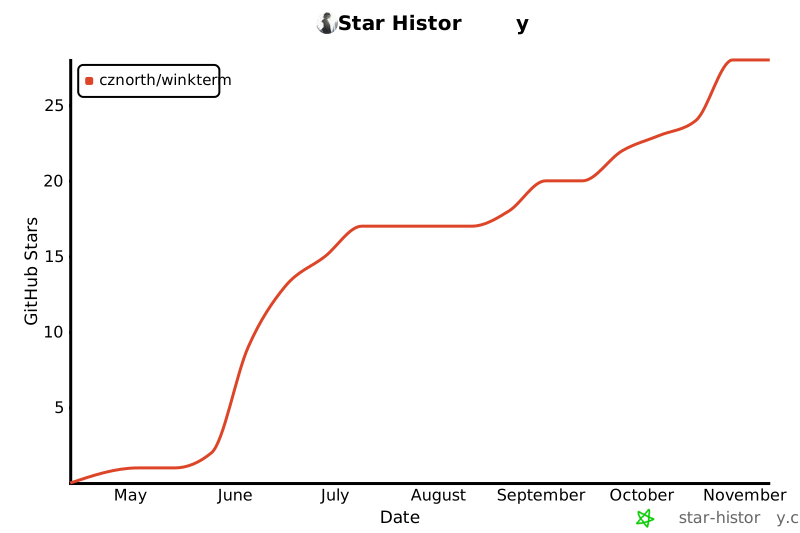](https://star-history.com/#Cznorth/winkterm&Date)
[](https://github.com/Cznorth/winkterm)
[](https://twitter.com/intent/tweet?text=WinkTerm%20-%20AI%20that%20shares%20your%20terminal%20session&url=https://github.com/Cznorth/winkterm)
[](assets/promo.mp4)
[](https://dev.to/cznorth/winkterm-ai-that-shares-your-terminal-session-not-just-command-suggestions-8p9)
[](https://codespaces.new/Cznorth/winkterm)
</div>
<p align="center">
<a href="#-demo">Demo</a> •
<a href="#-features">Features</a> •
<a href="#-codex-oauth-login">Codex OAuth</a> •
<a href="#-agent-api-highlights">Agent API</a> •
<a href="#-quick-start">Quick Start</a> •
<a href="#-why-winkterm">Why WinkTerm?</a> •
<a href="#-architecture">Architecture</a> •
<a href="#-configuration">Configuration</a> •
<a href="#-development">Development</a> •
<a href="#-roadmap">Roadmap</a>
</p>
---
## 🎬 Demo

*GIF — real SSH session: a mistaken command (`ipconfig`), then `# what's wrong`; the AI answers in the same PTY and can pre-fill the fix.*
[▶️ Watch Promo Video](assets/promo.mp4)
*Promo — single-column terminal with multiple SSH tabs; Craft orchestrates checks across hosts (`list_ssh_connections`, `terminal_exec`, `ssh_run`).*
```
$ ipconfig
Command 'ipconfig' not found, did you mean: ...
$ # what's wrong
[WinkTerm] `ipconfig` is a Windows command — on Linux use `ip addr` (or `ifconfig`).
$ ip addr█ ← AI wrote this. Press Enter to run. Backspace to edit. Ctrl+C to cancel.
```
**This is not a ChatGPT wrapper pasted into a terminal.**
The AI writes directly into your terminal's input line. You stay in control — press Enter to execute, edit freely, or cancel. It's like SSH-ing into a server with a knowledgeable partner who can reach across the screen and type.
---
## ✨ Features
- **Shared PTY Session** — AI and user operate in the same terminal process. No copy-paste, no "run this command" without context.
- **In-Terminal Chat** — Type `#` followed by your question, right where your shell prompt is. No need to alt-tab.
- **Sidebar AI Panel** — Full conversational interface with multi-conversation tabs, AI-generated titles, and chat/craft mode switching.
- **Persistent Chat History** — Conversations are saved to `~/.winkterm/chat_history.json` and restored on page load; survives WebSocket reconnects and backend restarts.
- **Streaming Resume** — Refresh or reconnect mid-response without losing in-flight tokens; active streams are tracked server-side and replayed to new WebSocket clients.
- **Streaming Queue & Suggestions** — Queue follow-up messages while the AI is responding (interrupt or drop queued items anytime), and get one-click follow-up suggestion chips after each answer.
- **External Agent API** — An authenticated HTTP interface lets external agents drive your terminal, SSH, and file transfers via an installable skill (see Agent API highlights below).
- **Agent Terminals in Your Tabs** — Agent-created sessions appear as normal terminal tabs (no separate monitor panel). `GET /api/sessions/stream` keeps the UI in sync; WebSocket disconnect no longer kills PTY sessions — refresh replays buffered output.
- **Remote Access Auth** — Web access is protected by an access key; the local desktop client needs no authentication.
- **SSH Remote Connections** — Connect to remote servers with built-in file transfer. Editing a connection without re-entering the password keeps the saved credential.
- **Settings Export & Secret-safe Saves** — Export `config.json` from Settings (`GET /api/settings/export`). Blank password or API key fields on save do not wipe stored secrets.
- **Reliable Terminals** — Debounced PTY sizing fixes truncated PowerShell prompts; agent multi-tab creation no longer leaves empty panes; WebSocket reconnect is silent (no disconnect banner that breaks PSReadLine).
- **Internationalization** — Built-in English / Chinese UI, with language selection on first launch.
- **Multi-Model Support** — Bring your own LLM (OpenAI, Anthropic, Ollama, any compatible endpoint), or sign in with **Codex OAuth** and use your ChatGPT / Codex subscription directly.
- **Docker & Desktop** — Deploy instantly with `docker compose up` or package as a standalone desktop app (Windows/macOS).
---
## 🔐 Codex OAuth Login
WinkTerm can talk to OpenAI **Codex** through an official OAuth flow — no API key, no third-party relay, no `codex exec` subprocess.
**Why use it**
| Advantage | What it means for you |
|-----------|----------------------|
| **ChatGPT / Codex subscription** | Use models like `gpt-5.5` with the account you already pay for — no separate OpenAI API billing. |
| **Zero API config** | In **Settings → API format**, choose **Codex OAuth**, click login, pick a model. No `base_url` or `api_key` fields. |
| **Official OAuth, local tokens** | Browser authorization; tokens land in `~/.codex/auth.json` on the machine running WinkTerm. |
| **Native WebSocket transport** | Sidebar chat and the in-terminal `#` agent stream over Codex Responses — full tool calls (`list_terminals`, `ssh_run`, …), multi-turn history, no fallback to shelling out to the CLI. |
| **Same human-in-the-loop UX** | Craft / chat / ask modes, streaming, queued follow-ups, and tool approval all work the same as with a BYO endpoint. |
| **Desktop-friendly** | OAuth URL can be copied when the embedded WebView cannot open a browser tab automatically. |
**Setup (30 seconds)**
1. Open **Settings** → set **API format** to **Codex OAuth**.
2. Click **Login with ChatGPT** (or copy the auth URL into your browser).
3. Select a Codex model (e.g. `gpt-5.5`) and start chatting in the sidebar or with `#` in any terminal tab.
You can switch back to OpenAI / Anthropic / a custom base URL anytime — Codex OAuth is an option, not a lock-in.
---
## 🤖 Agent API Highlights
WinkTerm's HTTP Agent API is designed for AI agents (Claude Code, Cursor, etc.) to drive the terminal remotely — not just an afterthought.
### Endpoints
| Endpoint | Purpose |
|----------|---------|
| `POST /api/agent/terminals/{id}/exec` | **Atomic execution**: returns stdout + real `exit_code` + current `cwd`. Sentinel marker auto-strips command echo and prompt. Supports `cwd` / `env` subshell injection (doesn't pollute persistent terminal state). |
| `POST /api/agent/ssh/{conn_id}/run` | **One-shot SSH execution**: bundles create → exec → close into one call, saving 3 round-trips. |
| `POST/GET/PUT/DELETE /api/agent/ssh/connections[/{id}]` | **SSH connection management**: full CRUD on the stored connection profiles, plus `POST /api/agent/ssh/import/electerm`. Update leaves masked/omitted secrets unchanged. |
| `POST /api/agent/terminals/{id}/input` | **Named control keys**: `{"keys": ["ctrl+c"]}` instead of stuffing control chars into JSON. `data_b64` input bypasses multi-layer quote escape hell. |
| `GET /api/agent/terminals/{id}/snapshot?pattern=...` | **Server-side grep**: regex-match within the 256KB rolling buffer. Save bandwidth. |
| `GET /api/agent/terminals/{id}/stream` | **SSE live output**: killer feature for long-running commands / `tail -f`. Resume with `since` after disconnect. |
| `GET /api/agent/events/stream` | **Operation event feed**: every agent action is pushed to a ring buffer (no persistence), broadcast via SSE. |
| `GET /api/sessions` / `GET /api/sessions/stream` | **Session lifecycle**: list user-visible terminals; SSE pushes `session_created` / `session_closed` so the web UI tab bar stays in sync with agent activity. |
| `GET /api/chat/conversations` | **Chat persistence**: list saved sidebar conversations (also written to `~/.winkterm/chat_history.json`). |
| `GET /api/settings/export` | **Config backup**: download full `config.json` (localhost or valid `X-Access-Key`). |
| `GET /api/agent/handshake` | **Zero-config onboarding**: localhost or web-auth'd clients get the token automatically. The agent doesn't need to ask the user every session. |
### Key Design Choices
- **Exit codes are first-class**: no need to grep output to detect failure — `exit_code` is in the response.
- **30+ named keys**: `ctrl+c` / `up` / `tab` / `esc` / `f1` — no raw control chars in JSON.
- **base64 input**: complex awk / jq / heredoc commands go through `command_b64`, sidestepping triple-escaping.
- **Persistent cwd tracking**: the exec sentinel reports `$PWD` after every run; the monitoring panel displays the terminal's current directory.
- **TTL auto-cleanup**: terminals default to 30-minute idle TTL, so forgotten terminals don't leak.
- **wait reason field**: distinguishes `idle` / `timeout` / `no_output` so callers know what happened.
### Installable Skill
**Claude Code plugin (one-liner):**
```bash
/plugin marketplace add Cznorth/winkterm
/plugin install winkterm-remote@winkterm
```
**Any agent (raw skill from a running backend):**
```bash
curl -s http://<your-winkterm-host>:8000/api/agent/skill.md > SKILL.md
```
Drop SKILL.md into Claude Code / Cursor / any agent tool's skills directory and the AI immediately knows how to drive the API. The skill is versioned — agents check for updates each session.
### Unified Session Pool
Internal craft agents and the external HTTP API share the same terminal session pool and tool surface (`list` / `create` / `close` / `snapshot` / `input` / `exec` / `ssh_run`). Agent-created terminals are **user-visible** and open as regular tabs in the main UI. Subscribe to `/api/sessions/stream` for live tab sync, or `/api/agent/events/stream` for a color-coded operation audit log.
### Case Study
[📖 Case: AI agent locates and removes an XMR cryptojacker in 30 minutes via WinkTerm](docs/case-study-xmr-miner-cleanup.en.md)
A real incident write-up: user said only "the 107.173 server's load is high," and the AI agent completed discovery → investigation → kill chain reconstruction → hardening → abuse reporting end-to-end via the Agent API. The 9 new features in this release were reverse-engineered from the pain points hit during this exact case.
---
## 🔥 Why WinkTerm?
| Feature | WinkTerm | Warp | Tabby | Claude Code |
|---------|----------|------|-------|-------------|
| Shared PTY (AI types in your terminal) | ✅ | ❌ | ❌ | ❌ |
| Open source | ✅ | ✅ | ✅ | ❌ |
| Self-hosted / BYO LLM | ✅ | ❌ | ❌ | ✅ |
| Codex OAuth (ChatGPT login) | ✅ | ❌ | ❌ | ❌ |
| Web UI | ✅ | ✅ | ✅ | ❌ (CLI only) |
| SSH + file transfer | ✅ | ❌ | ✅ | ❌ |
| Desktop app | ✅ | ✅ | ✅ | ❌ |
**WinkTerm's core philosophy**: The terminal is where operations happen. AI should live *inside* it, not beside it. When the AI writes a command into your input line and you press Enter, you're not blindly trusting — you're reviewing, understanding, and choosing. That's collaborative ops.
---
## 🚀 Quick Start
### Docker (easiest)
```bash
docker run -p 3000:3000 -p 8000:8000 \
-e ANTHROPIC_API_KEY=*** \
ghcr.io/cznorth/winkterm:latest
```
Or with docker-compose:
```bash
git clone https://github.com/Cznorth/winkterm.git
cd winkterm
cp .env.example .env
# Edit .env with your API keys
docker compose up -d
```
The compose file mounts a `winkterm-data` volume at `/root/.winkterm`, so config, chat history, and SSH credentials survive container rebuilds. The image also bundles the installable agent skill (no 404 on `skill.md` fetch).
Then open **http://localhost:3000**
### Desktop App
Download the latest release for your platform from the [Releases page](https://github.com/Cznorth/winkterm/releases).
- **Windows**: `.exe` installer
- **macOS**: `.app` bundle (Intel & Apple Silicon). The desktop build starts the embedded backend before opening the WebView and avoids baking dev-only `localhost:8000` into static assets.
---
## ⚙️ Configuration
| Variable | Description | Default |
|----------|-------------|---------|
| `ANTHROPIC_API_KEY` | Anthropic API key (required) | — |
| `OPENAI_API_KEY` | OpenAI API key (alternative) | — |
| `MODEL_NAME` | Model to use | `claude-sonnet-4-20250514` |
| `OPENAI_BASE_URL` | Custom API endpoint | — |
| `AGENT_RECURSION_LIMIT` | Agent recursion limit | `100` |
| `PROMETHEUS_URL` | Prometheus endpoint | `http://localhost:9090` |
| `LOKI_URL` | Loki endpoint | `http://localhost:3100` |
| `DEBUG` | Enable debug mode | `false` |
> **Bring your own LLM**: WinkTerm uses the OpenAI-compatible protocol. Set `OPENAI_BASE_URL` to any provider (Ollama, vLLM, Groq, OpenRouter, etc.) and WinkTerm will use it.
> **Codex OAuth (UI)**: No env vars required — enable **Codex OAuth** in Settings and complete browser login. Status: `GET /api/codex/status`; start login: `POST /api/codex/oauth/start`.
---
## 🏗 Architecture
```
User Keyboard Input
│
▼
Frontend Terminal (xterm.js)
│ WebSocket
▼
ws_handler.py
│
├── Normal input ──► pty_manager.write() ──► shell process
│
└── Lines starting with # ──► intercept ──► Agent (LangGraph)
│
├── get_terminal_context()
├── terminal_input()
└── write_command() ──► pty ──► terminal input line
```
**Key insight**: AI messages are written directly into the PTY output stream, so they appear seamlessly in your terminal. No separate UI chrome, no context switching.
### Tech Stack
| Layer | Technology |
|-------|-----------|
| Backend | Python + FastAPI + LangGraph + LangChain |
| Frontend | Next.js 14 + TypeScript + xterm.js |
| Database-less | `~/.winkterm/config.json` + `chat_history.json` on disk |
| Deployment | Docker Compose / PyInstaller desktop app |
---
## 🛠 Development
### Prerequisites
- Python 3.12+
- Node.js 20+
- Docker (optional)
### Backend
```bash
cd backend
python -m venv .venv
source .venv/bin/activate # Windows: .venv\Scripts\activate
pip install -r requirements.txt
python -m uvicorn backend.main:app --reload --port 8000
```
### Frontend
```bash
cd frontend
npm install
npm run dev
```
Open http://localhost:3000
### Frontend verification
In **Cursor**, use the built-in browser MCP against `http://localhost:3000` (click `.xterm-screen`, read `.xterm-rows` via CDP). Elsewhere, use `puppeteer-core` with system Chrome — see [CLAUDE.md](CLAUDE.md) for the full smoke checklist and agent HTTP curl recipes.
### README media (maintainers)
Requires local frontend/backend, system Chrome, and `ffmpeg`. Uses your `~/.winkterm/config.json` (theme, language, SSH connections).
```bash
cd scripts && npm install
node record-readme-normal.mjs # → assets/demo.gif
node record-promo-normal.mjs # → assets/promo.mp4
node capture-og-image.mjs # → assets/og-image-social.png (from demo final frame)
```
Slow down an existing GIF without re-recording: `REBUILD_GIF_ONLY=1 GIF_FRAME_SEC=1.4 node record-readme-normal.mjs`
### API Types (orval)
```bash
# With the backend running
cd frontend
npm run gen:api
```
---
## 🗺 Roadmap
- [ ] Vim/Neovim integration (AI writes inside buffers)
- [ ] Terminal recording & replay (as replays)
- [ ] Multi-Agent orchestration (parallel ops)
- [ ] Plugin system for custom tools
- [ ] Native tmux integration
- [ ] Kubernetes context awareness
---
## 🤝 Contributing
We welcome contributions! See [CONTRIBUTING.md](CONTRIBUTING.md) for guidelines.
**Ideas for first PRs:**
- Improve error messages and edge-case handling
- Add more agent tools (kubectl, docker, git helpers)
- Write tests (backend is undertested)
- Improve the xterm.js theme/color scheme
- Add language support for agent prompts
---
## 🔗 Friendly Links
- [LinuxDo](https://linux.do) — a community of people who love technology
---
## 📄 License
[MIT](LICENSE) © 2026 Cznorth
---
## 🌐 Translations
- [English](README.md) (current)
- [中文](README.zh-CN.md)
---
<div align="center">
<p>Made with ❤️ by <a href="https://github.com/Cznorth">Cznorth</a></p>
<p>
<a href="https://github.com/Cznorth/winkterm/issues">Report Bug</a> •
<a href="https://github.com/Cznorth/winkterm/discussions">Discussion</a> •
<a href="https://star-history.com/#Cznorth/winkterm&Date">Star History</a> •
<a href="https://twitter.com/intent/tweet?text=WinkTerm%20-%20AI%20that%20shares%20your%20terminal%20session&url=https://github.com/Cznorth/winkterm">Share on Twitter</a>
</p>
</div>
历史前置条件说明(补充参考)
Docker 部署;或开发/自行构建需 Python 3.12+ 与 Node.js 20+;需自备 Anthropic/OpenAI 等 API Key 或使用 Codex OAuth 订阅登录;模型调用费用由用户承担,定价待核验;端口 3000(前端)与 8000(后端);国内网络对镜像、OAuth 与模型 API 的可达性待核验
项目来源与清单版权许可
https://github.com/Cznorth/winkterm
整理来源:https://github.com/slavakurilyak/awesome-ai-agents
清单版权与许可:
MIT License
Copyright (c) 2024 Slava Kurilyak
Permission is hereby granted, free of charge, to any person obtaining a copy of this software and associated documentation files (the "Software"), to deal in the Software without restriction, including without limitation the rights to use, copy, modify, merge, publish, distribute, sublicense, and/or sell copies of the Software, and to permit persons to whom the Software is furnished to do so, subject to the following conditions:
The above copyright notice and this permission notice shall be included in all copies or substantial portions of the Software.
THE SOFTWARE IS PROVIDED "AS IS", WITHOUT WARRANTY OF ANY KIND, EXPRESS OR IMPLIED, INCLUDING BUT NOT LIMITED TO THE WARRANTIES OF MERCHANTABILITY, FITNESS FOR A PARTICULAR PURPOSE AND NONINFRINGEMENT. IN NO EVENT SHALL THE AUTHORS OR COPYRIGHT HOLDERS BE LIABLE FOR ANY CLAIM, DAMAGES OR OTHER LIABILITY, WHETHER IN AN ACTION OF CONTRACT, TORT OR OTHERWISE, ARISING FROM, OUT OF OR IN CONNECTION WITH THE SOFTWARE OR THE USE OR OTHER DEALINGS IN THE SOFTWARE.