 AI仙宝
项目介绍
Agent 开发框架 · 2026-11-09 更新 · 本站尚未实测
Skyvern 是一个用 LLM 与计算机视觉自动执行浏览器工作流的项目。按照 README 的描述,它提供兼容 Playwright 的 SDK,在 Playwright 之上增加 AI 能力,同时也提供无代码的可视化工作流构建器,面向技术与非技术用户,用自然语言描述目标来完成网页操作。
传统浏览器自动化依赖 DOM 解析和 XPath 选择器,网页布局一变就容易失效。Skyvern 则借助视觉大模型理解页面并规划动作,README 声称它可以处理未见过的网站,并适应页面布局变化。项目还提供了 WebBench、WebVoyager 等基准上的评测结果,具体数字以官方技术报告为准。
需要明确:Skyvern 是一个完整软件平台(服务端 + UI + SDK),不是可直接下载导入的单个 Agent 配置文件,也不是 MCP 服务器本身。它虽然声明支持 MCP 集成,但相关配置需查阅官方文档。
核心能力
点击能力名称查看输入、输出和原文依据。
- 任务(Tasks):以单次请求为单位,要求指定
url、prompt,可选数据提取 schema 与错误码。 - 工作流(Workflows):把多个任务串成完整业务流程,支持浏览器任务、浏览器动作、数据提取、校验、For 循环、文件解析、发送邮件、文本提示、HTTP 请求块、自定义代码块、文件上传到块存储等,条件分支标注为即将推出。
- AI 增强的 Playwright 命令:
page.act、page.extract、page.validate、page.prompt,以及更高层的page.agent.run_task、login、download_files、run_workflow。标准 Playwright 动作也可加入prompt参数,实现选择器失败后回退到 AI 定位。 - 表单填写与数据提取:原生支持填写表单输入,可按 JSON schema 约束提取结构化数据。
- 文件下载:可导航并下载文件,下载内容若配置了块存储会自动上传,可通过 UI 访问。
- 登录与 2FA:支持多种认证方式,文档列出二维码类、邮箱类、短信类 2FA(TOTP)能力,并集成 Bitwarden 与自定义凭据服务(HTTP API),1Password、LastPass 标注为未完成。
- 实时视图:可将浏览器视口实时推送到本地,便于观察和必要时人工介入。
实际应用场景
适用场景
README 给出的示例包括:从多个网站批量下载发票;自动化求职申请流程;制造企业材料采购;访问政府网站注册账号或填写表单;填写各类联系表单;跨语言获取保险报价。
这些场景适合需要跨多个未知或易变网站执行重复性网页操作、又难以维护固定选择器的团队。若任务链路完全固定且页面结构稳定,传统脚本可能更轻量;若需要自然人机协作或登录态复用,可结合本地 Chrome 远程调试与浏览器隧道功能使用。
安装与接入
README 提供两种本地运行方式。
方式 A:pip 安装(推荐用于 Python 环境)。前置依赖为 Python 3.11、3.12 或 3.13;Windows 另需 Rust 以及带 C++ 开发工具和 Windows SDK 的 Visual Studio 构建工具(并非仅安装 VS Code)。安装命令:
pip install "skyvern[all]"
随后运行:
skyvern quickstart
默认使用 SQLite 数据库;若要用 Postgres,可通过 --database-string 连接已有数据库,或让 quickstart 启动自带 Postgres 容器。
方式 B:Docker Compose。需安装 Docker Desktop,克隆仓库后复制 .env.example 为 .env 并填写 LLM API Key,再执行 docker compose up -d,打开 http://localhost:8080。
SDK 安装:Python SDK / 云端 API 使用 pip install skyvern;TypeScript 使用 npm install @skyvern/client。仅需 UI 对接已有 API 时,可安装 skyvern[ui] 并通过环境变量指定 API 地址。
云端:访问 app.skyvern.com 注册账号,即可使用托管版,无需自行维护基础设施。
接入自有浏览器:可在 Chrome 打开 chrome://inspect/#remote-debugging 启用调试,再通过 browser_address 或 .env 中的 BROWSER_TYPE=cdp-connect 连接。README 提示通过隧道暴露浏览器时必须使用 API Key,否则任何拿到 URL 的人都能控制你的浏览器。
集成:README 列出 Zapier、Make.com、N8N 以及 MCP 支持,具体参数需查阅官方文档;本次资料中 MCP 与 server 配置文件均未获取(404),配置细节待核验。
使用条件与限制
- 是否需要部署
- 需自行准备运行环境,具体要求见正文
- 是否需要注册
- 账号和认证要求见正文;未明确说明的项目仍待核验
- 是否需要 API Key
- 待核验
- 费用与额度
- 费用边界见正文,项目许可不代表模型或托管服务免费
- 所需权限
- 待核验
- 许可证与服务条款
- 待核验
权限费用与限制
- 模型与 API Key:本地部署需自行配置 LLM 提供商与密钥。README 支持 OpenAI、Anthropic、Azure OpenAI、AWS Bedrock、Gemini、Ollama、OpenRouter,以及任何遵循 OpenAI 格式的自定义端点(经 liteLLM)。可用的具体模型列表以官方 LLM 配置文档为准。
- 费用:仓库代码开源不等于模型调用免费。使用云端托管服务、代理网络、验证码识别、反机器人机制等,费用需向官方核验,本文不提供未经确认的价格。
- 权限与安全:登录凭据、浏览器隧道、远程调试都会涉及账号权限,务必按官方安全文档配置 API Key 与访问控制。自动化目标网站前应确认对方服务条款是否允许。
- 遥测:默认收集基础使用统计,可通过设置环境变量
SKYVERN_TELEMETRY=false关闭。 - 平台:README 表示 CLI 支持 Windows、WSL、macOS 和 Linux;其他平台与国内网络环境下的可用性待核验。
国内使用情况
网友核验 用户经验分享
与站长实测独立,不代表官方认证或本站已实测。
最近核验:暂无有效核验。参与人数按当前项目有效身份去重;不同核验项分别统计,不合并成用户总结果。仅统计审核通过且未过期的记录。
分项统计、有效期与样本量
| 核验项目 | 有效人数 | 成功 / 部分 / 失败 / 无法判断 | 成功率 | 最近核验 / 有效期 |
|---|---|---|---|---|
| 官方网站访问 | 0 | 0 / 0 / 0 / 0 | 样本不足 | 暂无 / 7 天 |
| GitHub 仓库访问 | 0 | 0 / 0 / 0 / 0 | 样本不足 | 暂无 / 7 天 |
| 安装与运行 | 0 | 0 / 0 / 0 / 0 | 样本不足 | 暂无 / 30 天 |
| 官方服务国内连接 / MCP 连接 | 0 | 0 / 0 / 0 / 0 | 样本不足 | 暂无 / 30 天 |
| 国内网络情况 | 0 | 0 / 0 / 0 / 0 | 样本不足 | 暂无 / 7 天 |
| 国内模型兼容性 | 0 | 0 / 0 / 0 / 0 | 样本不足 | 暂无 / 30 天 |
| 自定义 API | 0 | 0 / 0 / 0 / 0 | 样本不足 | 暂无 / 30 天 |
| 海外服务依赖 | 0 | 0 / 0 / 0 / 0 | 样本不足 | 暂无 / 30 天 |
| 海外账号要求 | 0 | 0 / 0 / 0 / 0 | 样本不足 | 暂无 / 30 天 |
| 中文界面 | 0 | 0 / 0 / 0 / 0 | 样本不足 | 暂无 / 30 天 |
| 客户端兼容性 | 0 | 0 / 0 / 0 / 0 | 样本不足 | 暂无 / 30 天 |
| 账号及费用信息 | 0 | 0 / 0 / 0 / 0 | 样本不足 | 暂无 / 30 天 |
成功率 = 成功 ÷(成功 + 部分成功 + 失败);无法判断不计入分母。至少 5 份可判断结果才显示成功率。账号、费用、海外依赖与语言等事实项,成功表示核查结论与资料吻合,具体观察另行统计;不表示免费或没有海外依赖。不同网络、客户端和版本的结果不能直接等同。
最近有效核验
暂无审核通过且未过期的网友核验。欢迎提交真实使用记录。
查看全部有效核验 →国内实测状态:国内可用性待核验。协议兼容和官方资料说明不等于国内网络可用。
- 官方网站访问
- 尚未实测 待核验
- GitHub 仓库访问
- 尚未实测 待核验
- 官方服务国内连接
- 尚未实测 待核验
- 国内网络情况
- 尚未实测 待核验
- 国内模型兼容性
- 尚未实测 待核验
- 自定义 API
- 尚未实测 待核验
- 海外服务依赖
- 尚未实测 待核验
- 海外账号要求
- 尚未实测 待核验
- 中文界面
- 尚未实测 待核验
- 国内最后核验时间
- 尚未实测
许可与国内使用
仓库代码采用 AGPL-3.0 许可证。README 明确说明,开源仓库包含 Skyvern 的核心逻辑,但防机器人措施等能力仅存在于托管云服务中;商业模块、托管服务的条款与模型服务的许可需分别向官方核验。AGPL-3.0 对通过网络对外提供修改版本有源码开放要求,商用或二次分发前应评估合规性。
国内使用方面,资料未说明服务器部署地域、境内网络访问稳定性或境内外模型的合规适配情况,均待核验。本地部署可选择 Ollama 等本地模型,但实际效果与硬件要求本次资料未给出。
项目资料与来源
字段依据与待核验事项
access:来源确认 · pip install "skyvern[all]"
project_type:来源确认 · It provides a Playwright-compatible SDK that adds AI functionality on top of playwright, as well as a no-code workflow builder
原始 README(折叠技术参考)
<!-- DOCTOC SKIP -->
<h1 align="center">
<a href="https://www.skyvern.com">
<picture>
<source media="(prefers-color-scheme: dark)" srcset="fern/images/skyvern_logo.png"/>
<img height="120" src="fern/images/skyvern_logo_blackbg.png"/>
</picture>
</a>
<br />
</h1>
<p align="center">
🐉 Automate Browser-based workflows using LLMs and Computer Vision 🐉
</p>
<p align="center">
<a href="https://www.skyvern.com/"><img src="https://img.shields.io/badge/Website-blue?logo=googlechrome&logoColor=black"/></a>
<a href="https://www.skyvern.com/docs/"><img src="https://img.shields.io/badge/Docs-yellow?logo=gitbook&logoColor=black"/></a>
<a href="https://discord.gg/fG2XXEuQX3"><img src="https://img.shields.io/discord/1212486326352617534?logo=discord&label=discord"/></a>
<!-- <a href="https://pepy.tech/project/skyvern" target="_blank"><img src="https://static.pepy.tech/badge/skyvern" alt="Total Downloads"/></a> -->
<a href="https://github.com/skyvern-ai/skyvern"><img src="https://img.shields.io/github/stars/skyvern-ai/skyvern" /></a>
<a href="https://github.com/Skyvern-AI/skyvern/blob/main/LICENSE"><img src="https://img.shields.io/github/license/skyvern-ai/skyvern"/></a>
<a href="https://twitter.com/skyvernai"><img src="https://img.shields.io/twitter/follow/skyvernai?style=social"/></a>
<a href="https://www.linkedin.com/company/95726232"><img src="https://img.shields.io/badge/Follow%20 on%20LinkedIn-8A2BE2?logo=linkedin"/></a>
</p>
[Skyvern](https://www.skyvern.com) automates browser-based workflows using LLMs and computer vision. It provides a Playwright-compatible SDK that adds AI functionality on top of playwright, as well as a no-code workflow builder to help both technical and non-technical users automate manual workflows on any website, replacing brittle or unreliable automation solutions.
<p align="center">
<img src="fern/images/geico_shu_recording_cropped.gif"/>
</p>
Traditional approaches to browser automations required writing custom scripts for websites, often relying on DOM parsing and XPath-based interactions which would break whenever the website layouts changed.
Instead of only relying on code-defined XPath interactions, Skyvern relies on Vision LLMs to learn and interact with the websites.
# How it works
Skyvern was inspired by the Task-Driven autonomous agent design popularized by [BabyAGI](https://github.com/yoheinakajima/babyagi) and [AutoGPT](https://github.com/Significant-Gravitas/AutoGPT) -- with one major bonus: we give Skyvern the ability to interact with websites using browser automation libraries like [Playwright](https://playwright.dev/).
Skyvern uses a swarm of agents to comprehend a website, and plan and execute its actions:
<picture>
<source media="(prefers-color-scheme: dark)" srcset="fern/images/skyvern_2_0_system_diagram.png" />
<img src="fern/images/skyvern_2_0_system_diagram.png" />
</picture>
This approach has a few advantages:
1. Skyvern can operate on websites it's never seen before, as it's able to map visual elements to actions necessary to complete a workflow, without any customized code
1. Skyvern is resistant to website layout changes, as there are no pre-determined XPaths or other selectors our system is looking for while trying to navigate
1. Skyvern is able to take a single workflow and apply it to a large number of websites, as it's able to reason through the interactions necessary to complete the workflow
A detailed technical report can be found [here](https://www.skyvern.com/blog/skyvern-2-0-state-of-the-art-web-navigation-with-85-8-on-webvoyager-eval/).
# Demo
<!-- Redo demo -->
https://github.com/user-attachments/assets/5cab4668-e8e2-4982-8551-aab05ff73a7f
# Quickstart
## Skyvern Cloud
[Skyvern Cloud](https://app.skyvern.com) is a managed cloud version of Skyvern that allows you to run Skyvern without worrying about the infrastructure. It allows you to run multiple Skyvern instances in parallel and comes bundled with anti-bot detection mechanisms, proxy network, and CAPTCHA solvers.
If you'd like to try it out, navigate to [app.skyvern.com](https://app.skyvern.com) and create an account.
## Run Locally (UI + Server)
Choose your preferred setup method:
> **Database default**: `skyvern quickstart` and `skyvern run server` default to a SQLite database at `~/.skyvern/data.db` so the pip path works without Postgres or Docker. To use Postgres instead, pass `--database-string` for an existing database (or omit `--no-postgres` so `quickstart` starts its own Postgres container). Docker Compose always uses the bundled Postgres service.
### Option A: pip install (Recommended for Python-managed local setup)
Dependencies needed:
- [Python 3.11, 3.12, or 3.13](https://www.python.org/downloads/)
Additionally, for Windows:
- [Rust](https://rustup.rs/)
- VS Code with C++ dev tools and Windows SDK
#### 1. Install Skyvern
```bash
pip install "skyvern[all]"
```
#### 2. Run Skyvern
```bash
skyvern quickstart
```
The pip quickstart uses SQLite by default. To use a local Postgres container instead, run `skyvern quickstart` (Postgres container is started unless you pass `--no-postgres`), or connect to an existing database with `--database-string=postgresql+psycopg://user:pass@host:5432/dbname`.
### Option B: Docker Compose
Use this option if you want everything containerized (Postgres, API, UI) and don't want to install Python/Node locally.
1. Install [Docker Desktop](https://www.docker.com/products/docker-desktop/)
2. Clone the repository:
```bash
git clone https://github.com/skyvern-ai/skyvern.git && cd skyvern
```
3. Configure your LLM provider in `.env` (the `quickstart --docker-compose` command below will create it from `.env.example` if missing):
```bash
cp .env.example .env # if not already created
# edit .env to add your LLM API key
```
4. Start everything:
```bash
docker compose up -d
```
5. Open http://localhost:8080
### Troubleshooting
**`(sqlite3.OperationalError) table organizations already exists`** — You hit a known bug in `pip install skyvern==1.0.31`. Fix:
```bash
rm ~/.skyvern/data.db # remove the leftover SQLite file
pip install --upgrade skyvern # 1.0.32+ contains the fix
skyvern quickstart
```
If you are still on 1.0.31 and cannot upgrade, install via uv instead:
```bash
uv pip install skyvern
```
**`pip install skyvern` fails with ResolutionImpossible (litellm / fastmcp)** — You hit a dependency-resolution conflict in 1.0.31. Either upgrade to 1.0.32+ or use uv: `uv pip install skyvern`.
## SDK
**Skyvern is a Playwright extension that adds AI-powered browser automation.** It gives you the full power of Playwright with additional AI capabilities—use natural language prompts to interact with elements, extract data, and automate complex multi-step workflows.
**Installation:**
- Python SDK / cloud API: `pip install skyvern`
- Local server + packaged UI: `pip install "skyvern[all]"` then run `skyvern quickstart`
- Local server + packaged UI with Postgres: `pip install "skyvern[all]"` then run `skyvern quickstart --database-string=postgresql+psycopg://user:pass@host:5432/dbname`
- Packaged UI for an existing API: `pip install "skyvern[ui]"` then set `VITE_API_BASE_URL` (and `VITE_SKYVERN_API_KEY` if your API requires a key) and run `skyvern run ui`
- TypeScript: `npm install @skyvern/client`
### AI-Powered Page Commands
Skyvern adds four core AI commands directly on the page object:
| Command | Description |
|---------|-------------|
| `page.act(prompt)` | Perform actions using natural language (e.g., "Click the login button") |
| `page.extract(prompt, schema)` | Extract structured data from the page with optional JSON schema |
| `page.validate(prompt)` | Validate page state, returns `bool` (e.g., "Check if user is logged in") |
| `page.prompt(prompt, schema)` | Send arbitrary prompts to the LLM with optional response schema |
Additionally, `page.agent` provides higher-level workflow commands:
| Command | Description |
|---------|-------------|
| `page.agent.run_task(prompt)` | Execute complex multi-step tasks |
| `page.agent.login(credential_type, credential_id)` | Authenticate with stored credentials (Skyvern, Bitwarden, 1Password) |
| `page.agent.download_files(prompt)` | Navigate and download files |
| `page.agent.run_workflow(workflow_id)` | Execute pre-built workflows |
### AI-Augmented Playwright Actions
All standard Playwright actions support an optional `prompt` parameter for AI-powered element location:
| Action | Playwright | AI-Augmented |
|--------|------------|--------------|
| Click | `page.click("#btn")` | `page.click(prompt="Click login button")` |
| Fill | `page.fill("#email", "a@b.com")` | `page.fill(prompt="Email field", value="a@b.com")` |
| Select | `page.select_option("#country", "US")` | `page.select_option(prompt="Country dropdown", value="US")` |
| Upload | `page.upload_file("#file", "doc.pdf")` | `page.upload_file(prompt="Upload area", files="doc.pdf")` |
**Three interaction modes:**
```python
# 1. Traditional Playwright - CSS/XPath selectors
await page.click("#submit-button")
# 2. AI-powered - natural language
await page.click(prompt="Click the green Submit button")
# 3. AI fallback - tries selector first, falls back to AI if it fails
await page.click("#submit-btn", prompt="Click the Submit button")
```
### Core AI Commands - Examples
```python
# act - Perform actions using natural language
await page.act("Click the login button and wait for the dashboard to load")
# extract - Extract structured data with optional JSON schema
result = await page.extract("Get the product name and price")
result = await page.extract(
prompt="Extract order details",
schema={"order_id": "string", "total": "number", "items": "array"}
)
# validate - Check page state (returns bool)
is_logged_in = await page.validate("Check if the user is logged in")
# prompt - Send arbitrary prompts to the LLM
summary = await page.prompt("Summarize what's on this page")
```
### Quick Start Examples
**Run via UI:**
```bash
skyvern run all
```
Navigate to http://localhost:8080 to run tasks through the web interface. If the packaged UI is missing, `skyvern run ui` will offer to install the matching UI package.
To run only the packaged UI against an existing Skyvern API, install `skyvern[ui]` and set the
environment variables below before running `skyvern run ui`:
- `VITE_API_BASE_URL` (e.g. `http://localhost:8000/api/v1`) — points the UI at your Skyvern API
- `VITE_SKYVERN_API_KEY` — the API key if your API requires one
- `VITE_WSS_BASE_URL` — WebSocket endpoint (inferred from `VITE_API_BASE_URL` if unset)
- `VITE_ARTIFACT_API_BASE_URL` — base URL for artifact downloads
- `VITE_BROWSER_STREAMING_MODE` — browser viewport streaming mode
**Python SDK:**
```python
from skyvern import Skyvern
# Local mode
skyvern = Skyvern.local()
# Or connect to Skyvern Cloud
skyvern = Skyvern(api_key="your-api-key")
# Launch browser and get page
browser = await skyvern.launch_cloud_browser()
page = await browser.get_working_page()
# Mix Playwright with AI-powered actions
await page.goto("https://example.com")
await page.click("#login-button") # Traditional Playwright
await page.agent.login(credential_type="skyvern", credential_id="cred_123") # AI login
await page.click(prompt="Add first item to cart") # AI-augmented click
await page.agent.run_task("Complete checkout with: John Snow, 12345") # AI task
```
**TypeScript SDK:**
```typescript
import { Skyvern } from "@skyvern/client";
const skyvern = new Skyvern({ apiKey: "your-api-key" });
const browser = await skyvern.launchCloudBrowser();
const page = await browser.getWorkingPage();
// Mix Playwright with AI-powered actions
await page.goto("https://example.com");
await page.click("#login-button"); // Traditional Playwright
await page.agent.login("skyvern", { credentialId: "cred_123" }); // AI login
await page.click({ prompt: "Add first item to cart" }); // AI-augmented click
await page.agent.runTask("Complete checkout with: John Snow, 12345"); // AI task
await browser.close();
```
**Simple task execution:**
```python
from skyvern import Skyvern
skyvern = Skyvern()
task = await skyvern.run_task(prompt="Find the top post on hackernews today")
print(task)
```
## Advanced Usage
### Control your own browser (Chrome)
Let Skyvern control your existing Chrome browser — with all your cookies, logins, and extensions.
#### Step 1: Enable remote debugging in Chrome
1. Open Chrome and navigate to `chrome://inspect/#remote-debugging`
2. Click **Enable** to start the debugging server
3. You should see: **Server running at: 127.0.0.1:9222**
> [!TIP]
> The `skyvern init browser` command can do this automatically — it opens `chrome://inspect/#remote-debugging`, waits for you to enable it, and saves the config.
#### Step 2: Connect Skyvern
**Option A — Python Code:**
```python
from skyvern import Skyvern
skyvern = Skyvern(
base_url="http://localhost:8000",
api_key="YOUR_API_KEY",
browser_address="http://127.0.0.1:9222",
)
task = await skyvern.run_task(
prompt="Find the top post on hackernews today",
)
```
**Option B — Skyvern Service:**
Add two variables to your .env file:
```bash
BROWSER_TYPE=cdp-connect
BROWSER_REMOTE_DEBUGGING_URL=http://127.0.0.1:9222
```
Restart Skyvern service `skyvern run all` and run the task through UI or code
### Connect Skyvern Cloud to your local browser
Let Skyvern Cloud control a Chrome browser running on your machine — with all your existing cookies, logins, and extensions. Useful for automating sites where you're already logged in or behind a VPN.
```bash
# One command to start Chrome + create a tunnel to Skyvern Cloud
skyvern browser serve --tunnel
```
Then use the tunnel URL in your task:
```python
from skyvern import Skyvern
skyvern = Skyvern(api_key="your-api-key")
task = await skyvern.run_task(
prompt="Download the latest invoice from my account",
browser_address="https://abc123.ngrok-free.dev",
)
```
> [!WARNING]
> Always use `--api-key` when exposing your browser via a tunnel. Without it, anyone with the URL has full control of your browser. See the [security docs](https://www.skyvern.com/docs/optimization/browser-tunneling#security).
See the [full documentation](https://www.skyvern.com/docs/optimization/browser-tunneling) for all options, manual tunnel setup, and troubleshooting.
### Get consistent output schema from your run
You can do this by adding the `data_extraction_schema` parameter:
```python
from skyvern import Skyvern
skyvern = Skyvern()
task = await skyvern.run_task(
prompt="Find the top post on hackernews today",
data_extraction_schema={
"type": "object",
"properties": {
"title": {
"type": "string",
"description": "The title of the top post"
},
"url": {
"type": "string",
"description": "The URL of the top post"
},
"points": {
"type": "integer",
"description": "Number of points the post has received"
}
}
}
)
```
### Helpful commands to debug issues
```bash
# Launch the Skyvern Server Separately*
skyvern run server
# Launch the Skyvern UI
skyvern run ui
# Check status of the Skyvern service
skyvern status
# Stop the Skyvern service
skyvern stop all
# Stop the Skyvern UI
skyvern stop ui
# Stop the Skyvern Server Separately
skyvern stop server
```
# Performance & Evaluation
Skyvern has SOTA performance on the [WebBench benchmark](webbench.ai) with a 64.4% accuracy. The technical report + evaluation can be found [here](https://www.skyvern.com/blog/web-bench-a-new-way-to-compare-ai-browser-agents/)
<p align="center">
<img src="fern/images/performance/webbench_overall.png"/>
</p>
## Performance on WRITE tasks (eg filling out forms, logging in, downloading files, etc)
Skyvern is the best performing agent on WRITE tasks (eg filling out forms, logging in, downloading files, etc), which is primarily used for RPA (Robotic Process Automation) adjacent tasks.
<p align="center">
<img src="fern/images/performance/webbench_write.png"/>
</p>
# Skyvern Features
## Skyvern Tasks
Tasks are the fundamental building block inside Skyvern. Each task is a single request to Skyvern, instructing it to navigate through a website and accomplish a specific goal.
Tasks require you to specify a `url`, `prompt`, and can optionally include a `data schema` (if you want the output to conform to a specific schema) and `error codes` (if you want Skyvern to stop running in specific situations).
<p align="center">
<img src="fern/images/skyvern_2_0_screenshot.png"/>
</p>
## Skyvern Workflows
Workflows are a way to chain multiple tasks together to form a cohesive unit of work.
For example, if you wanted to download all invoices newer than January 1st, you could create a workflow that first navigated to the invoices page, then filtered down to only show invoices newer than January 1st, extracted a list of all eligible invoices, and iterated through each invoice to download it.
Another example is if you wanted to automate purchasing products from an e-commerce store, you could create a workflow that first navigated to the desired product, then added it to a cart. Second, it would navigate to the cart and validate the cart state. Finally, it would go through the checkout process to purchase the items.
Supported workflow features include:
1. Browser Task
1. Browser Action
1. Data Extraction
1. Validation
1. For Loops
1. File parsing
1. Sending emails
1. Text Prompts
1. HTTP Request Block
1. Custom Code Block
1. Uploading files to block storage
1. (Coming soon) Conditionals
<p align="center">
<img src="fern/images/block_example_v2.png"/>
</p>
## Livestreaming
Skyvern allows you to livestream the viewport of the browser to your local machine so that you can see exactly what Skyvern is doing on the web. This is useful for debugging and understanding how Skyvern is interacting with a website, and intervening when necessary
## Form Filling
Skyvern is natively capable of filling out form inputs on websites. Passing in information via the `navigation_goal` will allow Skyvern to comprehend the information and fill out the form accordingly.
## Data Extraction
Skyvern is also capable of extracting data from a website.
You can also specify a `data_extraction_schema` directly within the main prompt to tell Skyvern exactly what data you'd like to extract from the website, in jsonc format. Skyvern's output will be structured in accordance to the supplied schema.
## File Downloading
Skyvern is also capable of downloading files from a website. All downloaded files are automatically uploaded to block storage (if configured), and you can access them via the UI.
## Authentication
Skyvern supports a number of different authentication methods to make it easier to automate tasks behind a login. If you'd like to try it out, please reach out to us [via email](mailto:founders@skyvern.com) or [discord](https://discord.gg/fG2XXEuQX3).
<p align="center">
<img src="fern/images/secure_password_task_example.png"/>
</p>
### 🔐 2FA Support (TOTP)
Skyvern supports a number of different 2FA methods to allow you to automate workflows that require 2FA.
Examples include:
1. QR-based 2FA (e.g. Google Authenticator, Authy)
1. Email based 2FA
1. SMS based 2FA
🔐 Learn more about 2FA support [here](https://www.skyvern.com/docs/credentials/totp).
### Password Manager Integrations
Skyvern currently supports the following password manager integrations:
- [x] Bitwarden
- [x] Custom Credential Service (HTTP API)
- [ ] 1Password
- [ ] LastPass
## Model Context Protocol (MCP)
Skyvern supports the Model Context Protocol (MCP) to allow you to use any LLM that supports MCP.
See the MCP documentation [here](https://www.skyvern.com/docs/integrations/mcp#mcp-server)
## Zapier / Make.com / N8N Integration
Skyvern supports Zapier, Make.com, and N8N to allow you to connect your Skyvern workflows to other apps.
* [Zapier](https://www.skyvern.com/docs/integrations/zapier)
* [Make.com](https://www.skyvern.com/docs/integrations/make.com)
* [N8N](https://www.skyvern.com/docs/integrations/n8n)
🔐 Learn more about 2FA support [here](https://www.skyvern.com/docs/credentials/totp).
# Real-world examples of Skyvern
We love to see how Skyvern is being used in the wild. Here are some examples of how Skyvern is being used to automate workflows in the real world. Please open PRs to add your own examples!
## Invoice Downloading on many different websites
[Book a demo to see it live](https://meetings.hubspot.com/skyvern/demo)
<p align="center">
<img src="fern/images/invoice_downloading.gif"/>
</p>
## Automate the job application process
[💡 See it in action](https://app.skyvern.com/tasks/create/job_application)
<p align="center">
<img src="fern/images/job_application_demo.gif"/>
</p>
## Automate materials procurement for a manufacturing company
[💡 See it in action](https://app.skyvern.com/tasks/create/finditparts)
<p align="center">
<img src="fern/images/finditparts_recording_crop.gif"/>
</p>
## Navigating to government websites to register accounts or fill out forms
[💡 See it in action](https://app.skyvern.com/tasks/create/california_edd)
<p align="center">
<img src="fern/images/edd_services.gif"/>
</p>
<!-- Add example of delaware entity lookups x2 -->
## Filling out random contact us forms
[💡 See it in action](https://app.skyvern.com/tasks/create/contact_us_forms)
<p align="center">
<img src="fern/images/contact_forms.gif"/>
</p>
## Retrieving insurance quotes from insurance providers in any language
[💡 See it in action](https://app.skyvern.com/tasks/create/bci_seguros)
<p align="center">
<img src="fern/images/bci_seguros_recording.gif"/>
</p>
[💡 See it in action](https://app.skyvern.com/tasks/create/geico)
<p align="center">
<img src="fern/images/geico_shu_recording_cropped.gif"/>
</p>
# Contributor Setup
Make sure to have [uv](https://docs.astral.sh/uv/getting-started/installation/) installed.
1. Run this to create your virtual environment (`.venv`)
```bash
uv sync --group dev
```
2. Perform initial server configuration
```bash
uv run skyvern quickstart
```
3. Navigate to `http://localhost:8080` in your browser to start using the UI
*The Skyvern CLI supports Windows, WSL, macOS, and Linux environments.*
# Documentation
More extensive documentation can be found on our [📕 docs page](https://www.skyvern.com/docs). Please let us know if something is unclear or missing by opening an issue or reaching out to us [via email](mailto:founders@skyvern.com) or [discord](https://discord.gg/fG2XXEuQX3).
# Supported LLMs
| Provider | Supported Models |
| -------- | ------- |
| OpenAI | GPT-5.5, GPT-5.4, GPT-5, GPT-4.1, o3, o4-mini |
| Anthropic | Claude 4.7 Opus, Claude 4.6 (Sonnet, Opus), Claude 4.5 (Haiku, Sonnet, Opus) |
| Azure OpenAI | Any GPT models deployed to your Azure subscription |
| AWS Bedrock | Claude 4.7, Claude 4.6 (Sonnet, Opus), Claude 4.5 (Sonnet, Opus) |
| Gemini | Gemini 3.1 Pro, Gemini 3 Flash, Gemini 2.5 Pro/Flash |
| Ollama | Run any locally hosted model via [Ollama](https://github.com/ollama/ollama) |
| OpenRouter | Access models through [OpenRouter](https://openrouter.ai) |
| OpenAI-compatible | Any custom API endpoint that follows OpenAI's API format (via [liteLLM](https://docs.litellm.ai/docs/providers/openai_compatible)) |
For detailed LLM configuration including all available model keys, environment variables, and multi-model setups, see the [LLM Configuration docs](https://www.skyvern.com/docs/self-hosted/llm-configuration).
# Contributing
We welcome PRs and suggestions! Don't hesitate to open a PR/issue or to reach out to us [via email](mailto:founders@skyvern.com) or [discord](https://discord.gg/fG2XXEuQX3).
Please have a look at our [contribution guide](CONTRIBUTING.md) and
["Help Wanted" issues](https://github.com/skyvern-ai/skyvern/issues?q=is%3Aopen+is%3Aissue+label%3A%22help+wanted%22) to get started!
If you want to chat with the skyvern repository to get a high level overview of how it is structured, how to build off it, and how to resolve usage questions, check out [Code Sage](https://sage.storia.ai?utm_source=github&utm_medium=referral&utm_campaign=skyvern-readme).
# Telemetry
By Default, Skyvern collects basic usage statistics to help us understand how Skyvern is being used. If you would like to opt-out of telemetry, please set the `SKYVERN_TELEMETRY` environment variable to `false`.
# License
Skyvern's open source repository is supported via a managed cloud. All of the core logic powering Skyvern is available in this open source repository licensed under the [AGPL-3.0 License](LICENSE), with the exception of anti-bot measures available in our managed cloud offering.
If you have any questions or concerns around licensing, please [contact us](mailto:support@skyvern.com) and we would be happy to help.
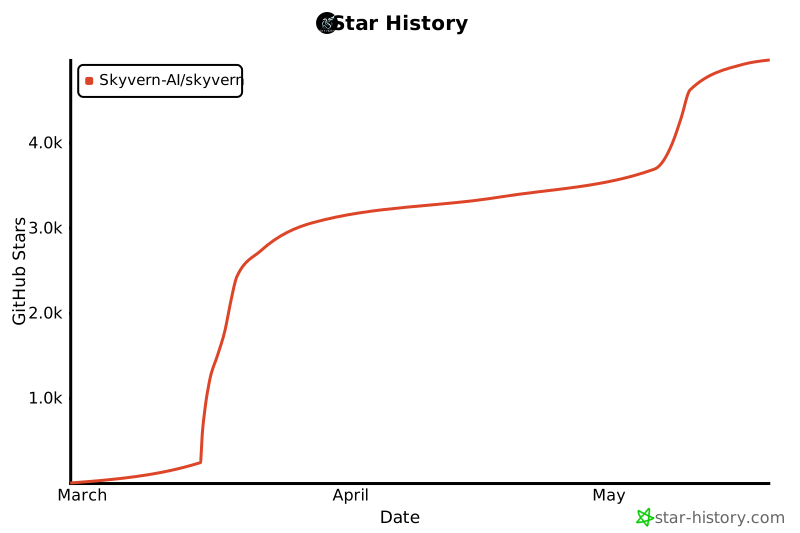
# Star History
[](https://star-history.com/#Skyvern-AI/skyvern&Date)
历史前置条件说明(补充参考)
Python 3.11/3.12/3.13(pip 方式);Windows 另需 Rust 与 VS Code C++ 开发工具及 Windows SDK;Docker Desktop(容器方式);需自行配置 LLM 提供商 API Key;云端托管与高级功能费用待核验;MCP 与 server 配置细节待核验。
项目来源与清单版权许可
https://github.com/Skyvern-AI/skyvern
整理来源:https://github.com/slavakurilyak/awesome-ai-agents
清单版权与许可:
MIT License
Copyright (c) 2024 Slava Kurilyak
Permission is hereby granted, free of charge, to any person obtaining a copy of this software and associated documentation files (the "Software"), to deal in the Software without restriction, including without limitation the rights to use, copy, modify, merge, publish, distribute, sublicense, and/or sell copies of the Software, and to permit persons to whom the Software is furnished to do so, subject to the following conditions:
The above copyright notice and this permission notice shall be included in all copies or substantial portions of the Software.
THE SOFTWARE IS PROVIDED "AS IS", WITHOUT WARRANTY OF ANY KIND, EXPRESS OR IMPLIED, INCLUDING BUT NOT LIMITED TO THE WARRANTIES OF MERCHANTABILITY, FITNESS FOR A PARTICULAR PURPOSE AND NONINFRINGEMENT. IN NO EVENT SHALL THE AUTHORS OR COPYRIGHT HOLDERS BE LIABLE FOR ANY CLAIM, DAMAGES OR OTHER LIABILITY, WHETHER IN AN ACTION OF CONTRACT, TORT OR OTHERWISE, ARISING FROM, OUT OF OR IN CONNECTION WITH THE SOFTWARE OR THE USE OR OTHER DEALINGS IN THE SOFTWARE.